



Automate Fusion 360 CAM: Templates, Formulas, and Time‑Saving Techniques
Unlock the full potential of Fusion 360 CAM with proven automation strategies that boost productivity and reduce errors.
Ready to take your Fusion 360 CAM workflow to the next level? This guide walks you through practical steps to streamline toolpath creation, automate calculations, and accelerate quoting, all while keeping your process error‑free.
By mastering these techniques, you’ll not only cut down programming time but also enjoy a smoother, more consistent experience in the Fusion 360 workspace.
1. Leverage Toolpath Templates for Rapid Setup
Creating a new toolpath from scratch every time is time‑consuming. Instead, save your preferred configurations as templates and apply them instantly.
- Select the toolpaths you want to capture.
- Right‑click and choose Store as Template; give it a descriptive name.
- When you need the template, create a new setup, right‑click the setup, and select Create from Template to load it.
Templates can deliver an 80%+ head start on repetitive machining jobs—especially when you work with the same toolpaths and settings across similar parts.
Typical use cases include material‑specific templates or categories of parts you handle frequently. Sharing templates with teammates encourages collaboration and consistency.
PRO TIP: Pair templates with Machining Time estimation to build a rapid quoting system, streamline new‑part estimates, and improve overall efficiency.
2. Automate Calculations with Built‑In Formulas
Fusion 360 CAM’s toolpath settings feature fields that accept formulas, letting you automate values instead of typing them manually.
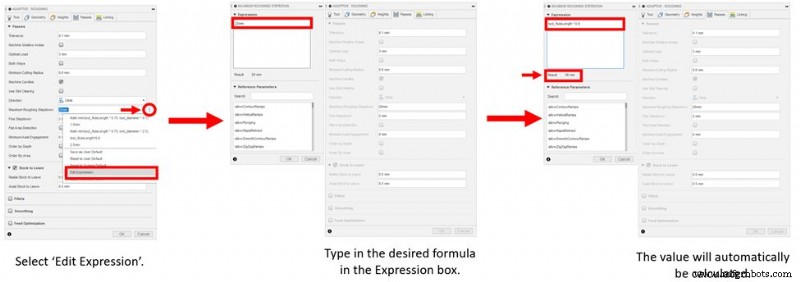
To insert a formula, click the three dots next to a field, select Edit Expression, and use the built‑in library of parameters such as tool length, diameter, and flute length. The full list is available in the Autodesk CAM Help.
For example, set the Maximum Roughing Stepdown to 90% of the tool flute length: Flute Length * 0.9. Automation reduces decision fatigue and minimizes mistakes.
3. Accelerate Quoting with Automation
By combining templates and formula automation, you can quickly generate accurate machining times and material estimates for new parts. This speeds up the quoting process and frees you to focus on higher‑value tasks.

Embrace these automation practices to unlock a faster, more reliable CAM experience. Start implementing templates and formulas today to see a tangible improvement in productivity and collaboration.
CNC Machine
- Kyocera 2011‑2012 Cutting Tools Catalog – Free PDF Download
- Precision CNC Machining Enhances Reliability in Telecom Manufacturing
- Boosting Injection Molded Parts with Fiber‑Reinforced & Filled Materials
- 2060 Carousel ATC CNC Router Shipping to Oman – Ideal for Woodworking
- Choosing the Right Spindle for Milling Titanium Dental Implant Parts
- Keep Your CNC Running Smoothly: Expert DATRON Dynamics Service for Maximum Uptime
- New Zealand Client Achieves Crafting Excellence with ELE1212 CNC Router
- Efficient Bulk Material Removal: CNC Milling Strategies for DATRON Machines
- CNC Part Marking Explained: Laser Engraving, Silk Screening & More – Expert Tips & Techniques
- Norwegian Clients Tour Our CNC Router Factory: A Global Production Experience