



Ultimate Guide to Cloud Computing Architecture: Flexibility, Design, and Cost Savings
Compared to a classic hardware-based setup, a cloud computing architecture provides considerably more flexibility, design choices, and cost-saving opportunities. However, these benefits come at a price as a cloud platform is typically more complex to understand and has more moving parts than an average on-prem, physical infrastructure.
This article is an introduction to cloud computing architecture and the components that operate within a cloud environment. Read on to learn how different systems work in tandem to create a functional cloud and provide end-users with on-demand IT resources (servers, apps, databases, networks, etc.).
Cloud Computing Architecture Explained
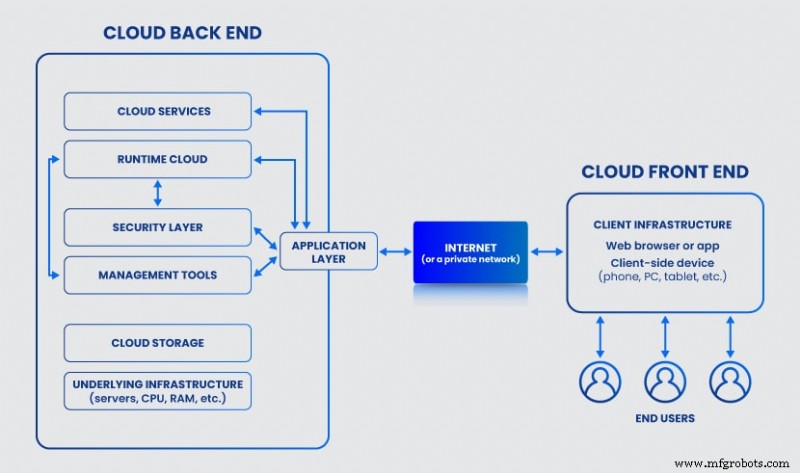
Cloud computing architecture refers to the mix of systems and technologies that, when integrated, create an IT infrastructure that abstracts, pools, and shares on-demand resources across a network. Every cloud architecture has two main components:
- Front end (elements visible to the end-user, such as web apps and browsers, mobile devices, user interface, etc.).
- Back end (the "cloud" section of the system with data storage, dedicated servers, OSes, security measures, etc.).
A cloud computing architecture also requires a network via which the front and back ends communicate. The two components usually share data over the Internet unless an architect prefers to use a private network (the go-to option in private and hybrid cloud architecture).
No matter the type of network, the communication layer between the front and back ends must have:
- High bandwidth.
- No latency.
- High availability
- Top network security.
At its design core, cloud computing architecture is a mix of:
- Event-driven architecture (EDA): A software design in which decoupled services produce, detect, and react to system events.
- Service-oriented architecture (SOA): A system in which a set of components provides services to other elements through a communication protocol.
A company has many reasons to deploy a cloud computing architecture despite these systems being more complex than an on-prem setup. Some of the main reasons are:
- Quicker time-to-market.
- Faster provisioning of resources.
- Real-time scalability (up and down).
- The ability to use cloud-native solutions (such as Kubernetes).
- More reliable compliance due to better data visibility.
- Cost-savings (no need for on-prem hardware and tight control over resource usage).
Front End of Cloud Computing Architecture
The front end acts as the client in the architecture and can communicate with the back end through the Internet or a private network. The front-end component is visible to the end-user and enables access to the cloud platform.
The two main elements of the front end are:
- The app or software (typically a web browser or a native app) the client uses to access and interact with the cloud platform. The app or browser has a dedicated UI, which some cloud architects consider a separate front-end component.
- The client-side device through which the user connects to and interacts with the browser or app (mobile phone, tablet, PC, laptop, etc.).
Elements of the front end are responsible for:
- Enabling the user to interact with the cloud.
- Sending queries to the back end through the middleware.
- Requesting services from the back end.
- Presenting all cloud-related info (resource utilization, security concerns, monitoring alerts, usage patterns, etc.).
The cloud handles more processing than the client-side device, which is another notable benefit of cloud computing that is especially useful for remote-first teams and companies with a BYOD policy.
Back End of Cloud Computing Architecture
In a cloud computing architecture, the back end refers to the cloud itself. This component contains various systems, servers, and storage units that have several key roles:
- Run cloud-related programs and apps.
- Give functionality to the front end and respond to whatever query the user sends.
- Deploy and scale resources.
- Monitor all operations and activities.
- Keep the cloud data and processes safe.
- Connect all services and apps.
- Run traffic control mechanisms.
- Govern cloud protocols.
The cloud provider is the one who manages the back-end component. However, some companies choose to develop and maintain their cloud, in which case the in-house team becomes responsible for back-end operations. A company can also split the back-end tasks between the in-house and the provider's team (a common choice in highly regulated companies that must comply with HIPAA or PCI).
Whereas the front end is just a UI with a connection, the back end is what gives the cloud its primary tenets:
- On‐demand resources a user can configure without the help of a service provider.
- The capability for a client to connect regardless of location.
- Resource pooling that enables the provider to pool resources and serve multiple users in a dynamic multi-tenant environment.
- Rapid elasticity for quick responses to consumer demand.
- Measured service that allows the end-user to monitor the cloud's usage in detail.
The back end has more components and is significantly larger than its front counterpart . Below is a closer look at every back-end component that can exist in a cloud computing architecture.
Application Layer
When an end-user interacts with the front end, the app layer of the back end receives the query and handles the client's requests. This layer has several vital roles:
- Provide users with access to cloud services.
- Connect the back and front end.
- Respond to front-end queries.
- Coordinate the needs of the consumer with resources in the back end.
Service Layer
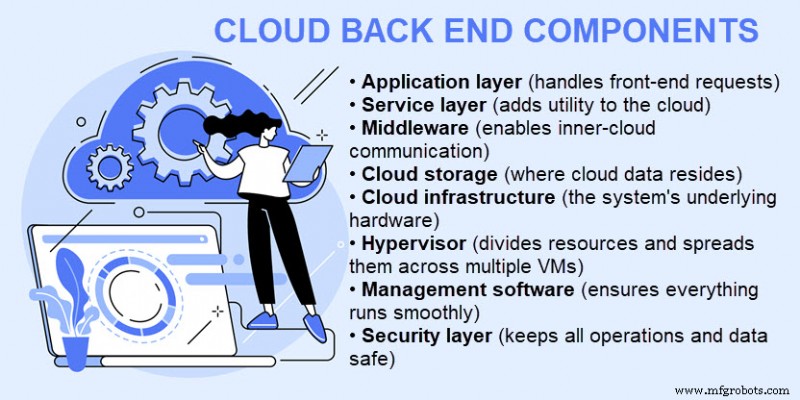
The service layer adds utility to the back end of the cloud computing architecture. This component handles every task and request via services for data storage, app development environments, web services, etc.
Services can perform a variety of tasks and functions in a cloud runtime. The type of services a client can use depends on the delivery model. There are three main cloud-based delivery methods:
- Infrastructure as a Service (IaaS): IaaS provides access and control over the cloud computing architecture resources (data storage, servers, network infrastructure, VMs, etc.).
- Software as a Service (SaaS): SaaS enables a client to host application software in the cloud. In a SaaS model, the provider handles all upgrades and development, and the vendor maintains the underlying infrastructure.
- Platform as a Service (PaaS): The PaaS model provides users with an on-demand platform for software development. Providers host the complete technology stack and toolset, but the user handles software development, app management, and updates.
Delivery models are not cloud deployment models (such as hybrid, community, or multi-cloud). Whereas the delivery model determines the type of services users have access to, the deployment model defines the type of cloud in question.
Middleware
Middleware refers to software components that enable networked devices and apps to communicate. This component is responsible for connections between:
- Apps.
- Services.
- Runtime clouds.
- Storage units.
- Infrastructure devices.
- Security solutions.
- The front end.
As in a traditional data center, middleware relies on databases and communication apps to establish coordination between different systems.
Cloud Storage
Storage is the section of the back end that keeps all cloud data. The type and capacity of cloud storage vary based on the cloud provider and the client's requirements. This cloud computing service enables the user to store data in the cloud instead of on-site data storage, which is both a safer and more convenient option.
Cloud Infrastructure
Although the end-user never sees or interacts with the cloud infrastructure, clouds also require hardware. The cloud infrastructure includes all the features of a standard server room in a data center, including:
- Servers.
- Central Processing Units (CPUs).
- Graphics Processing Units (GPUs).
- Motherboards.
- Storage units (hard drives and SSDs).
- Networking gear with routers and switches.
- Network and accelerator cards.
- Cooling and power infrastructure.
The infrastructure layer also includes the software necessary to run and manage all the hardware.
Hypervisor
A hypervisor is a piece of software that creates and runs virtual machines. A hypervisor allocates resources of a single device (CPU, memory, storage, etc.) and enables multiple virtual machines with separate OSes to run on the same device.
The virtualization provided by a hypervisor increases the efficiency of servers, storage, and networking in a multi-tenant cloud. However, this component can impact overall performance if the host device has too many VMs.
Management Software
The management software of a cloud computing architecture ensures that all operations and programs run smoothly and efficiently. Some of the tasks these systems perform are:
- Security and compliance auditing.
- Performance and capacity monitoring.
- Usage tracking.
- Deployment of new apps.
- Data integration.
- Disaster recovery management.
Management software also includes programs and tools for automation. Automation is a core value of the cloud and one of the tech's main selling points. In a cloud computing architecture, automation tools have three vital tasks:
- Scale up or down to meet usage or traffic needs.
- Ensure governance across the cloud environment.
- React to events following instructions from a pre-defined threshold or cloud policy.
Security Layer
The security layer is a vital aspect of cloud architecture. As most provider-level clouds are a high-risk, multi-tenant environment, vendors typically rely on various techniques to ensure cloud computing security, such as:
- Immutable, regular data backups.
- Data encryption (at-rest, in-motion, and in-use)
- High-end debugging tools.
- Virtual firewalls (both for the entire setup and in-between tenants).
- Zero-trust security principles.
- Multifactor authentication and strong passwords.
- Intrusion detection systems (IDSes).
- Anti-malware and virus software.
- Ransomware prevention.
Cloud Computing Architecture Best Practices
There is no single way to build an efficient cloud computing architecture, but a few guidelines apply to every design. Here are the best practices you should consider when designing a new or adapting an existing architecture:
- Take a security-first approach: While creating an architecture, your security or SecOps team should embed protection into the design from the start. The more robust the security system at the beginning, the fewer risks you will have with data leaks and breaches as you grow the environment.
- Plan for spikes in usage: Try to forecast and understand how the setup will behave during regular and peak workloads. Ensure the architecture performs well in any scenario and prepare optimal mechanisms for scaling.
- Take no chances with cybersecurity: Besides planning for security from the start, you should also protect your architecture with all available cybersecurity measures. Find a provider that offers data encryption, regular patch management, endpoint protection, cloud disaster recovery, and robust policies.
- Set up continuous monitoring: Continuously monitoring the environment with a tool like Nagios for performance and usage issues creates insightful patterns that help optimize the setup.
- Optimize and cut costs: Take advantage of automated processes and utilization tracking to eliminate unnecessary expenses and ensure you are not overspending on resources.
Ready to Move Away from On-Prem Hardware?
The concept of cloud computing architecture remains vague to many managers and teams. Providing non-technical staff members with this article will help demystify the cloud and take your business a step closer to cloud migration.
Cloud Computing
- Why Linux Powers the Cloud: A Comprehensive Guide
- Top 5 Cloud Computing Certifications for 2026: Earnings, Costs, and Career Path
- Essential Cloud Computing Strategies for Startups and Enterprises
- 10 Essential Cloud Computing Benefits for Modern Businesses
- How Cloud Computing Fuels AI Innovation and Drives Business Efficiency
- Cloud Computing vs On-Premise: Which Infrastructure Best Suits Your Business?
- Will Cloud Computing Replace Enterprise Architecture? A Balanced Analysis
- Expert Guide to Seamless Cloud Migration: Strategies, Benefits, and Tools
- Cloud Computing for Manufacturers: A Practical Guide
- Hybrid Cloud Architecture: Modernizing Legacy Systems with On‑Premise Control & Public Cloud Power