



Mastering Maintenance Scheduling: Boost Efficiency & Cut Costs
When you have the right maintenance schedule in place, you can improve efficiency, accuracy and save on costs.
But how do you set up the best schedule?
All organizations strive for maximum quality but with minimum cost, downtime, and potential problems. Maintenance scheduling, paired with maintenance planning, helps you map out the best ways to make that a reality.
But first, let’s make sure we’re starting from the right spot.
What are maintenance planning and maintenance scheduling?
Maintenance planning and maintenance scheduling are two different things.
Maintenance scheduling is planned work that includes the who, what, when, and where of tasks.
Maintenance planning is a process that helps you identify and solve potential problems before they get out of hand.
Scheduled maintenance helps you schedule the maximum amount of hours available, based on your resources. They are normally organized by priority, with the work orders of the highest priority at the forefront. You can use scheduled maintenance to minimize the number of outside resources and maximize internal labor, which cuts costs and dramatically speeds up all tasks. Scheduled maintenance allows you to implement preventive maintenance jobs when necessary to further minimize potential downtime and increase efficiency.
What is the purpose of maintenance scheduling?
Maintenance scheduling is a way to organize all tasks to improve efficiency, speed up workflow, cut costs, and prevent problems. Before you start, consider these basic principles of maintenance scheduling.
Prioritize the planner
If your planner is too busy doing maintenance work orders that could be done by other techs, your planning gets behind. You should remove them from general tasks and get them focusing on the schedule so they have enough time to complete it. Have general tasks assigned to other members of the team.
Focus on the future
Your planner has to focus on future work. Do this by giving your maintenance department an already planned week of backlogged work that your planner can use to help create schedules.
This week of planned backlogged work is beneficial for creating a well-rounded schedule because the technicians that complete the job can give feedback to the planner to either make changes, give ideas on how to improve the schedule, and bring up any problems that occurred.
Use component-level files
Your planner’s files should not be system-level files, but individual, component-level files. These can be maintained in a secure system based on equipment tag numbers. When there is new machinery, your planner should create a new mini-file (component-level file) and give it the same label as the other equipment so they can use it to improve future processes.
Your planner creates these files for all equipment after the maintenance team closes out the first work order. By adding files and tag numbers, they better organize that, when they compare it over time, helps them plan more efficiently.
Trust your planner
You picked your planner for a reason.
Planners bring their own skills and experience to the job, which helps them in the creation of work orders and scheduling because they know what is best for the equipment. They know what makes things flow most efficiently and can determine how long specific tasks should take.
To make these choices, planners use their best judgment based on technical, communication, and organizational data. They can assign senior-level employees with the most skills to high-priority work orders to minimize potential problems. Having an experienced technician minimizes the amount of errors.
Additionally, this gives planners an advantage. Because they know how long a task should take and know historically how long it takes a worker to get a job done, they can see when there may be a problem or time wasted.
For example, if a task generally takes two hours to complete, and the data coming in shows that a worker is taking 8 hours to complete it, then supervisors can intervene and get to the bottom of why that’s happening. From there, they can implement a solution to minimize downtime and solve the problem efficiently.
Recognize your technicians’ skills
Your technicians have the skills to get the job done correctly and on time. Your planner should leverage these skills and work in tandem with the technicians to create the best, most detailed procedures and checklists to increase efficiency.
When the planner is creating the maintenance schedule, ensure they’re scheduling the right tasks to the right technicians. Don’t schedule a less skilled worker for a high-priority task, and try not to use a highly skilled worker for a more basic task.
Use work sampling to measure performance
“Wrench time” is the amount of time technicians can work on tasks. Often technicians get interrupted and are forced to work on emergency maintenance, or they encounter delays in their work, like if they’re left waiting for clearance, a tool to arrive, or having to travel to locations. Wrench time measures the time technicians actually get to work on their assigned tasks.
This helps planners understand how much time is lost to delays or unplanned maintenance and how much time is spent doing assigned work. When you plan and schedule work, you drastically reduce delays. Understanding the when and why of the delays aids the planner in planning for those delays and taking them into account in the scheduling.
Use schedule to create job plans
You need to know the details of a job to create the right schedule for its completion. To schedule work, job plans should include:
- Number of available technicians
- Minimum skill level of technicians
- Work hours available per skill level
- Estimation of the required time
The planner needs to ask themselves questions about what all goes into the job. Does the job require wiring? How long does it take before technicians can come in and finish the job? Make sure all necessary people are on the schedule to complete the job efficiently.
Prioritize all the jobs
Having your team know what’s a priority every week and what is less pressing is the key to completing important tasks quickly and increasing productivity. Weekly schedules are useful for coordinating these tasks, and you can focus on the week’s priorities instead of backlogged work.
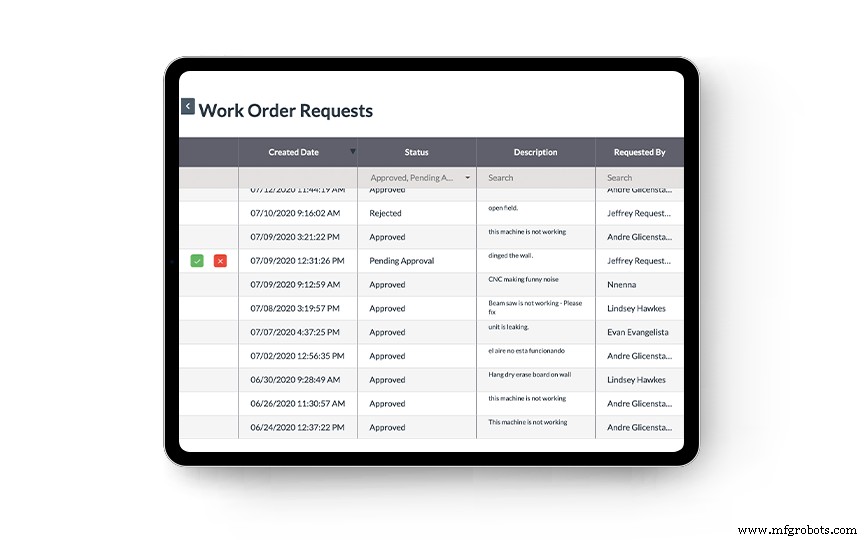
By prioritizing work orders, you have the ability to see if they need to become part of a daily or weekly schedule. When you schedule by priority, you increase productivity and ensure the team is closing out the most important work, which means less downtime for your assets and equipment, both scheduled and unscheduled.
Schedule based on the on-hand crew
Your planner should create a plan based on the number of available technician hours estimated for a week using backlog data. When you start your schedule, a one-week forecast is sufficient. Still, as time passes, your planner develops a better handle on how many technicians are available and the task priorities, so they can schedule further out in the future.
Schedule based on available hours
In general, the schedule should show how much work can and needs to be scheduled. Like what is reflected in the previous sections, the planner puts together what tasks are to be assigned based on priority, available work hours, technicians available, and their skill level.
One hundred percent of all available hours for the upcoming week can be scheduled ahead of time, so there is no downtime in between where technicians are unaware of what they need to be doing.
Let the crew leaders handle the day-to-day
Based on priorities, your team should refer to a daily schedule that is created by the planner to get important jobs done first and to focus on jobs that are already in progress so they can be completed quickly.
The crew leaders should also be in charge of handling any emergency problems that arise throughout the workweek.
Use schedule compliance to measure performance
When your planner makes the one-week schedule, after the week has been completed, use the data collected from that schedule to see how successful it was.
Where you see there were problems or things were completed in less time than expected, make adjustments.
What are the benefits of scheduled maintenance?
Maintenance scheduling and maintenance planning go hand in hand. When you use both correctly and to their fullest potential, maintenance scheduling comes with many benefits, including:
- Higher productivity
- Increased efficiency
- Decrease in spare parts
- Improved overall workflows
- Fewer injuries and less stress
- Reduced downtime
- Less resource movement
- Fewer and lower costs
This is why it is crucial to ensure your planner schedules everything correctly, using the most accurate data to make the best decisions.
How do I make a maintenance schedule?
Start by developing a general strategy for 100% of the possible work hours. If you have any, include previous notes from past technicians who have worked on equipment in your job plans. Additionally, if there are any existing procedures notes, you can include those as well.
here are six steps to take to create a maintenance schedule.
1. Ensure you’re good to go
Make sure your organization is on board. Pitch your ideas by explaining how it cuts costs, delivers a bigger ROI for your organization, raises efficiency and productivity, and helps locate and fix weak spots.
2. Analyze the situation
Gather all representation of all departments — technicians, crew leaders, supervisors, stakeholders, whoever can help give a clear picture of where the organization currently stands. With everyone together, build an outline of the current situation and the problems you’re currently facing, and create a schedule that can help you fix them.
3. Begin the preparations
Your planner needs to work directly with the maintenance team to create documentation, process maps, roles, and responsibilities. It’s essential to update your CMMS and make necessary changes with this new information. With a modern CMMS solution, you only have to make these changes once because the information is updated across the board for everyone who has access, so you don’t have to worry about any miscommunications.
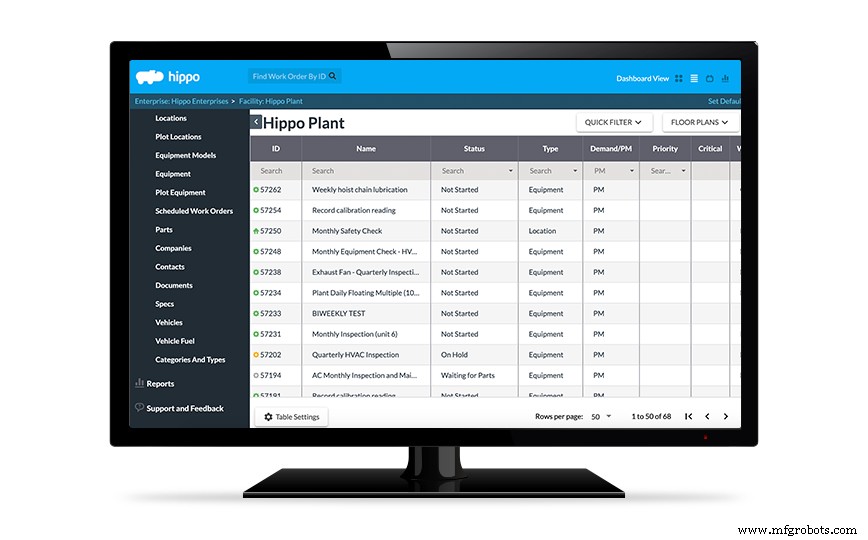
From here, you can implement training sessions for newly established roles.
4. Start the implementation
The goal here is to make those weekly schedules part of the new normal. It may take a few months of coaching, but the team can settle into the schedule over time. A CMMS system helps achieve this by having all your data readily in one place.
Remember that the planner should not be doing any other work except creating schedules, and all other work should fall to the rest of the team.
5. Set up a review process
Finally, you’re in the stages of wrapping up your new schedule. Once you’re finally done with the coaching phase, you want to ensure all your hard work doesn’t come undone.
Don’t let your workers feel like their hard work isn’t seen. They’ve been working hard to get into the groove of the new schedule, so celebrate your wins. Send out a review, see what things could be going better, what they do and don’t think is working, and so on. Check-in with your crew every so often to ensure things are running smoothly on their end as well.
6. Aim for “evergreen”
You now have your schedules set in place. However, procedures should continually be improving, and you should always be reviewing your metrics in meetings to ensure you’re still hitting your targets.
Extra tips
Here are a few more tips to ensure your planner makes the best schedule possible for your organization:
- Ensure all your job plans are concise and easily understandable. Technicians shouldn’t have to play a guessing game when trying to figure out how to complete a task, and they shouldn’t have to waste time asking for help or additional information.
- When you receive feedback, use it. The information is coming from someone who is currently working on the task, and it’s an easy way to learn where to make improvements. It’s also good to have your technicians and employees know they’re being heard.
- Always consider the equipment history. If there is any existing information for a piece of equipment, including notes from those who have worked on it before, be sure to include that. Any information left out could cause delays or failures in the future.
As long as all the work hours are being filled, tasks are organized by priorities, and your CMMS is in place, a schedule should make your workflow smooth and efficient.
What are some examples of scheduled maintenance?
There are endless possibilities for what you can include in your specific maintenance schedule, but here are just a few examples to give you an idea of the types of tasks usually included in maintenance schedules.
Public transportation maintenance schedule:
- Agency/organization
- Equipment code
- Equipment description
- Condition
- Age
- Remaining useful life
- Replacement cost
This list is for public transportation but can easily be used for many types of workplaces. The following is similar but includes additional schedules to be even more detailed. This will help the techs be even more precise and increase efficiency.
Machinery maintenance schedule:
- Machine name
- Condition
- Location
- Assigned to
- Last maintenance date
- Maintenance frequency (in days)
- Next maintenance date
- Next maintenance date
- Notes
The list is for dates of completed maintenance for refrigeration.
Refrigeration maintenance schedule:
- Pressure cleaning of all air cooled condenser coils
- Inspection of evaporators
- Pressure cleaning all drains
- Check all fan motors and fan blades
- Temperature check
- Cycling check
- Refrigerant level check
- Inspection of door gaskets and seals
- Inspection of hinges and automatic door closers
- Oil motors or bearings when oil ports exist
- Check unit thermostat
- For accuracy
- Check unit insulation
- Inspect unit wiring
- Verify defrost clock setting and operation
- Inspect unit compressor
- Recommendations/notes
Each maintenance schedule is unique to each organization and should be as detailed as possible so that the team doesn’t miss anything.
Next steps
Ready to improve your maintenance scheduling?
Hippo’s here to help you get the CMMS solution that works best for you, including answering your questions about CMMS software, helping you book a live software demo, or even setting you up with a free trial.
CEO summary
CMMS software solutions help maintenance departments keep critical assets online for less money by streamlining processes and capturing and leveraging reliable data. Unlike older management systems, a modern CMMS lives in the cloud, ensuring everyone has access to up-to-date data. This means less miscommunications and mistakes, saving you money and resources.Organizations across industries can see concrete benefits from the systems, including more uptime and less wasted time and money. When choosing a CMMS, it’s important to consider not only the features but also the complete user experience, including implementation, training, and ongoing support. Using CMMS software for your maintenance scheduling helps you cut costs and minimize downtime.
Industrial Technology
- What is Maintenance Tracking? – A Clear Guide to Proactive Asset Management
- Proactive Maintenance Explained: Prevent Downtime and Save Costs
- Breakdown Maintenance: The Reactive Approach Explained
- Periodic Maintenance Explained: The Key to Reliable Asset Management
- Understanding Unplanned Maintenance: When and Why It Happens
- The Role of a Maintenance Director: Responsibilities & Impact
- The Role of a Maintenance Planner: Optimizing Operations and Ensuring Reliability
- Understanding Scheduled Maintenance: Definition, Benefits, and Best Practices
- Understanding Prescriptive Maintenance: Benefits and Implementation Guide
- Maintenance Data Explained: The Key to Reliable Asset Management