



Fusion 360 Machining Extension: Accelerate Production with Intelligent Toolpath Automation
Discover how Autodesk Fusion for Manufacturing streamlines CAM by automating toolpaths—leveraging steep and shallow surface finishing and intelligent hole recognition—to boost speed and safety.

Elevate Your Design and Manufacturing Processes with Autodesk Fusion
Fusion for Manufacturing automatically generates toolpaths by detecting complex surface geometries and hole features. These intelligent tools reduce CAM programming time, provide automatic collision avoidance, and enable standardized workflows across teams, helping manufacturers operate leaner and more efficiently.
Starting a business is no simple task. While a great idea is the foundation, ongoing success depends on efficient decision‑making—from hiring skilled machinists to managing client relations and purchasing equipment. With Fusion, the critical choice of CAD/CAM software becomes straightforward. This three‑part series highlights key Fusion tools that save time, reduce costs, and drive profitability. Here we focus on toolpath automation, showcasing how steep & shallow surface finishing and hole recognition let machines run unattended and with precision.
Manufacturers striving for continual improvement, or “Kaizen,” know that revenue growth and margin expansion require meticulous planning and efficient execution. Fusion’s automation tools simplify these processes, allowing teams to concentrate on long‑term strategy rather than day‑to‑day operational drudgery.
Key Benefits of Toolpath Automation in Fusion for Manufacturing
- Reduced CAM programming time through intelligent feature detection and batch processing.
- Automatic design version updates that alert programmers when models change, enabling rapid toolpath regeneration.
- Standardized processes across teams via configurable templates that embed company best practices.
- Batch hole machining groups similar features, applying consistent cutting methods for efficiency.
- Automatic collision avoidance ensures safe, unattended machining operations.
- Support for 3‑axis and 5‑axis machines with continuous passes for superior surface finish.
What Is Steep and Shallow?
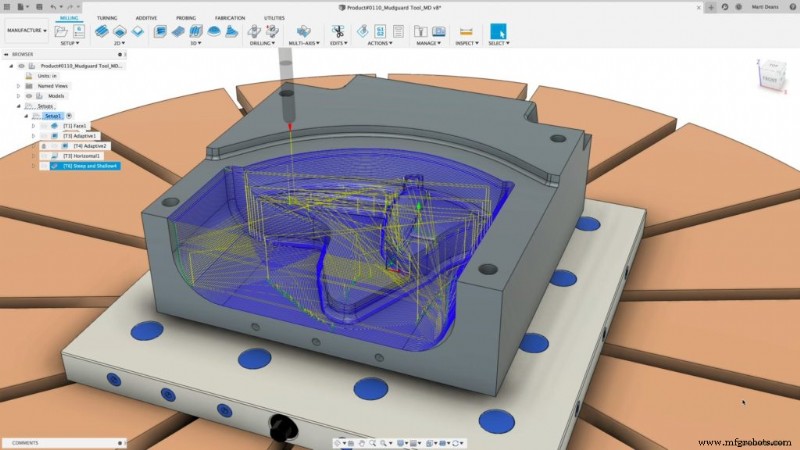
Steep & Shallow automatically identifies surface slope angles and applies the optimal finishing strategy for each region. It enables a single toolpath to machine complex free‑form geometries—covering both steep and shallow areas—while maintaining rigorous collision avoidance and maximizing 5‑axis capabilities.
By harnessing full 5‑axis motion, Steep & Shallow allows the use of rigid, short‑stroke tools that deliver finer surface finishes. Its configurable templates support company‑wide standardization, and continuous passes reduce the need for multiple machining steps.
The integrated design‑manufacturing environment further enhances efficiency: programmers receive real‑time notifications of design changes, enabling immediate toolpath regeneration and eliminating costly manual tracking.
Steep and Shallow on 3‑Axis Machines
Steep & Shallow is fully compatible with both 3‑axis and 5‑axis machines. When 5‑axis motion is available, operators gain improved access to complex geometries and can employ more rigid tools for superior surface quality.
What Is Hole Recognition?
Hole Recognition in Fusion for Manufacturing automatically identifies and groups holes in a 3‑D model based on dimensions such as chamfer size, thread size, diameter, and depth. It applies pre‑defined machining templates—spot drilling, tapping, threading, and reaming—to streamline drilling cycles.
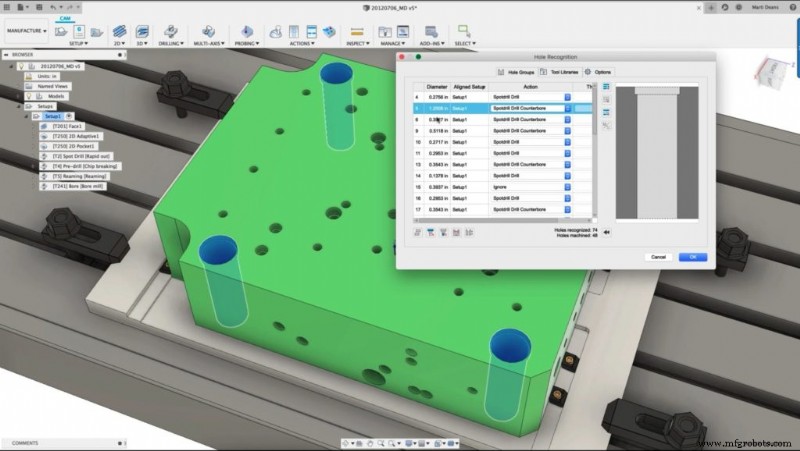
In high‑volume sectors—such as aftermarket automotive or industrial fittings—developers often face thousands of holes. Hole Recognition eliminates the need to manually select each feature, preventing errors and saving hours of labor.
Supported Hole Types
Hole Recognition can identify and batch holes by chamfer size, thread size, diameter, and depth, supporting drilling cycles for spot drilling, tapping, threading, and reaming.
Choosing Between Steep & Shallow and Hole Recognition
| Feature | Steep & Shallow | Hole Recognition | Best For |
|---|---|---|---|
| Complex free‑form surface finishing | ✓ | Molds, dies, sculpted surfaces, organic shapes | |
| Cylindrical hole features and drilling operations | ✓ | Plates, brackets, housings with multiple holes | |
| Operations | Finishing passes on curved geometry | Spot drilling, tapping, threading, reaming | |
| Key benefit | Single toolpath for varying surface angles | Batch processing of similar hole features |
When combined, Steep & Shallow surface finishing and automated Hole Recognition enable manufacturers to standardize processes, cut CAM time, and machine with confidence.
Industrial Technology
- Navigating Black Friday 2020: Strategies to Handle the Rush and Manufacturers' 'Crazy Thursday'
- How U.S. Toy Manufacturers Bring Holiday Magic to Life
- Avoiding Overprotection: Safely Using Hearing Protection in Loud Workplaces
- Boost CNC Machine Efficiency with 4 Proven Time‑Saving Tips
- Mastering MRO: Boost Profitability by Optimizing Maintenance, Repair, and Operations
- Proven Strategies for Efficient CAD Model and 3D File Management
- Electrochemical Grinding (ECG): How It Works and Its Advantages
- Safeguarding Your Organization’s Data Journey
- Industry Groups Warn: Food Fraud Escalates Amid Post‑Pandemic Supply Chain Challenges
- Measuring the ROI of Phone Calls in Industrial Marketing