



Installing Leviton Smart Breakers in a 120/240 V Panel: Step‑by‑Step Guide
How to Wire 1‑Pole & 2‑Pole Smart Breakers in a 120/240V Smart Load Center
Upgrading your home electrical system with Leviton’s 2nd‑Generation Smart Circuit Breakers adds a layer of intelligence that traditional breakers simply can’t match. Integrated with the My Leviton app, these breakers give you remote on/off control, real‑time energy monitoring, circuit‑level analytics, scheduling, and over‑the‑air firmware updates—all while maintaining the same robust protection you expect from a standard breaker.
Below you’ll find a detailed, safety‑first wiring guide for both 1‑pole and 2‑pole Leviton smart breakers in a 120/240 V residential panel. Before you begin, we’ll explain what smart breakers are, why they’re beneficial, and how they differ from conventional devices.
What Is a Smart Circuit Breaker?
Unlike conventional thermal‑magnetic breakers, which merely trip under overload or short‑circuit conditions, Leviton’s smart breakers fuse protective hardware with embedded electronics and communication modules. They enable:
- Remote on/off control and scheduling via Wi‑Fi or Bluetooth
- Trip notifications and fault diagnostics
- Load classification (essential vs. non‑essential) for backup‑power scenarios
- Automatic load shedding during generator or battery events
- Patented reset‑lockout that blocks reset while a fault remains
- Line‑side LEDs that display trip status even when the breaker is off
Smart breakers come in 1‑pole and 2‑pole variants, covering a range of applications—from basic thermal protection to GFCI, AFCI, surge, and dual‑function devices. They support 120/208 V and 120/240 V circuits and work in tandem with Leviton’s Whole‑Home Energy Monitor (LWHEM‑2) to provide per‑circuit energy data.
Key Features & Ratings
- Model: 2nd Gen Smart Branch Circuit Breaker
- Poles: 1‑pole & 2‑pole (2‑ or 3‑wire with ground)
- Voltage: 120 V, 120/208 V, 120/240 V, single‑phase, 60 Hz
- Current: 15 A to 60 A
- Short‑Circuit Rating: 10 kA
- Wiring: Plug‑on design
- Control: Manual, remote on/off, scheduling
- LED: Continuous status indicator
- Compatibility: My Leviton app, Leviton Smart panels, LWHEM‑Hub
Step‑by‑Step Wiring for 1‑Pole & 2‑Pole Smart Breakers
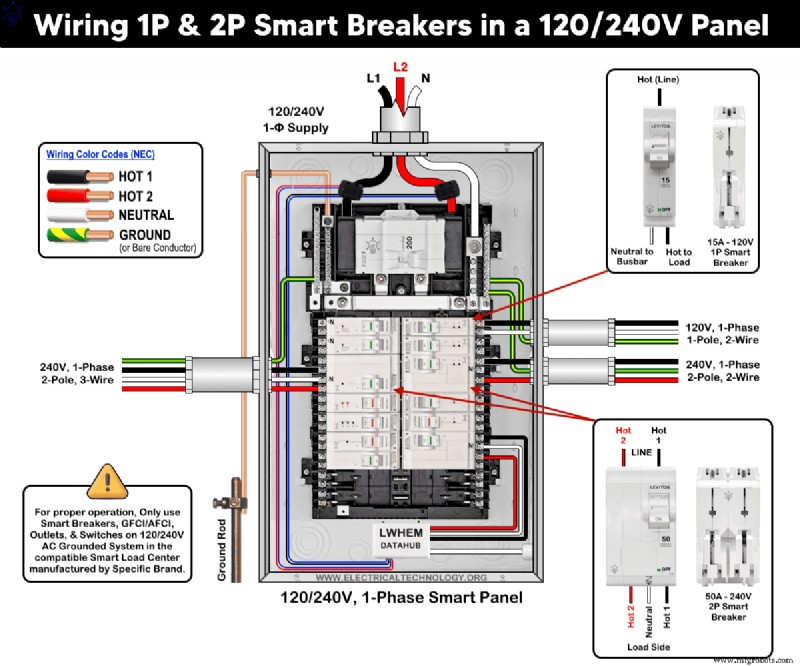
The following diagram illustrates a 1‑pole 15 A, 120 V breaker (LB115‑ST) and 20 A / 50 A 2‑pole 120/240 V breakers (LB220‑ST & LB250‑ST) installed in a Leviton LP220‑BPD smart load center.
Wiring configurations:
- 15 A/120 V – 1‑pole, 2‑wire, single‑phase
- 20 A/240 V – 2‑pole, 2‑wire, single‑phase
- 50 A/120/240 V – 2‑pole, 3‑wire, single‑phase
Follow these steps for a safe installation:
- Turn the main breaker OFF to isolate power. Verify the panel is de‑energized before touching any conductors.
- Remove the panel cover to access the breaker slots and bus bars.
- Ensure the new breaker’s handle is in the OFF position.
- Snap the breaker into place, aligning the hooks with the bus bars until it seats fully.
- Replace the panel cover and secure it tightly—never energize the panel without it in place.
- Restore power by turning the main breaker ON, then switch the new smart breaker ON.
- Attach the “Remotely‑Operated Circuit Breaker” label to a visible spot (no cover removal required).
- Use the My Leviton app and the Getting Started guide to enable the breaker’s smart features.
Smart Breaker LED Status Indicator
| LED Color | State | Meaning |
|---|---|---|
| Green | OFF | ON (breaker closed) |
| Green – Solid | ON | Remote OFF |
| Red | OFF | Short‑circuit or overload trip |
| White | OFF | Manual OFF |
- These breakers are designed exclusively for Leviton load centers.
- Smart functionality requires a Leviton Whole‑Home Energy Monitor (LWHEM‑2) or an LDATA hub.
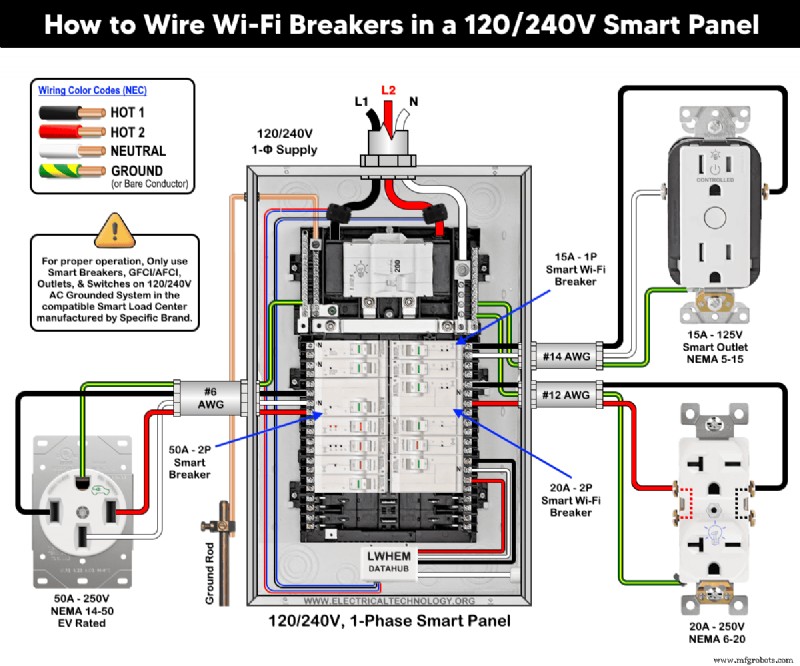
Wiring Smart Breakers for Standard and Smart Outlets
The same wiring method applies when feeding outlets from smart breakers:
- 1‑pole 15 A, 120 V breaker → 15 A/125 V NEMA 5‑15 smart outlet (D215R)
- 2‑pole 20 A, 240 V breaker → 20 A/250 V NEMA 6‑20 standard outlet
- 2‑pole 50 A, 120/240 V breaker → 50 A, 125/250 V NEMA 14‑50 EV‑rated receptacle
Connect load conductors as follows:
- Strip hot (black) and neutral (white) conductors to the recommended lengths (≈0.4 in. or 1 cm).
- Attach hot to the brass terminal, neutral to the silver terminal, and ground to the ground bar.
- Do not connect neutral to the panel’s main neutral bar at this stage; it must go to the breaker’s neutral terminal.
Wire sizes per NEC Table 310.16:
- 14 AWG for 15 A circuits
- 12 AWG for 20 A circuits
- #6 AWG for 50 A circuits
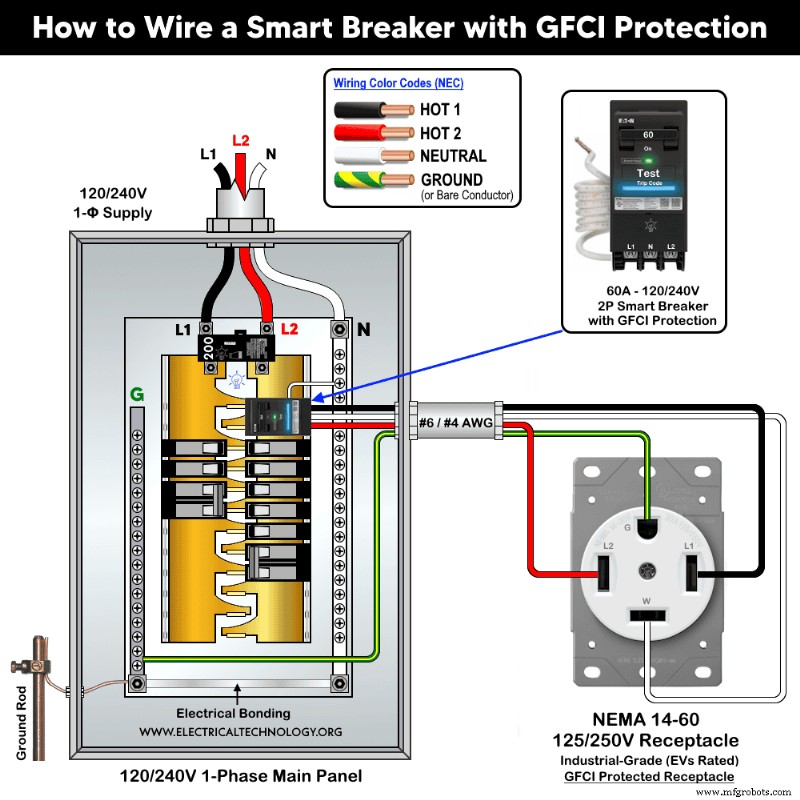
Using a Smart GFCI Breaker in a Standard Panel
If your panel isn’t a Leviton Smart panel, you can still add remote control with Eaton’s 2‑pole Wi‑Fi smart GFCI breaker (SBR260WGF). It protects a 60 A, 125/250 V NEMA 14‑60 receptacle while allowing smartphone control.
Installation parallels that of a standard 2‑pole GFCI breaker:
- Mount the breaker on the main bus bars.
- Connect the built‑in white pigtail to the panel’s neutral bus.
- Run #6 AWG or #4 AWG conductors to the receptacle: black, red, white, and bare/green ground.
Ideal for EV chargers or other high‑load circuits that benefit from GFCI protection and Wi‑Fi control.
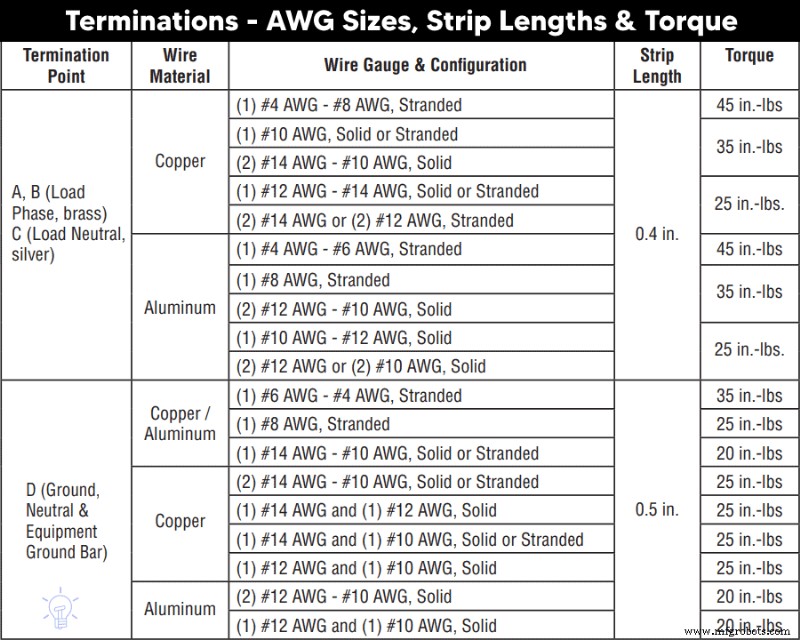
Termination Chart
The chart below lists recommended wire sizes, strip lengths, and torque values for Leviton smart breakers. If you’re working with a different brand, consult that manufacturer’s manual or a licensed electrician.
Safety Precautions
- Never use a 15 A breaker on a 20 A circuit; it will trip unnecessarily.
- Never use a 20 A breaker on a 15 A circuit; it allows unsafe current levels through undersized wiring.
- Do not install a 20 A outlet on a 15 A circuit (except where code permits multiple 15 A outlets on a 20 A breaker).
- Code permits 15 A outlets on 20 A breakers (NEC 210.21(B)(2)), but the reverse is prohibited.
- A 2‑pole 240 V breaker can technically run a 120 V circuit, but it is not recommended. A 1‑pole breaker cannot run a 240 V circuit.
- Do not mix three‑phase breakers with single‑phase circuits or vice versa.
Important Safety Notes
- Always disconnect the main breaker before performing any work.
- Consult a licensed electrician if you’re unsure about any step or local code requirements.
- Electricity is dangerous—improper handling can cause injury, damage, or death.
- The author disclaims liability for any loss or damage resulting from misuse of this guide.
Resources
Smart Devices Wiring Series
- How to Wire 120/240V Smart Load Center with Smart Breakers
- How to Wire a Smart GFCI Breaker in a 120/240V Smart Panel
Main Panels Wiring Tutorials
- How to Wire 120/240V Main Panel – Breaker Box Installation
- How to Wire 120/208V, 1‑Phase & 3‑Phase Main Panel?
- How to Wire 120/208/240V High Leg Delta 1‑Phase & 3‑Phase Main Panel?
- How to Wire 277/480V, 1‑Phase & 3‑Phase Main Service Panel?
- How to Wire 347/600V, 1 and 3‑Phase Main Service Panel?
- How to Wire a Subpanel? Main Lug Installation for 120V/240V
- How to Wire a Spa Panel Box for a Hot Tub using 2P GFCI & Breaker
- Single Phase Electrical Wiring Installation in Home – NEC & IEC
- Three Phase Electrical Wiring Installation in Home – NEC & IEC
- How To Wire a Single Phase kWh Meter – 120V/240V
- How to Wire a Three‑Phase Meter? 120/208/240/277/347/480/600V
Wiring Smart / Standard GFCI & Breakers
- How to Wire a 1‑Pole Breaker
- How to Wire a 2‑Pole Breaker
- How to Wire a 3‑Pole Breaker
- How to Wire a 1‑Pole GFCI
- How to Wire a 2‑Pole GFCI
- How to Wire a 3‑Phase, 3‑Pole GFCI
- How to Wire a Tandem Breaker
- How to Wire GFCI Circuit Breakers
- How to Wire an AFCI Breaker
Wiring Smart / General Outlets & GFCI/AFCI Receptacles
- How to Wire an Outlet Receptacle? Socket Outlet Wiring Diagrams
- How to wire a GFCI Outlet?
- How to wire a 3‑Way Combination Switch and Grounded Outlet?
- How to Wire a 15A – 125V Outlet – NEMA 5‑15 Receptacle
- How to Wire a 20A – 125V Outlet – NEMA 5‑20 Receptacle
- How to Wire a 15A – 250V Outlet – NEMA 6‑15 Receptacle
- How to Wire a 20A – 250V Outlet – NEMA 6‑20 Receptacle
- How to Wire a 50A – 125/250V Outlet – NEMA 14‑50 Receptacle
Switches Wiring
- How to Wire Single Pole, Single Throw (SPST) as 2‑Way Switch?
- How to Wire Single Pole, Double Throw (SPDT) as 3‑Way Switch?
- How to Wire Double Pole, Single Throw Switch? Wiring DPST
- How to Wire Double Pole, Double Throw Switch? Wiring DPDT
- How to Wire Double Switch? 2‑Gang, 1‑Way Switch – IEC & NEC
- How to Wire 4‑Way Switch (NEC) or Intermediate Switch as 3‑Way (IEC)?
- How to Wire Auto & Manual Changeover & Transfer Switch – (1 & 3 Phase)
Sizing Breakers, Wires, and Panels
- How to Size a Load Center, Panelboards and Distribution Board?
- How to Determine the Right Size Capacity of a Subpanel?
- How to Find the Right Wire Size for 100A Service 120V/240V Panel?
- How to Size a Circuit Breaker?
- How to Find the Proper Size of Wire & Cable In Metric & Imperial Systems
- How to Size a Breaker and Wires in AWG with EGC for Load?
- How to Size Service-Entrance Conductors and Feeder Cables?
- How to Size Feeder Conductors with Overcurrent Protection
- How to Size a Branch Circuit Conductors with Protection?
- How to Size Equipment Grounding Conductor (EGC)?
- How to Size Grounding Electrode Conductor (GEC)?
- How to Size Main Bonding Jumper (MBJ)?
- How to Size Motors FLC, HP, Voltage, Breaker Size and Wire Size
- What is the Correct Wire Size for 100A Breaker and Load?
- What is the Right Wire Size for 15A Breaker and Outlet?
- What is the Suitable Wire Size for 20A Breaker and Outlet?
Finding the Number of Breakers/Outlets in a Circuit
- How to Determine the Number of Circuit Breakers in a Panelboard?
- How to Find the Number of Outlets on a Single Circuit Breaker?
- How to Find Voltage & Ampere Rating of Switch, Plug, Outlet & Receptacle
- How to Calculate the Number of Fluorescent Lamps in a Final Sub Circuit?
- How to Calculate the Number of Incandescent Lamps in a Final Sub Circuit?
- How to Determine the Number of Lighting Branch Circuits?
- How to Determine the Number of Branch Circuits? – 3 Ways
- How to Find the Number of Lights on a Single Circuit Breaker?
General Wiring Installation Tutorials
- How to Toggle Electric Water Heater Between 120V and 240V?
- How to Wire 120V Water Heater Thermostat – Non‑Simultaneous?
- How to Wire 240V Water Heater Thermostat – Non‑Continuous?
- How to Wire 3‑Phase Simultaneous Water Heater Thermostat?
- How to Wire Twin Timer for 120V/240V Circuits – ON/OFF Delay
- How to Wire ST01 Timer with Relay & Contactor for 120V/240V Motors?
- How to Wire Multifunction ON/OFF Delay Timer for 120V/240V Motors?
- Even More Residential Wiring Installation Tutorials
Industrial Technology
- Metal Fabrication vs. Metal Welding: What Sets Them Apart?
- Apply for Connected Industry 4.0 Grants—up to €300,000 for Industrial Innovation Projects
- 10 Key Advantages of Adopting Industrial Automation Systems
- Product Lifecycle Management: A Key Strategy for Business Success
- MachineMetrics & Fiix Join Forces to Deliver Automated Machine Maintenance via Real‑Time IoT Data
- Freight Companies Urge Rapid Blockchain Adoption; Purolator President Discusses New NAFTA Approval
- Top 3 Generator Components You Must Maintain Regularly
- Strengthening Supply Chains & Logistics for Long-Term Resilience
- COVID-19 Accelerates the End of Annual Shipper RFPs
- Revolutionizing Industrial Sales: Amy Kim, Thomas’s CRO & Former Google Executive Shares Game-Changing Insights