



CNC Machine Lock: Accurate Program Testing Without Production
CNC Machine Lock
CNC machine lock is very handy function for testing a cnc program before actually making a part.
In machine lock axis stay stationary on their positions, but the their positions change with program on the display, this way cnc machinists can figure out any problems before making the part.
There are two types of machine lock:
- all-axis machine lock, which stops the movement along all axes.
- specified-axis machine lock, which stops the movement along specified axes only.
To activate machine lock, press the machine lock switch on the operator’s panel. The tool does not move but the position along each axis changes on the display as if the tool were moving.
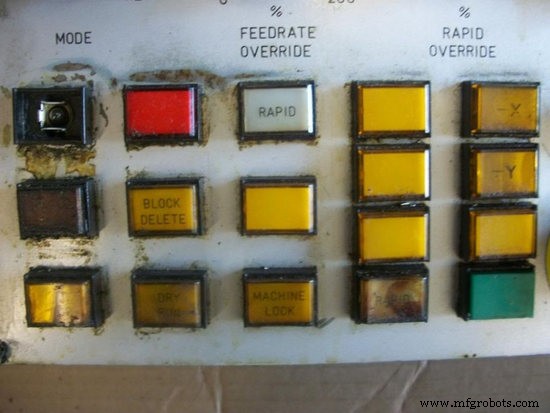
Some machines have a machine lock switch for each axis. On such machines, press the machine lock switches for the axes along which the tool is to be stopped.
CAUTION
The positional relationship between the workpiece coordinates and machine coordinates may differ before and after automatic operation using machine lock. In such a case, specify the workpiece coordinate system by using a coordinate setting command or by performing manual reference position return.
Auxiliary Function Lock
Auxiliary function lock disables M, S, and T commands, is available for checking a program together with machine lock.
CNC Machine
- The Anatomy and Evolution of CNC Machines
- What Is CNC? – Understanding Computer Numerical Control for Modern Manufacturing
- The Evolution of CNC Machinery: A Milestone in Manufacturing
- Build a Fully Functional CNC Machine with Arduino Nano R3
- Build a Triple-Function CNC Machine: Engraving, Laser Cutting, and Pen Drawing
- Customer Testimonials on Our CNC Routers
- Mastering Hard Milling on CNC Machines: Expert Tips & Best Practices
- CNC Fundamentals: Mastering Computer Numerical Control
- How to Select a Top-Quality CNC Machine Shop for Your Project
- High-Precision CNC Services in Orlando – Fast, Local, Cost‑Effective