



Top CNC Router Software for Precise Woodworking Automation
In modern wood fabrication, CNC router software is the backbone of automated machining, turning digital designs into flawless, repeatable cuts. As technology evolves, these programs continually improve, enabling manufacturers to scale production and deliver cost‑effective, high‑quality products. Whether you’re a seasoned woodworking professional or just starting out, understanding the full suite of CNC router software is essential.
This guide walks you through the three core software categories—CAD, CAM, and control—explains how each stage of the machining process relies on them, and lists the best tools that work seamlessly with our CNC routers. We also recommend two highly adaptable router models that pair perfectly with these programs.
Three Pillars of CNC Router Software
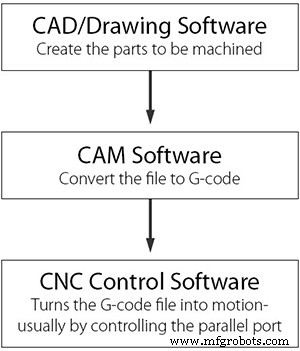
From concept to finished part, a wood CNC router relies on three distinct types of software:
- CAD (Computer‑Aided Design) – transforms your ideas into precise vector files.
- CAM (Computer‑Aided Manufacturing) – converts those files into machine‑readable G‑code.
- CNC Control Software – interprets the G‑code and drives the router’s spindle along the desired path.
Each category offers both free and paid options, allowing you to tailor your workflow to budget and skill level.
Why CNC Router Software Matters
CNC technology has revolutionized manufacturing across every sector. In woodworking, it replaces labor‑intensive carving with precise, repeatable cuts. The software ecosystem—CAD, CAM, and control—ensures that every design is translated accurately into physical form.
The typical CNC router workflow consists of three phases:
- Design a model
- Generate G‑code
- Process the G‑code and drive the machine
Understanding each phase helps you select the right tools for each step.
Step 1: Design Your Models – CNC CAD Software
Using CAD software, operators create detailed 2D or 3D drawings. These files become the “blueprint” that guides the entire machining process. Common vector formats include DXF, which is widely supported across platforms.
For beginners or those looking for ready‑made designs, several websites offer free DXF, SVG, and EPS files. Popular sources include:

- Weekly‑updated DXF designs that are 100% CNC‑ready.
- Extensive collections in CMX, DXF, EPS, and SVG.
- Over 600 free SVG/DXF designs for practice.
Popular CAD CNC Router Software
Both free and commercial options exist. Leading choices are:
- Rhino 3D
- AutoCAD
- SolidWorks
- SketchList 3D
- Fusion 360
- Wings 3D
Free programs tend to be simpler yet still support 2D drawing and basic 3D modeling.
Step 2: Generate G‑code – CAM CNC Router Software
The CAM software interprets CAD drawings and creates the G‑code that directs the router’s movements. G‑code is the lingua franca of CNC machines, specifying tool paths, speeds, feeds, and more.
Common file extensions for G‑code include .CNC, .NC, and .TAP. A robust CAM program can dramatically reduce tool‑path planning time—up to 85% faster with tools like PowerMILL.
Popular CAM CNC Router Software
- Paid: PowerMILL, MeshCAM, OneCNC, MasterCam for SolidWorks
- Free: FreeMILL, G‑Simple, PyCAM
Step 3: Process G‑code – CNC Router Control Software
The control software receives G‑code and converts it into electrical signals that move the router’s spindle. Two main categories exist: built‑in router control panels and PC‑based programs.
Key players include:
- Mach‑3
- LinuxCNC
- TurboCNC
- Universal G‑Code Sender
- DSP, Siemens, SYNTEC, LNC, Ncstudio, FangLing
When choosing a control system, consider:
- Interface friendliness
- Hardware compatibility (controller type)
- Transfer protocol (USB, serial, Ethernet)
- Update frequency
Best CNC Software for Beginners
Learning curve varies by background and skill. A solid start is to explore free software for at least two weeks, then progress to paid options as needed. The goal is to find a tool that feels intuitive and scales with your growing expertise.
Below is a concise comparison of our recommended software, indicating whether it generates G‑code and its primary focus.
| Type | Name | Version | Generate G‑code |
|---|---|---|---|
| CAD | AutoCAD | 2007‑2016 | No |
| CAD | CAXA CAD | 2008‑2015 | No |
| CAD | SolidWorks | 2012‑2014 | No |
| CAD | ZW CAD | 2013 | No |
| CAD | CorelDRAW X7 | — | No |
| CAM | PowerMILL 10.0 | — | Yes |
| CAD/CAM | Artcam | 2008‑2012 | Yes |
| CAD/CAM | UCAN CAM V10 | — | Yes |
| CAD/CAM | UG (NX) | 10 | Yes |
| CAD/CAM | ZW 3D | 2013 | Yes |
| CAD/CAM | Type3 | 3.53 | Yes |
| CAD/CAM | CAXA Manufacturing Engineer | 2013‑2015 | Yes |
| CAD/CAM | AlphaCAM | 2015 | Yes |
Choosing the Right CNC Router Software
When selecting software, keep these criteria in mind:
- Processing Needs – 2D engraving vs. 3D relief influences CAD/CAM choice.
- Cost – Free tools cover basics; paid options unlock advanced features.
- Technical Skill – Beginners may prefer simple interfaces; experienced users can handle complex modeling.
- Interface – A clean, intuitive UI boosts productivity.
Recommended Wood CNC Routers
Hardware and software must complement each other. Below are two models that have earned strong reviews for reliability and performance.
ELECNC 1325 Auto‑Feeding CNC Furniture Machine
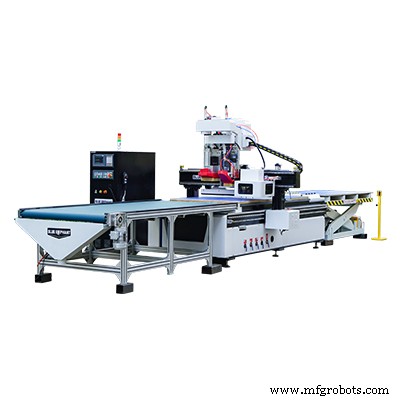
This gantry‑type router features a carousel tool magazine for rapid one‑second tool changes, supporting 8–12 tools in a single pass. It excels in 2D woodworking for cabinets, closets, and panel furniture and is compatible with AutoCAD, ZW CAD, SolidWorks, and Type3.
2040 ATC CNC Router with Rotary Device
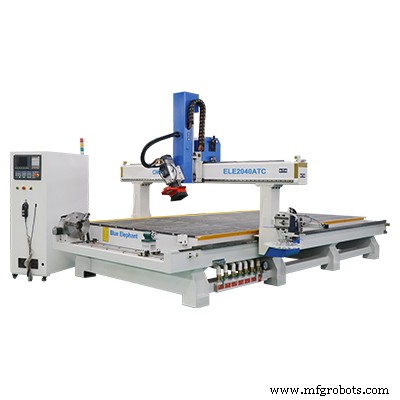
With a working area of 2060 × 4000 × 400 mm, this machine handles large‑scale cutting and engraving. Automatic tool change minimizes downtime, while its 3D capabilities allow the use of Artcam, AutoCAD, Mastercam, and PowerMILL.
Conclusion
By integrating the right CAD, CAM, and control software with a capable CNC router, you gain full control over the machining workflow, ensuring precision, consistency, and efficiency. Whether you’re a hobbyist or a commercial manufacturer, selecting software that aligns with your processing needs, skill level, and budget will deliver the best results.
CNC Machine
- Complete GSK 980TDb G Codes Guide for Turning CNC Systems
- Premium 1325 4‑Axis ATC CNC Machine for Sale – Shipping to Dubai, UAE
- Indonesian Client Visits Blue Elephant’s 5‑Axis CNC Router – Impressive Demo and Positive Feedback
- CNC Programming Proficiency Test – Skill Assessment 1
- New 1637 ATC 3‑Axis CNC Router Delivered to Toronto – Custom Build & Precision Tooling
- Haas G76 Threading Cycle: Multi-Pass Cutting for External & Internal Threads
- Your Complete Guide to Attending IWF Atlanta: Plan, Register, and Maximize Your Experience
- CNC Sculpting: How Computer‑Controlled Machines Revolutionized Art
- Choosing the Ideal CNC Mill: A Guide for Shop Owners
- Premium CNC Routers for Sale – Unlock Precision & Versatility