



Avoid Production Disruptions: The Hidden Risks of Robot Axis Coupling
About 10%-20% of robots have this little-known feature. It can mess with your programming if you’re not prepared.
I learned about new robotics concept the other day… robot axis coupling.
RoboDK’s CEO Albert Nubiola told me: “Robot axis coupling is important for robot programming, but not many users are aware of it and often get confused.”
He was right! There is very little written about axis coupling. What’s more, despite the fact that I’ve been a robotics expert for almost a decade, I had never been made aware of this slightly unusual feature.
If you’ve never heard of robot axis coupling, don’t worry. You are not alone.
Axis coupling is not a bad feature. In fact, it has some benefits. But, it can affect your programming if you are not prepared for it. Albert estimates that between 10-20% of industrial robots are affected by axis coupling.
What is Axis Coupling?
Axis coupling is when two or more of the robot’s joints are linked together. They can either be physically linked, with a parallel linkage, or linked in the control software.
Here’s a description of axis coupling in practice…
No Axis Coupling: Most 6 DoF Robots
First, let’s look at the classic 6 Degree of Freedom (DoF) industrial robot, for example, the Comau Smart NJ 16-3.1
For most modern 6 DoF robots, the following holds true:
- Each joint is physically independent.
- Each joint can be controlled independently without affecting other joints.
- The motor for each joint is located on the joint itself.
For most 6 DoF robots, there is no axis coupling. This makes control very simple — if you move a joint (e.g. Joint 3) by an amount, only that joint will move.
Axis Coupling: Some robots
Let’s look at a robot which has axis coupling: the Comau Smart5 NJ-165-3.0
Comau produces several robots which have axis coupling. This is one of the 6 DoF robot model with axis coupling. All Comau’s palletizing robots also have this feature.
The following is true for this robot:
- The motors for Joints 2 and 3 are both located at the base of the robot.
- Joint 3 is moved by a parallel link mechanism which physically links the two joints.
- When the Joint 2 is moved, Joint 3 also moves, and vice versa.
This slightly affects the control and programming of these robots. Usually, you program a 6 DoF robot by sending 6 values, each corresponding to the desired position of the 6 joints. With axis coupling, this becomes more difficult because two of the robot’s joints are dependent.
The Big Benefit of Axis Coupling: High Payload
If axis coupling is so problematic, why use it at all?
There is one big benefit of using axis coupled robots over traditional 6 DoF robots in some situations: High payload.
Let’s take the Comau NJ-165 (axis coupled) and NJ-16 (traditional 6 DoF) as examples:
| Smart NJ-1-3.1 | Smart 5 NJ-165-3.0 | |
| Type | Traditional 6 DoF | Axis Coupled 6 DoF |
| Reach | 3.11 m | 3.00 m |
| Repeatability | 0.1 mm | 0.1 mm |
| Payload | 16 kg | 165 kg |
| Weight | 680 kg | 1240 kg |
As you can see, these two robots are very similar in their reach and repeatability. However, when it comes to payload they are very different.
The robot with axis coupling has over 10x the payload capacity of the traditional 6 DoF robot!
This makes a lot of sense. Much of a robot’s payload capacity comes from the motors in Joints 2 and 3. Usually, the motor at Joint 2 also has to support the heavy weight of the powerful Joint 3 motor. By adding this motor to the base of the robot, it allows Comau to make the structure bigger and stronger without requiring an excessively powerful motor at Joint 2.
What type of robots use axis coupling?
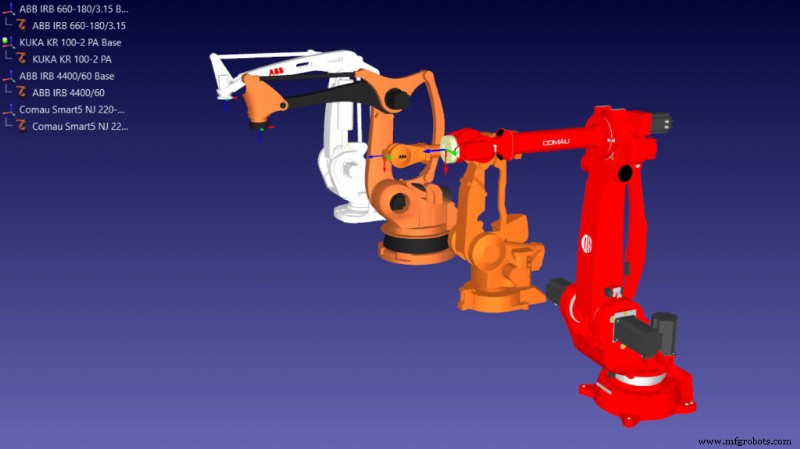
There are three main types of robot which use axis coupling:
- Palletizing robots — Many palletizing robots have axis coupling because it allows them to have a higher payload.
- High payload 6 DoF robots — The highest payload robots from Comau, Fanuc, and ABB all have axis coupling to help them lift higher payloads. Some (e.g. the KUKA IRB 8700-800/3.50 with 800 kg payload) even have a counterweight attached to the parallel linkage to counterbalance heavy payloads.
- Thin robots — A few thin robots use axis coupling to account for their thin structure.
How to tell if your robot has axis coupling
Finding if your robot uses axis coupling isn’t always easy… unless you are using RoboDK.
To our knowledge, RoboDK is the only brand-agnostic software which can accurately account for axis coupling.
You can see if your robot has axis coupling in RoboDK in 2 ways:
- Move either Joint 2 or 3 in the robot panel and see if the other joint moves.
- Double click on a joint limit value of either Joint 2 or 3 to bring up the axis coupling mapping window (interaction of Axis 2 vs Axis 3).
In some robots, it is easy to tell that a robot has axis coupling because you can see the parallel linkage going from the base of the robot up to Joint 3. Also, there is no motor attached at Joint 3, it is also in the base.
Some robots also have gearbox coupling between Joints 5 and 6.
Some specific robot brand pointers
From our experiences using robots, here are a few pointers about 3 robot brands:
- FANUC uses axis coupling on all models, even those without a physical linkage where the coupling is applied in software.
- ABB also provides detailed mapping on some robots with axis coupling.
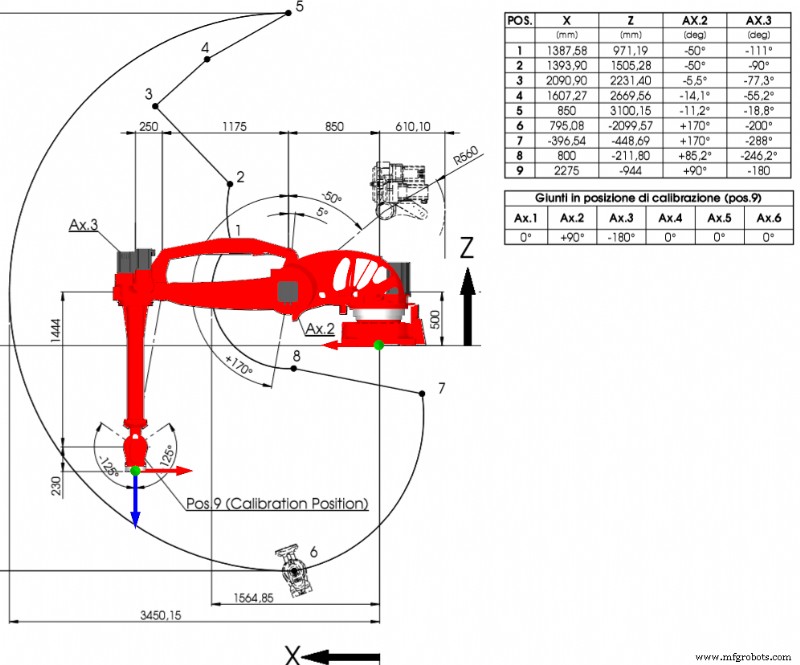
- Comau provides a detailed mapping of their axis coupling on all the robot’s datasheet. For example, see the joint map limits (axis 2 and 3) for various positions of the robot on this datasheet. Some of their robots also have a “dead zone” where one joint becomes restricted due to axis coupling. The workspace described allows to accurately model and display the interactions as a Joint 2 vs. Joint 3 chart.
So, open your robot model in RoboDK and give it a try to find out if it has axis coupling.
If so, know that RoboDK will handle it all for you and axis coupling won’t mess up your programming!
Industrial robot
- 5 Proven Ways Maintenance Teams Can Boost Production Efficiency
- Unlocking Production Efficiency: Emerging Manufacturing Trends to Boost Your Line
- Robot Machining: A Game-Changer for Production Efficiency
- Can You Buy a Ready‑Made Robot Application? What to Expect
- 10 Essential Robot Components for Optimal Performance
- Optimizing Space Requirements for Micro-Automation Six-Axis Robots
- How Robots Enhance Health Care: Benefits & Innovations
- GE Leads Innovation in Industrial Robot Automation Software
- Installing Automation in Your Production Line: A Step-by-Step Guide
- Essential Guide to Greasing Your Industrial Robot