



Multi‑Cloud vs Hybrid Cloud: A Definitive Guide for Modern Businesses
For most businesses, an ideal cloud solution is not deploying a single cloud, whether public or private. Instead, the right choice is to set up two or more cloud solutions.
When deploying multiple clouds, a business has two options. Either set up a hybrid cloud or go with a multi-cloud strategy. While similar, these deployment types have differences a decision-maker must know when planning a move to the cloud.
This article outlines the main differences between multi and hybrid clouds. Read on to learn about both cloud computing strategies and see what factors you should consider when choosing between these deployment models.
Multi-Cloud vs Hybrid Cloud: Definition
Multi and hybrid clouds are similar, but these cloud deployment models have unique definitions and solve different business needs.
Multi-Cloud
In a multi-cloud strategy, a company uses multiple cloud services of the same type from different providers. Partnering with several vendors enables a company to:
- Use best-of-breed services for each app and task.
- Eliminate the risk of vendor lock-in.
- Ensure each team relies on the right cloud solution.
- Optimize business planning by choosing the most affordable services.
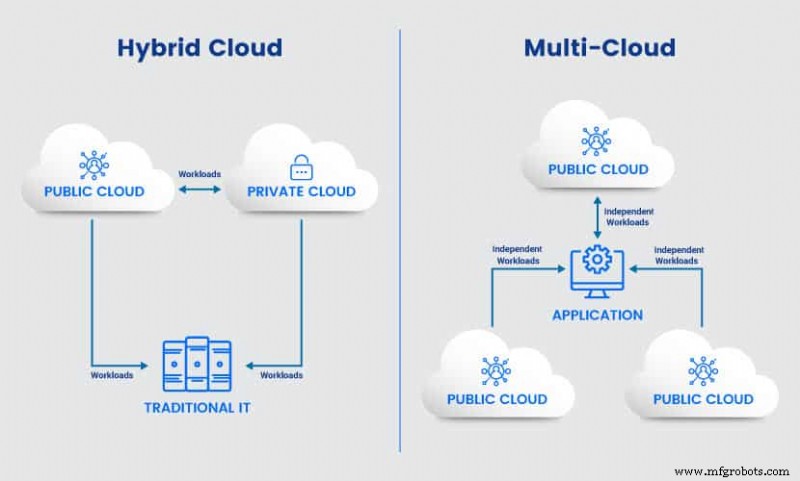
Most multi-cloud setups include a mix of public cloud providers such as Amazon Web Services (AWS), Google Cloud Platform (GCP), Bare Metal Cloud (BMC), Microsoft (Azure), and IBM. Every cloud in a multi-cloud setup handles specific workloads, so there are typically no workload integrations between infrastructures.
Hybrid Cloud
In a hybrid cloud environment, a company combines a public cloud with a private cloud or an on-premise data center. The most popular hybrid strategy is running app code on an in-house setup (either a data center or a private cloud) and cloud bursting into the public infrastructure in times of high traffic.
Hybrid deployments are common, and the two most typical scenarios are:
- A business moves partly to the cloud and decides that it is too resource-intensive to migrate all the way.
- A company decides to keep some processes and sensitive data in a controlled environment while capitalizing on the low overhead of a public cloud.
Unlike a multi-cloud strategy, a hybrid setup relies on deep orchestration between different cloud platforms. The goal is to create a unified environment in which separate systems communicate and handle the same IT workloads.
Can Multi-Cloud Include a Hybrid Cloud?
A hybrid cloud can be a part of a multi-cloud architecture. In most cases, this scenario occurs when a company expands a hybrid environment by adding one or more public cloud offerings. At that point, the setup becomes a multi-cloud deployment despite the present hybridization. Companies rarely add a hybrid system to an already deployed multi-cloud.
While a hybrid system can be a subset of a multi-cloud environment, the multi-cloud cannot be a subset of a hybrid setup. A hybrid environment requires all individual clouds to communicate, which is not how multi-cloud works.
Multi-Cloud vs Hybrid Cloud: Overview
The hybrid and multi-cloud strategies have a lot in common as both models allow an adopting company to:
- Rely on a mix of clouds to create an ideal structure for the use case.
- Ensure high levels of IT flexibility.
- Scale computing resources up or down almost instantly.
- Increase redundancy by using multiple clouds.
The table below outlines the main differences between multi and hybrid clouds to help you pick the right option for your use case.
This table is scrollable horizontally.
| Point of comparison | Multi-cloud | Hybrid cloud |
| Architecture | Includes multiple public clouds (but can also have private clouds, community clouds, and on-premise data centers) | Includes a public cloud and either a private cloud or an on-premise data center (or both) |
| Inter-cloud workloads | Different clouds handle different tasks, so data and processes typically operate in silos | Components work together to run a single IT solution, so data and processes intersect |
| Sensitive data storage | Valuable data can reside on-premise or in the cloud, depending on the design | Sensitive data resides either on the private cloud or in-house server |
| Security responsibilities | Public cloud providers are in charge of cloud computing security | The in-house team is responsible for protecting data in a private cloud and data center, while the provider handles public cloud security |
| Benefits when storing regulation-bound data | The company can ensure every piece of data resides in a geographic location per legal requirements | The team keeps sensitive data in a highly secure private cloud or data center |
| Vendor lock-in | Multiple cloud providers and separate workloads grant flexibility to change vendors easily and quickly | High levels of integration between the environments make it hard to change providers |
| Cloud migration | Migrating to multiple clouds can be time-consuming and challenging | Most workloads continue to run on-premises, so the migration process is shorter and less challenging |
| Availability | If one provider experiences a failure, workloads can shift to another vendor; companies can also set up individual public clouds based on user location to avoid latency | If the public cloud runs into an issue that prevents cloud bursting, end-users can experience issues |
| Cost | Public clouds are cheaper than private clouds or data centers, but a company must be careful not to overspend on each platform | There is less risk of overspending, but a company must account for more staffing and maintenance expenses |
The following sections offer a more detailed analysis of each significant difference between a hybrid and multi-cloud environment.

Architecture
A hybrid cloud architecture always consists of at least one private cloud or on-premise system and one public cloud. The infrastructures share:
- A single identity management system (IdM).
- Unified logging, cloud monitoring, and alerting (LMA) stacks.
- Integrations between internal networks.
High levels of interconnectivity turn the public environment into an extension of the private cloud.
A multi-cloud does not have a single IdM system, unified LMA stack, or an integrated network. The architecture instead relies on a mix of two or more clouds of the same type without inter-cloud communication.
Another architectural difference between hybrid and multi-cloud is the location of sensitive data. Hybrid clouds use on-premise servers or the private cloud to store valuable data. The public cloud does not keep any vital records. In a multi-cloud setup, all data can reside on a public cloud, either on the one that supplies compute resources or on a dedicated cloud.
Security
A hybrid cloud provides an organization with direct control over most data and processes. If the security team does its job well, the risk of a data breach is minimal. The company selects configurations and protocols to keep the on-premise environment secure with measures such as:
- Data encryption.
- Custom access controls.
- Endpoint security.
- Different types of network security.
The in-house team has less control over the data running in the public cloud. Providers are responsible for protecting their infrastructure and handling most cloud security threats and risks, so only partner with reputable vendors.
Security protocols in a multi-cloud depend on each system’s architecture. If the setup relies on several public clouds, the security levels of the vendors are even more crucial. Admins must have a clear understanding of configurations and IAM policies for each public cloud offering.
If the multi-cloud setup includes a private cloud or a data center, the in-house team has more on-hand responsibilities to keep environments safe.
Storing Regulation-Bound Data
If a multi-cloud architecture does not include a private cloud, a company must ensure public cloud storages meet regulations such as PCI, HIPAA, or GDPR. Most prominent providers offer availability zones and regions that allow you to store data at legally suitable locations.
A hybrid cloud is a sound choice for any company with high regulatory standards for data or business logic. This deployment model allows a company to store data in a tightly controlled environment. However, remember that the security of these systems depends on the in-house team’s capabilities. A public cloud vendor often has more cybersecurity resources than an individual user company, so keeping data in the cloud is sometimes a better option even in a hybrid setup.
Vendor Lock-In
Multi-cloud allows a business to avoid getting locked into a contract with a single provider. Multiple public cloud environments handling different workloads make changing vendors easy and quick. The company has the agility to change vendors based on:
- New technological opportunities.
- Service cost.
- Technical requirements of each new task or app.
- Geographic location.
The lack of lock-in is vital for any company that wants to respond to market changes with speed.
In a hybrid setup, companies create custom environments that work together to fit the use case entirely. High levels of integration between the on-premise system and the public cloud make it challenging to move to a new vendor without causing significant downtime.
Cloud Migration
Moving data and apps to the cloud is a resource-intensive task. As deploying a multi-cloud requires a company to migrate to several clouds, the migration can take a long time and be challenging for inexperienced teams.
If a company feels like a team is not ready to fully migrate to a cloud, adopting a hybrid strategy is a sound option. Most data and workloads can continue to run on an on-premise system, so the migration time is a lot shorter and less demanding.
Availability
High availability is one of the main benefits of a multi-cloud as companies can set up reliable cloud backups and alternative standby systems. If one of the providers has a temporary issue, the workloads shift to another cloud, and end-users do not experience problems.
In a hybrid setup, mainlining availability falls on the in-house team as most workloads occur on-premises or in the private cloud. However, if an app experiences a spike in traffic and a public cloud failure prevents bursting, the hybrid system can run into issues. Avoiding downtime in such scenarios is among the most common challenges of hybrid cloud adoption.
Another availability-related benefit of multi-cloud is that a company can set up individual public clouds based on user location. Setting up a cloud near each significant user group prevents latency. A hybrid cloud cannot provide this benefit without evolving into a multi-cloud.
Costs
Both hybrid and multi-cloud have pros and cons in terms of cost.
In a multi-cloud setup, a business does not typically pay for data centers or in-house private clouds. However, the team must always be aware of cloud computing costs to prevent overspending.
A hybrid solution with a private cloud does not have such a high risk of overspending as the system has a single public cloud. However, a business that chooses to create a private cloud must hire staff to develop and manage that complex environment.
A hybrid solution that combines a legacy data center and a public cloud is the most expensive option. Besides paying for the staff and the public cloud, a company must also account for the equipment and maintenance costs.
How to Choose Between Multi and Hybrid Cloud?
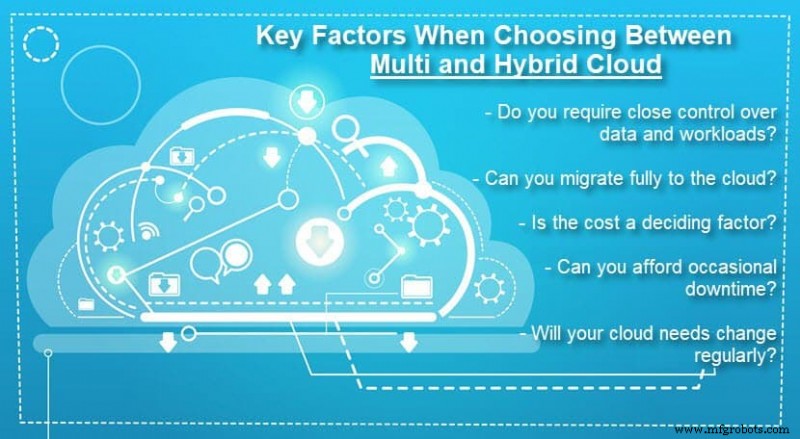
Choosing between a hybrid and a multi-cloud environment comes down to several factors. Below are the five main factors to consider when deciding on the right deployment strategy:
- Security requirements: If a business has high regulatory standards for data or business logic, a hybrid cloud deployment offers more control. However, remember that data centers and private clouds are not secure by default, so ensure the in-house team is up to the task.
- Cloud migration readiness: A complete migration into the cloud is not immediately feasible for every business. If the team is not ready to move all workloads to a cloud, consider a hybrid cloud solution.
- The budget: Public clouds typically come with less overhead and direct management than other deployment types. If the bottom line is the deciding factor, a company should consider a fully public cloud deployment.
- Reliability: Multiple clouds help keep applications up and running during periods of high user demand thanks to backup clouds. If a business cannot experience downtime, a multi-cloud is a good option.
- Dependency on providers: If the lack of reliance on a third-party provider is the main deciding factor, a multi-cloud deployment is a better choice than a hybrid.
Multi Cloud vs Hybrid Cloud: The Most Common Use Cases
Here are the most common scenarios and use cases in which a company decides to deploy a multi-cloud:
- A business is already using a public cloud provider, but another vendor offers a service the current partner does not (such as IaaS, PaaS, or SaaS).
- A company decides to set up a diverse infrastructure to improve efficiency, security, and cost-effectiveness.
- A team wants to set up a public cloud as a part of its backup strategy.
- A company has customers spread across a wide geographical area and wants to ensure users do not experience latency.
- Individual departments in an organization have different needs when using the cloud, so the business decides to invest in separate platforms to meet each team’s requirements.
- A business must store a particular data type in a specific geographical location for legal reasons.
- A company requires high data availability (up to 99.999%) on a 24/7 basis.
Here are several use cases in which a hybrid cloud might be a better choice over a multi-cloud deployment:
- A business does not want to move all data and services to the cloud.
- An organization wishes to test cloud computing before migrating most resources and workloads.
- A company does not want to move away from its on-premise data center.
- A company requires a centralized identity infrastructure across multiple systems.
- A DevOps team prefers to have a hybrid’s mix of self-service resources (private cloud) and a platform for running test workloads (public cloud).
- The team is not ready to start working with different provider’s procedures, tools, and resources.
- A business wants to use benefits of cloud computing but can tolerate some downtime without losing customers.
Understand When and How to Use Both Deployment Models
Although similar, hybrid cloud and multi-cloud are two distinct types of deployments that better fit different use cases. Both setups improve efficiency through cloud computing, but decision-makers must know the differences between the models to get the best results from either a multi or hybrid cloud.
Cloud Computing
- Hybrid Cloud Drives Innovation & Cost Savings in Finance
- Hybrid IT: Why the Cloud Isn’t the Endgame
- Hybrid Cloud: Advantages, Disadvantages, and How to Choose the Right Strategy
- Choosing the Right Cloud Strategy: Public, Private, and Hybrid Solutions Explained
- AWS vs Azure: Comprehensive Services Overview & Comparison
- Hybrid Cloud Explained: Key Benefits & How It Enhances IT Flexibility
- Navigating Hybrid Cloud Challenges: Strategies for Successful Adoption
- Hybrid Cloud Architecture: Modernizing Legacy Systems with On‑Premise Control & Public Cloud Power
- Multi‑Cloud Security: Proven Best Practices for Safeguarding Your Data
- Mastering Multi‑Cloud Strategy: Proven Steps to Boost Availability & Avoid Vendor Lock‑In