



Top CAD Software for 3D Printing: A Professional Guide
3D printing, like machining or forging, begins with a digital blueprint. In additive manufacturing, the foundation is a robust CAD model that defines every detail of the final part. A capable CAD tool not only shapes the geometry but also ensures the model is ready for seamless transfer to a 3D printer. When evaluating CAD solutions for 3D printing, confirm that the software can: Many platforms offer add‑ons that streamline this workflow—3DXpert for SolidWorks, Netfabb for Fusion 360, and 3YOURMIND for Siemens NX—by reducing translation steps or enabling direct print-from‑CAD. The STL (Stereolithography) file format, introduced by 3D Systems in 1987, has become the de‑facto standard for 3D printing. It represents a surface mesh composed of triangles, capturing complex shapes like splines, arcs, and extrusions through a tessellated approximation. Because STL files lack unit definitions, they must be paired with the correct scaling settings in your slicer. All major CAD tools provide STL export options, but attention to a few details makes the difference between a successful print and a failed one: Other optional attributes—such as color—can be included, but the three points above are essential for faithful reproduction of your design. Across engineering, manufacturing, and design, several CAD packages dominate the market. Below is a concise overview of the most widely adopted tools. Since its 1995 debut and acquisition by Dassault in 1997, SolidWorks has become a staple for over two million engineers in more than 165,000 companies. Its intuitive parametric interface, coupled with extensive simulation and rendering add‑ons, makes it a top choice for rapid prototyping and production. Originating in 1977 as an aerospace design platform, CATIA is now a full‑featured PLM system used extensively in automotive and industrial equipment design. Its integrated CAD‑to‑CAM workflow supports complex assemblies and high‑precision manufacturing. Released in 2013, Fusion 360 blends CAD, CAM, and simulation in a single cloud‑based environment. It offers free tiers for hobbyists, students, and educators, and integrates seamlessly with Autodesk’s ecosystem, making it ideal for collaborative projects. Launched in 1987, Creo pioneered rule‑based parametric modeling. Today, it’s part of a suite that covers assembly, FEA, direct and surface modeling, and tooling design—features that support both small‑batch prototyping and large‑scale production. Acquired by Siemens in 2007, NX is an enterprise‑grade solution that unifies CAD, CAE, and CAM. Its industry‑specific modules allow designers to tailor the toolset to aerospace, automotive, or energy applications. Onshape’s cloud‑first architecture, launched in 2015, eliminates the need for local installations. Its real‑time multi‑user collaboration and cross‑platform accessibility (browser, iOS, Android) make it especially attractive for distributed teams. Choosing the right CAD software hinges on your project scope, team size, and industry requirements. Whether you’re a hobbyist, student, or enterprise engineer, a robust CAD package that produces clean STL files will unlock the full potential of additive manufacturing, enabling faster iteration and higher quality parts.Intro
Key Requirements for a CAD Package
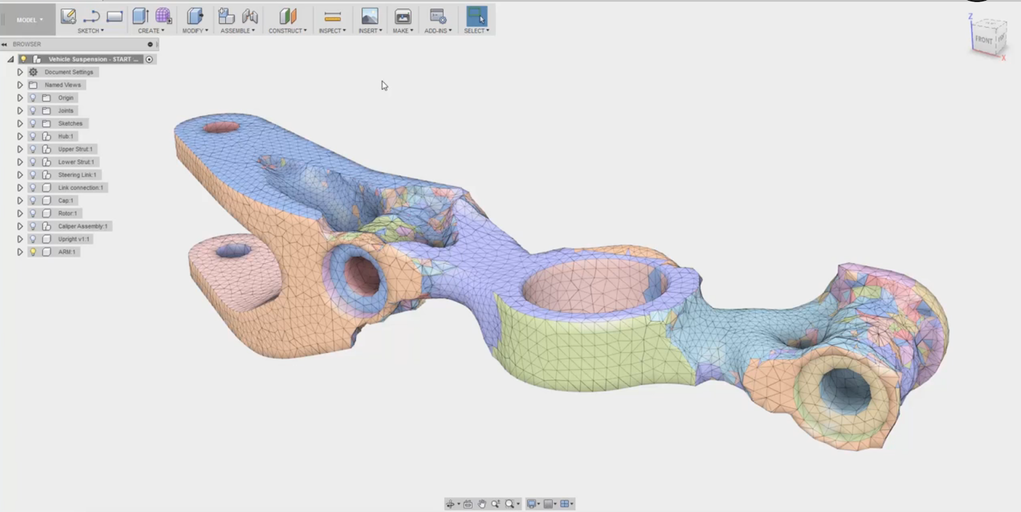
What Is an STL File?
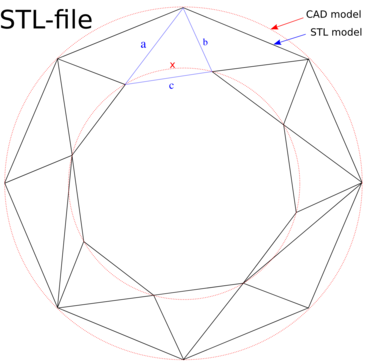
Exporting an STL: Practical Tips
Common Industry CAD Solutions
SolidWorks
Dassault Systèmes CATIA
Autodesk Fusion 360
Creo (PTC)
Siemens NX
Onshape
Conclusion
3D printing
- Choosing the Ideal CAD Software for Your 3D Printing Workflow
- Top Free CAD Tools for Industrial 3D Printing
- Choosing the Right CAD Software for Jewelry Design: A Comprehensive Guide
- How a CMMS Transforms Facility Management: Key Benefits Explained
- 5 Key Benefits of Markforged’s Eiger Slicer Software for 3D Printing
- Effortless 3D Geometry Programming on Hurco Controls—No CAD/CAM Software Required
- Mastering CAD: The Ultimate Guide to Computer-Aided Design
- Elevate Your Maintenance: 5 Key CMMS Resolutions for 2024
- 8 Best 3D Printing Software for macOS – Free & Premium Tools
- Best Free Laminating Software for FDM/FFF 3D Printing