



Effortlessly Integrate Haas Tooling into Fusion 360: A Step‑by‑Step Guide
Haas Automation has a line of cutting tools, tool holders, workholding and much more that are available as digital assets in Fusion 360. Focus on the work to be done and not the data creation yourself.
In this article, we’re going to cover how to set up a one-piece flow using Haas CNC workholding tools and tool holders by creating a digital twin in Fusion 360.
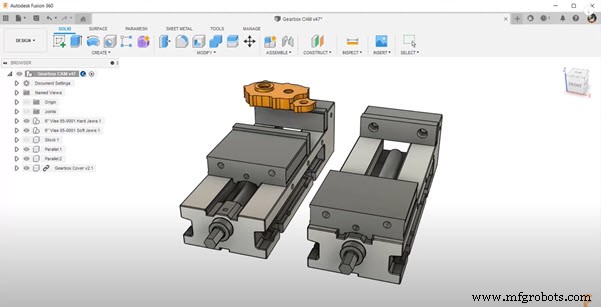
One-piece flow means that for every cycle, a complete part will come out. For a part that requires two operations, you’ll need to use two Haas vices side by side for Op 1 and 2. These are located in the Fusion 360 workholding library.
The Process – Haas Tooling & Fusion 360
Let’s walk through an example. To start, let’s cut Op 1 from raw bar stock. In order to keep the stock in place, in this example, we’ll use straight hard jaws and parallels. For Op 2, let’s use a pair of soft jaws and cut the part profile into the jaws. This allows you to easily locate the part accurately and hold on to it securely.
There’s a wide range of cutting tools and tool holders available from the Haas tooling website. These tools are also available in the Fusion 360 tool library.
To locate, all you need to do is search for the geometry you need or the product IDs you have. When you select the tool, it’ll bring up the Haas suggested feeds and speeds for different cut types and materials.
Once the vices and tools are loaded, let the machine do the work to set the offsets for you. At this point, it’s also a good idea to double-check your program using machine simulation for any collisions.
Once Op 1 is complete, take the part out. Place it into the Op 2 vise and load a fresh piece of stock. Here’s where the one-piece flow begins. After Op 2, the part is complete.
Now, combine setup one and two together. With an NC program, you can add all of the operations for the first and second into one NC program. You can also reorder to minimize the number of tool changes that’ll occur.
Take a look at the following video, where we’ll show you how Fusion 360 makes this process easy and how Haas Automation makes it possible.
Get started today with a Fusion 360 30-day trial, to gain access to truly integrated CAD/CAM.

Industrial Technology
- Machine Parts with Fusion 360 Using a Generatively Designed 3D-Printed Fixture
- Step‑by‑Step Guide to Machining a Steering Wheel with Fusion 360
- Mastering Spider Plate Machining with Fusion 360: A Detailed Tutorial
- Mastering Wheel Hub Machining in Fusion 360: A Practical Guide
- Mill a Hemisphere in Fusion 360: A Complete, Professional Guide
- Fusion 360 CNC Guide: How to Machine a Chess Piece
- Master Fusion 360’s Machine Builder: Build Custom Machines for Simulation
- Master Fusion 360 on a Haas Machine: Expert Tips – Part 1
- Explore Haas CNC Tooling in Fusion 360's Comprehensive Library
- Streamline Fusion 360 & Haas Machine Workflow: Expert Tips – Part 2