



How to Replace Your MacBook Battery: Four Proven Methods
Introduction:
Most MacBook or MacBook Pro’s have batteries that are good for around 300-1000 recharge cycles depending on the model you’ve got. Over time your battery starts running into serious problems with charge times, battery power and malfunctions. These are signs that it’s about time you replace your MacBook’s battery.
Here are a few options when it comes to battery replacement and steps to help you along the way.
Check the Battery Status of Your MacBook
To check the status of your battery, simply press the Option key and click the battery icon at the top of your screen. You’ll see one of four types of notes i.e. Normal (your battery does not need replacement), Replace Soon (your battery will require replacement soon/the battery holds less charge as compared to before), Replace Now (You battery needs replacement), or Service Battery (a fault has been detected in your battery).
This should give you an idea of whether or not your battery requires replacement. You can also view the number of charge + discharge cycles. For this, follow the steps below:
- At the top left corner of the screen click on the Apple logo.
- Next go to About This Mac > System Report.
- Here select the Power tab, under Hardware
- In the right panel, you will find the Cycle Count.
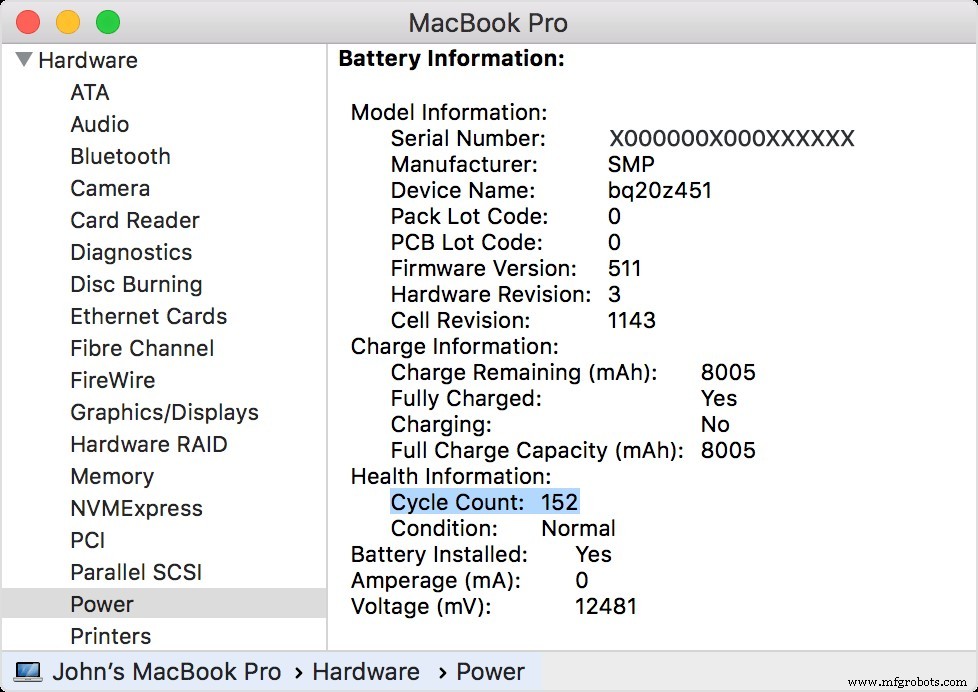
The number of cycles will give you an idea of how long your battery will last before it requires replacement. If your battery has reached its limit and has started to wear out it’s time to get rid of it. You can opt for one of these four options for battery replacement.
1: Use Apple Warranty
In case your MacBook is under warranty, you can easily get your battery replaced. Each Mac typically comes with a 1-year limited warranty in the US. For consumers in the EU and Australia, this consumer law extends to 2 years. You can also extend your warranty to 3 years with AppleCare+ (a bit expensive though).
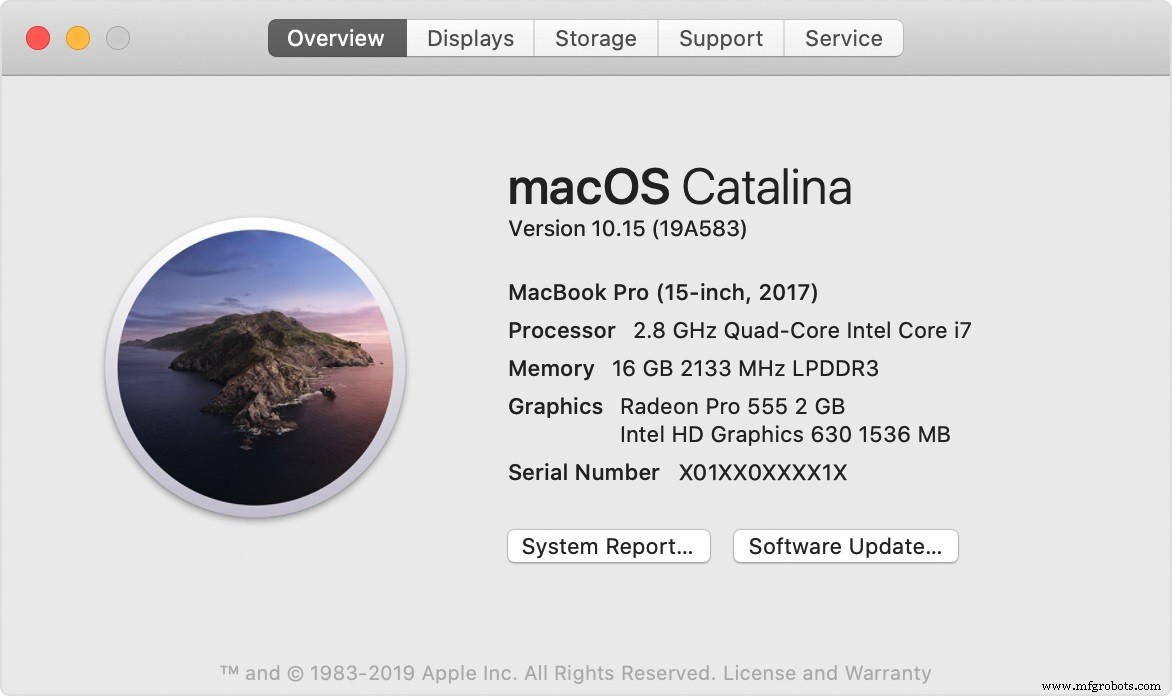
You can check your warranty status online at https://checkcoverage.apple.com/ by using your serial number. In order to find your serial number:
- Go to the top left corner and click the Apple icon.
- Go to ‘About This Mac’.
- You’ll find your serial number listed here.
In case you no longer have a warranty here are your other options.
2: Go to Apple Service Center
The next thing you could do is go to Apple’s Service Center. Getting your battery replaced by first-party or third-party authorized service centers can be expensive but is worth the cost. Apple also proves a ninety-day guarantee on any work done. The cost of repair can vary from $129 for a MacBook Air up to $199 for a MacBook Pro. For an outdated MacBook, it’s best to simply get your battery replaced.
Simply go to https://support.apple.com/mac/repair/serviceand click the ‘Start a service request’ option. In case there aren’t any Apple stores around your area, the website will instead suggest a list of third-party services that can help. These third-party services are authorized by Apple and so are trustworthy.
3: Go to a Computer Repair Shop
Getting your battery replaced from a third party source can save you some cash, although the cost depends on who you’re going to. However, you won’t have Apple’s guarantee on the battery being replaced. Third-party services may use foreign parts in an attempt to save money which is risky as such parts are prone to break down earlier. This does not always happen and you can try it out if you want to save some cash. Request for quotes from a computer repair shop around your area and then compare them to what Apple offers, the final decision is up to you.
4: Replace the Battery Yourself
This is the cheapest option by far, replace the battery yourself. You simply have to buy the parts and so the replacement yourself.For this, you’ll require a set of tools to open up your Mac, an anti-static wrist band and the replacement battery itself.
You can buy a kit from other sources such the iFixit which also comes with guides on simples fixes and more complex processes. For the battery, try to get a good quality battery from a trusted third-party source. Remember you’re taking a risk if you don’t know what you’re doing, but at the same time, you’ll save yourself a lot of money.
Once you’ve replaced your battery, make sure you dispose of the old battery responsibly. And if you still aren’t sure whether or not it’s worth getting your battery replaced you can always opt for external battery packs.
Industrial Technology
- Four Proven Strategies to Organize Your Asset Hierarchy and Find Assets Quickly
- How Manufacturing Brings Warmth and Joy to Your Holidays
- Effective Strategies for Reducing Scope 3 Emissions
- Maximize Capacity & Protect Your Business: 4 Key Benefits of Partnering with 3PLs
- How Environmental Factors Impact AC Motor Performance and Longevity
- 7 Proven Strategies to Cut PCB Production Costs
- From Concept to Creation: Making Your Idea a Reality
- 5 Proven Strategies to Optimize Your Supply Chain
- 8 Proven Strategies to Protect Your MacBook from Theft and Data Breaches in Public Spaces
- Proven Strategies to Keep Your Shear Blade in Peak Condition