LoRa‑Enabled COVID‑19 Patient Monitoring System for Remote Health Care
Components and supplies
The Things Network The Things Uno
×
1
The Things Network The Things Gateway
×
1
Maxim Integrated MAXREFDES117# Heart-Rate and Pulse-Oximetry Monitor Development Platform
×
1
Seeed Grove - Temperature Sensor
×
1
Jumper wires (generic)
×
1
DFRobot Gravity:Digital Push Button (Yellow)
×
1
Seeed Grove - Vibration Sensor (SW-420)
×
1
Buzzer
×
1
LED (generic)
×
1
Seeed Grove - Temperature, Humidity, Pressure and Gas Sensor (BME680)
×
1
Necessary tools and machines
Hot glue gun (generic)
Soldering iron (generic)
Apps and online services
Android Studio
Arduino Web Editor
Amazon Web Services AWS IoT
Microsoft Visual Studio Code Extension for Arduino
About this project
Summery
We have proposed an intelligent patient monitoring system for monitoring the patients’ health condition automatically through sensors based connected networks. This system is specially designed for Covid-19 patients. Several sensors are used for gathering the biological behaviors of a patient. The meaningful biological information are then forwarded to the IoT cloud. The system is more intelligent that can able to detect the critical condition of a patient by processing sensors data and instantly provides push notification to doctors/nurses as well as hospital in-charge personal. The doctors and nurses get benefited from this system by observing their corresponding patients remotely without visiting in person. Patients’ relatives can also get benefited from this system with limited access.
Description
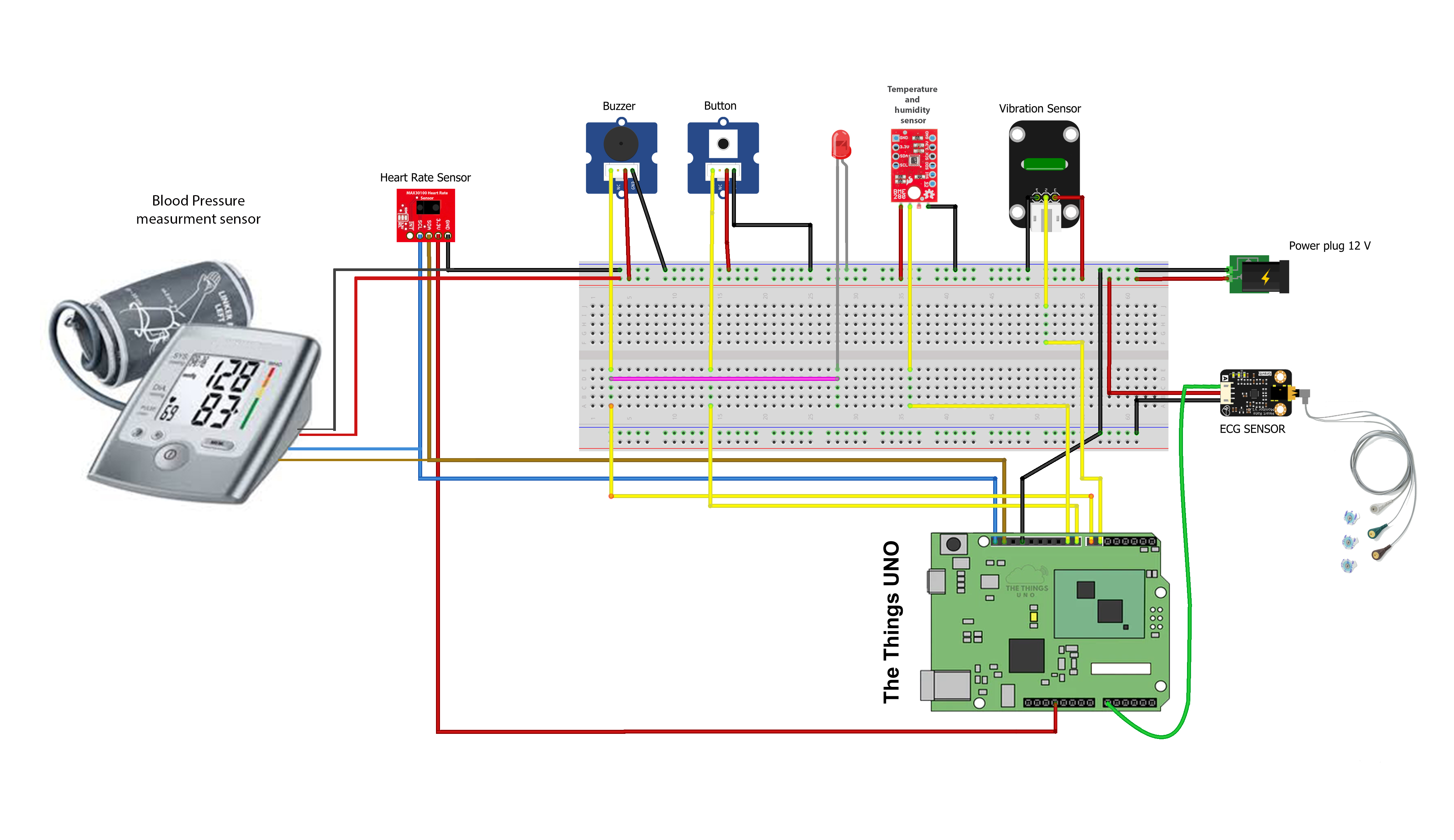
We have used an Things UNO (Lora development board) as a main controller of this monitoring system. The Things UNO board collected the information about patient health parameters from various sensors (described in Hardware component list section). The Things UNO is also responsible for transmitting data to the Lora Gateway (The Things Gateway). The Lora gateway is connected with AWS cloud. The AWS IoT cloud platform is used as a IoT cloud for this system.
HARDWARE COMPONENT LIST
The emergency condition of a patient is determined through the simple mathematical Equation-I,
where the details mathematical notation about threshold level is elaborated in Table-1.
We have developed a Mobile application for visualizing the sensor data. Various charts and gauges have used for displaying the real-time sensors data, which contains present health parameters (present health condition) of a patient. Through this application, doctors or nurses can monitor their patients remotely without visiting the ICU unit. Due to the nature of intelligence, the system sent the push notification to corresponding doctors or nurses about the emergency situation of the patient, where the Equation -I determines the emergency condition of a patient by processing the sensors data. The hospital-in charge personal (ICU in-charge person) also constantly monitored more than one patient at a time through our web based cloud connected desktop application (shown in Figure), which improves the efficiency of ICU unit. All the application were connected to the IoT cloud and visualized the real-time data using different type of charts such gauge, sparkline, Text etc.
Mobile application of patient monitoring system for doctors and nurses. The device continuously streams the sensors data to the IoT cloud and the application is directly connected to the cloud and visualize the real time using different type of charts.
Conclusion
Our proposed system described in this project allows doctors or nurses, as well as hospital in-charge personal allows them to monitor the patient in ICU unit in real time, which improves the efficiency and service quality. There is a huge opportunity to modify this system as a wearable device, that allows us to monitor the older people or babies remotely from any place.
Reference
1. Uddin, M. S., Alam, J. B., & Banu, S. (2017, September). Real time patient monitoring system based on internet of things. In 2017 4th International Conference on Advances in Electrical Engineering (ICAEE) (pp. 516-521). IEEE. DOI: 10.1109/ICAEE.2017.8255410
Code
source
sourceArduino
#include <TheThingsNetwork.h>
#include <SPI.h>
#include <MAX30100_PulseOximeter.h>
#include <Adafruit_Sensor.h>
#include <Adafruit_BME280.h>


// Set your AppEUI and AppKey
const char *appEui = "0000000000000000";
const char *appKey = "00000000000000000000000000000000";

#define loraSerial Serial1
#define debugSerial Serial

// Replace REPLACE_ME with TTN_FP_EU868 or TTN_FP_US915
#define freqPlan REPLACE_ME

//VARIABLE TO HOLD THE SENSORS DATA
int bpm;
int spo2;
float temp;

//the sea level presure in your region (****)
Adafruit_BME280 bme; 		// BME280  Sensnor declaration
unsigned long currentMillis;   //hold the current time


//pulse oximeter time period (measurment time period)
#define REPORTING_PERIOD_MS     1000
PulseOximeter pox;
uint32_t tsLastReport = 0;

// Callback (registered below) fired when a pulse is detected
void onBeatDetected()
{
    // Serial.println("Beat!");
}


void measured_pulse(){

    pox.update();
    if (millis() - tsLastReport > REPORTING_PERIOD_MS) {
      bpm=pox.getHeartRate();
      tsLastReport = millis();
    }

}


TheThingsNetwork ttn(loraSerial, debugSerial, freqPlan);

void setup()
{
  loraSerial.begin(57600);
  debugSerial.begin(9600);

  // Wait a maximum of 10s for Serial Monitor
  while (!debugSerial && millis() < 10000)
    ;

  debugSerial.println("-- STATUS");
  ttn.showStatus();

  debugSerial.println("-- JOIN");
  ttn.join(appEui, appKey);

  Serial.println(F("BME280 test"));
  Serial.println("Initializing MAX30100");

  pox.begin();
  pox.setOnBeatDetectedCallback(onBeatDetected);

  bool status;

  status = bme.begin();
  if (!status) {
    Serial.println("Could not find a valid BME280 sensor, check wiring!");
    while (1);
  }

  pinMode(7, OUTPUT);
  pinMode(A0,INPUT);
  pinMode(8,INPUT);
  pinMode(6,INPUT);

}


void loop()
{
  debugSerial.println("-- LOOP");

  h_rate = analogRead(A0);
  button = digitalRead(8);
  temperature = pox.getTemperature();
  spo2 = pox.getSpO2();
  bpm =  bpm;
  humidity =  bme.readHumidity();
  movement = digitalRead(6);


  byte payload[6];
  payload[0] = highByte(bpm);
  payload[1] = lowByte(temperature);
  payload[2] = highByte(humidity);
  payload[3] = lowByte(movement);
  payload[4] = lowByte(spo2);
  payload[5] = lowByte(button);
  payload[6] = lowByte(h_rate);

  debugSerial.print("Temperature: ");
  debugSerial.println(temperature);
  debugSerial.print("Humidity: ");
  debugSerial.println(humidity);

  debugSerial.print("BPM: ");
  debugSerial.println(bpm);
  debugSerial.print("SPO2: ");
  debugSerial.println(spo2);

  debugSerial.print("H_rate: ");
  debugSerial.println(h_rate);

  debugSerial.print("Button: ");
  debugSerial.println(button);
  debugSerial.print("Movement: ");
  debugSerial.println(movement);


  ttn.sendBytes(payload, sizeof(payload));

  delay(20000);
}