



Automated Garage Sliding Door Powered by Arduino Nano
Components and supplies
 |
| × | 1 | |||
 |
| × | 1 | |||
| × | 1 | ||||
| × | 1 | ||||
 |
| × | 1 | |||
 |
| × | 1 |
About this project
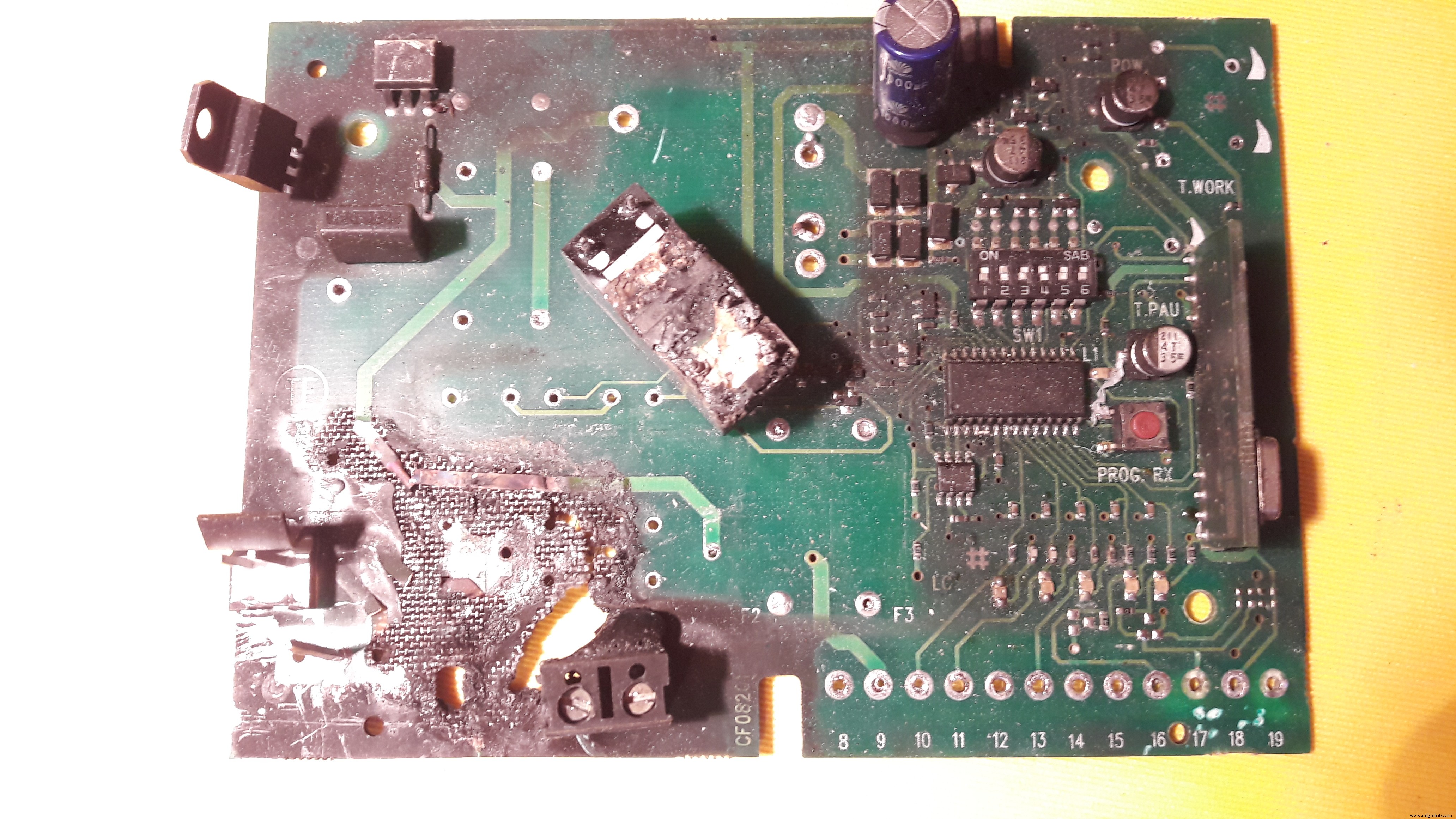
BackgroundWell, the story began one day when I arrived at home and I realized that the remote controller of the sliding door was not working. "The batteries!" I thought, but no, this was not the reason. I investigated a little and what a surprise when I removed the cover of the door motor: a little lizard was literally carbonized in a tiny space between the electronic control board and the plastic support (by the way, I am not going to upload images from that horrendous scene). I guess that the little reptile touched the 220V fastons and produced a short circuit. The result was its death and all the circuit became burnt.
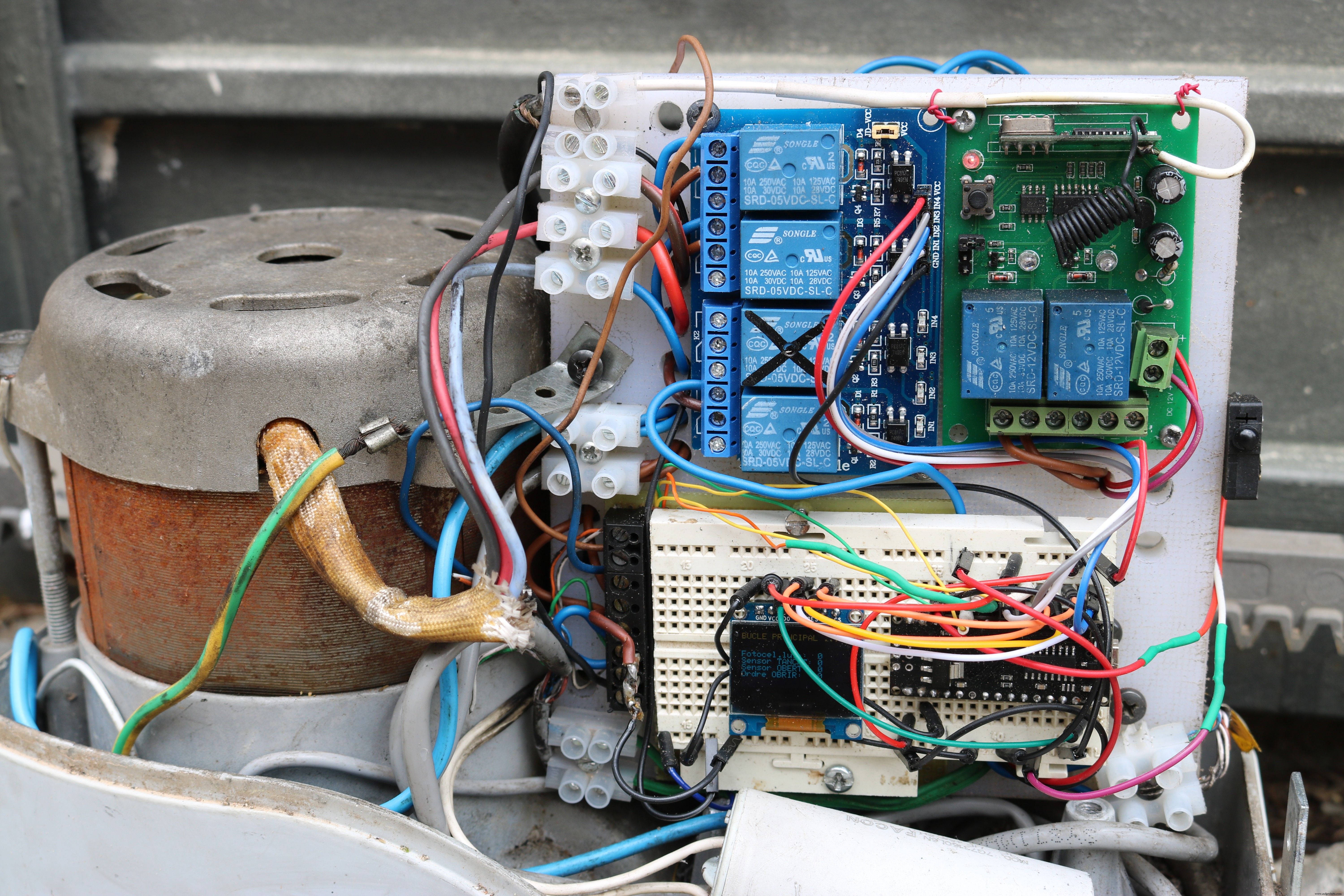
I have removed from the board some components that I could save for using in my projects, but you can see in this photo how it ended up.
In that very moment I decided that this might be the perfect excuse for make an Arduino project and a complete rebuild of the control unit.
WARNINGFor this project you will have to deal with components connected to 220V directly (or 110V). Take in account that this may be dangerous if you are not very skilled with this sort of installations. Please, be careful and proceed with caution. Always perform a simulation before connecting to the actual motor circuitry.
Components & CircuitryThe project is divided in some parts, but what I present here is the Arduino circuitry that controls the rotation of the motor and the signaling light, and takes into account the status of the limit switch sensors and a safety photocell.
At first, you could think that it is easy to build and program, but I can assure you that I had to overcome a lot of difficulties that made this project so exciting.
Other important components for the whole project are:
- Electric 220V motor and physical guides and mechanisms: these were not affected by the lizard's action.
- Remote radio receiver to issue the "Open" command: I have used a commercial ready made unit that included the remote controllers and the receiver.
- 220V relays to support the high current used by the motor.
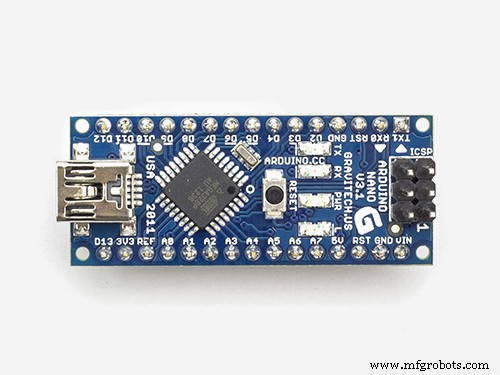
- Main control unit made with Arduino Nano and other compatible accessories such as OLED display and relays module. This is what I show you in this portal.
I also have added some improvements and several automated actions that were not included in the commercial original control unit.
Pinouts for This ProjectThe following information sumarizes the pins of the components and how to connect them:
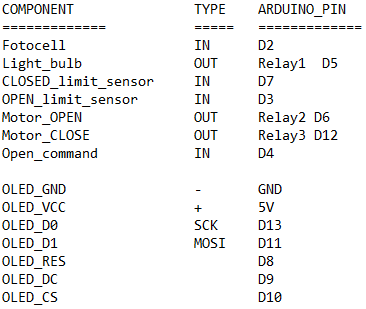
As you can see, for this project I have used an OLED display directly attached to the board. Under normal working conditions, this display is located inside the protection cover of the mechanism and the electronics. So that, you are not able to see it. In fact, this display is intended to be used used only to check the status of the components while you adjust settings and do a fine tunning to the code (max time adjustement for instance).
The information provided by this display could also have been sent to the serial port and checked from a laptop with the Arduino IDE software, but I find that this little display is a cool way to operate the unit without the need of using any laptop or additional device.
The displayed information in the OLED is the following:
- Phase of the code being executed (Opening door, closing door, waiting for "Open" command, main loop, ...)
- Elapsed time for main actions (Opening, waiting before closing again and closing)
- Photocell status (active when someone or something is in the closing path)
- CLOSED limit sensor status (active when the door is fully closed)
- OPENED limit sensor status (active when the door is fully Opened)
- OPEN command signal (active when the remote controller is pressed and the radio module activate a relay)
Note: The OLED display that I am using is 0.96 inches and has a resolution of 128 x 64 pixels. This display can use I2C or SPI to communicate to the control device (Arduino Nano in this case) and I am using SPI (Serial Peripheral Interface).
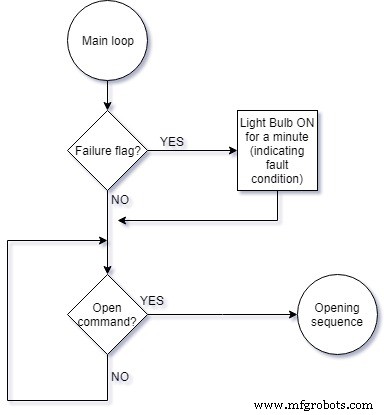
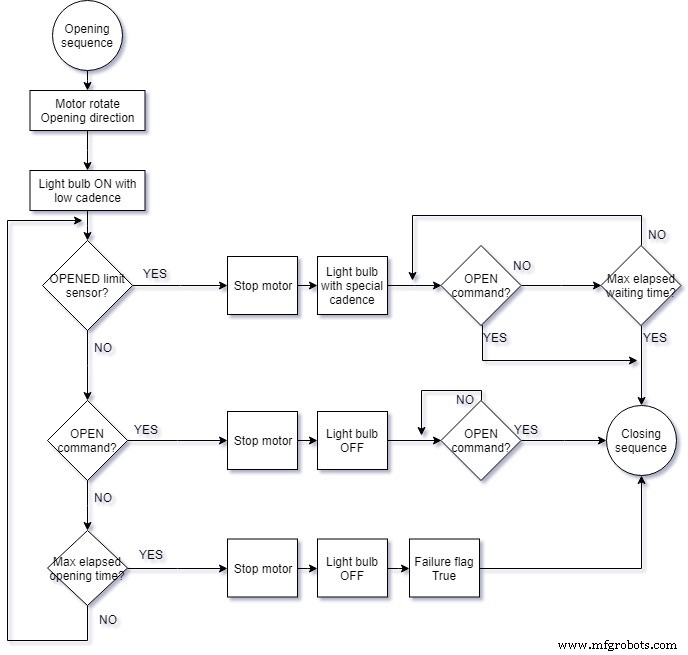
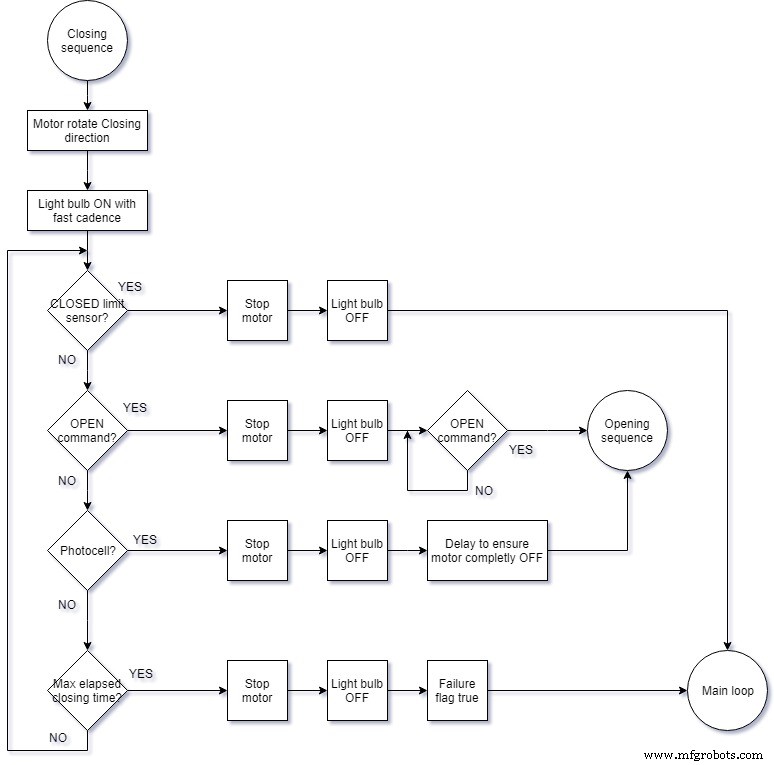
The following flow charts sumarize the software code in a readable way:
Code
- English Software code version
- Code
English Software code versionC/C++
Here you have the code with all the comments translated to english. It includes a short list of vocabulary in order to understand the meaning of variables and labels./*********************************************************************
Automatism for sliding motorized door
*********************************************************************/
/* Comments are translated to english, but in order to help
you understand the name of the variables and labels, here
you have a quick vocabulary "Catalan-English":
Bucle principal = Main loop
Sequencia Obertura = Opening sequence
Sequencia Tancament = Closing sequence
Obrir = Open ; Obert = Opened
Tancar = Close ; Tancat = Closed
Bombeta = Light bulb
Llum = light
Porta = Gate / door
Avaria = Failure
Temps = Time
Recorregut = door travel
*/
// Libraries for Oled Display
#include <SPI.h>
#include <Wire.h>
#include <Adafruit_GFX.h>
#include <Adafruit_SSD1306.h>
// We define the pins to be used by the control circuitry
int FOTOCELULA = 2;
int BOMBETA = 5; //Relay 1
int TANCAT = 7;
int OBERT = 3;
int MOTOR_OBRIR = 6; //Relay 2
int MOTOR_TANCAR = 12; //Relay 3
int OBRIR = 4;
// We define the pins to be used by the Oled display
#define OLED_MOSI 11
#define OLED_CLK 13
#define OLED_DC 9
#define OLED_CS 10
#define OLED_RESET 8
Adafruit_SSD1306 display(OLED_MOSI, OLED_CLK, OLED_DC, OLED_RESET, OLED_CS);
// We define global variables
unsigned long TEMPS_PORTA_OBERTA = 20000;
unsigned long TEMPS_MAXIM_RECORREGUT = 15000; //Later we'll redefine this value
int interval = 1000; // Interval is how long we wait
int TEMPS_DISPLAY = 1; // Time in seconds to display
int DURADA = 300; // Cicle for light bulb
unsigned long previousMillis = 0; // Tracks the time since last event fired
unsigned long currentMillis = millis();
unsigned long TEMPS_LLUM = 1000; // time in milliseconds for light bulb status
boolean LLUM = false; // light ON or OFF
boolean AVARIA = false; //door travel time exceeded without detecting limiting switch
void setup() {
// Turn off motor and light
digitalWrite(MOTOR_OBRIR, HIGH);
digitalWrite(MOTOR_TANCAR, HIGH);
digitalWrite(BOMBETA, HIGH);
// We initialize the pins for the automatism
pinMode(FOTOCELULA, INPUT_PULLUP);
pinMode(TANCAT, INPUT_PULLUP);
pinMode(OBERT, INPUT_PULLUP);
pinMode(OBRIR, INPUT_PULLUP);
pinMode(BOMBETA, OUTPUT);
pinMode(MOTOR_OBRIR, OUTPUT);
pinMode(MOTOR_TANCAR, OUTPUT);
// Display initialization
Serial.begin(9600);
display.begin(SSD1306_SWITCHCAPVCC);
display.display(); // Show Adafruit initial logo
delay(1000);
display.clearDisplay();
display.display();
// We prepare the text size for the display (not important because later it is dinamically redefined)
display.setTextSize(1);
display.setTextColor(WHITE);
}
void loop() {
BUCLE_PRINCIPAL:
delay(2000);
previousMillis = millis();
while (digitalRead(OBRIR) == HIGH)
{
display.clearDisplay();
display.setTextSize(1);
display.setCursor(0, 0);
display.println("BUCLE PRINCIPAL ...");
display.setTextSize(1);
display.setCursor(0, 20);
display.print("Fotocel.lula: "); display.println(digitalRead(FOTOCELULA));
display.print("Sensor TANCAT: "); display.println(digitalRead(TANCAT));
display.print("Sensor OBERT: "); display.println(digitalRead(OBERT));
display.print("Ordre OBRIR: "); display.println(!digitalRead(OBRIR));
display.display();
if (AVARIA and (millis() - previousMillis < 60000)) {
digitalWrite(BOMBETA, LOW);
} else (digitalWrite(BOMBETA, HIGH));
}; // We wait until Open command is issued and meanwhile the display is being refreshed showing the status of the sensors
goto SEQUENCIA_OBERTURA;
SEQUENCIA_OBERTURA:
interval = 28000; // Maximum time opening the door (if exceeded it will denote some failure)
previousMillis = millis();
digitalWrite(MOTOR_OBRIR, LOW);
digitalWrite(BOMBETA, LOW);
delay(1000);
A:
if (digitalRead(OBERT) == HIGH) {
goto PORTA_OBERTA;
};
if (digitalRead(OBRIR) == LOW)
{
display.clearDisplay();
display.setTextSize(1);
display.setCursor(0, 0);
display.println("Esperant ordre per tancar"); // "Waiting order to close"
display.setTextSize(1);
display.setCursor(0, 20);
display.print("Fotocel.lula: "); display.println(digitalRead(FOTOCELULA));
display.print("Sensor TANCAT: "); display.println(digitalRead(TANCAT));
display.print("Sensor OBERT: "); display.println(digitalRead(OBERT));
display.print("Ordre OBRIR: "); display.println(!digitalRead(OBRIR));
display.display();
digitalWrite(MOTOR_OBRIR, HIGH);
digitalWrite(BOMBETA, HIGH);
delay(1000);
while (digitalRead(OBRIR) == HIGH) {}; //Do nothing until OPEN command is issued
goto SEQUENCIA_TANCAMENT;
};
//--Time control and display refreshing---------------
currentMillis = millis();
TEMPS_DISPLAY = (currentMillis - previousMillis) / 1000;
display.clearDisplay();
display.setTextSize(1);
display.setCursor(0, 0);
display.println("Obrint porta");
display.setTextSize(2);
display.setCursor(90, 0);
display.println(TEMPS_DISPLAY);
display.setTextSize(1);
display.setCursor(0, 20);
display.print("Fotocel.lula: "); display.println(digitalRead(FOTOCELULA));
display.print("Sensor TANCAT: "); display.println(digitalRead(TANCAT));
display.print("Sensor OBERT: "); display.println(digitalRead(OBERT));
display.print("Ordre OBRIR: "); display.println(!digitalRead(OBRIR));
display.display();
if ((currentMillis - previousMillis) >= interval)
{
digitalWrite(MOTOR_OBRIR, HIGH);
AVARIA = true; //
goto PORTA_OBERTA;
};
//--light Flashing frequence control------------------
if ((currentMillis - TEMPS_LLUM) >= 1000) //Flashing at low speed
{
LLUM = !LLUM;
digitalWrite(BOMBETA, LLUM);
TEMPS_LLUM = currentMillis;
};
goto A;
SEQUENCIA_TANCAMENT:
interval = 28000; // Maximum time closing the door (if exceeded it will denote some failure)!
previousMillis = millis();
digitalWrite(MOTOR_TANCAR, LOW);
digitalWrite(BOMBETA, LOW);
if (digitalRead(TANCAT) == LOW) {delay(1000);};
B:
if (digitalRead(TANCAT) == HIGH)
{
digitalWrite(MOTOR_TANCAR, HIGH);
digitalWrite(BOMBETA, HIGH);
goto BUCLE_PRINCIPAL;
};
if (digitalRead(OBRIR) == LOW)
{
display.clearDisplay();
display.setTextSize(1);
display.setCursor(0, 0);
display.println("Esperant ordre per obrir");
display.setTextSize(1);
display.setCursor(0, 20);
display.print("Fotocel.lula: "); display.println(digitalRead(FOTOCELULA));
display.print("Sensor TANCAT: "); display.println(digitalRead(TANCAT));
display.print("Sensor OBERT: "); display.println(digitalRead(OBERT));
display.print("Ordre OBRIR: "); display.println(!digitalRead(OBRIR));
display.display();
digitalWrite(MOTOR_TANCAR, HIGH);
digitalWrite(BOMBETA, HIGH);
delay(1000);
while (digitalRead(OBRIR) == HIGH) {}; //Do nothing until OPEN command is issued
goto SEQUENCIA_OBERTURA;
};
if (digitalRead(FOTOCELULA) == HIGH)
{
digitalWrite(MOTOR_TANCAR, HIGH);
delay(1000);
goto SEQUENCIA_OBERTURA;
};
//--Time control and display refreshing---------------------
currentMillis = millis();
TEMPS_DISPLAY = (currentMillis - previousMillis) / 1000;
display.clearDisplay();
display.setTextSize(1);
display.setCursor(0, 0);
display.println("Tancant porta");
display.setTextSize(2);
display.setCursor(90, 0);
display.println(TEMPS_DISPLAY);
display.setTextSize(1);
display.setCursor(0, 20);
display.print("Fotocel.lula: "); display.println(digitalRead(FOTOCELULA));
display.print("Sensor TANCAT: "); display.println(digitalRead(TANCAT));
display.print("Sensor OBERT: "); display.println(digitalRead(OBERT));
display.print("Ordre OBRIR: "); display.println(!digitalRead(OBRIR));
display.display();
if ((currentMillis - previousMillis) >= interval) {
digitalWrite(MOTOR_TANCAR, HIGH);
AVARIA = true;
goto BUCLE_PRINCIPAL;
};
//--light Flashing frequence control------------------
if ((currentMillis - TEMPS_LLUM) >= 300) // Flashing at fast speed
{
LLUM = !LLUM;
digitalWrite(BOMBETA, LLUM);
TEMPS_LLUM = currentMillis;
};
goto B;
PORTA_OBERTA:
interval = 30000; // Time waiting before closing the door! (30 seconds to enter the car...)
previousMillis = millis();
digitalWrite(MOTOR_OBRIR, HIGH);
delay(500);
C:
if (digitalRead(OBRIR) == LOW) {
goto SEQUENCIA_TANCAMENT;
};
//--Time control and display refreshing---------------------
currentMillis = millis();
TEMPS_DISPLAY = (currentMillis - previousMillis) / 1000;
display.clearDisplay();
display.setTextSize(1);
display.setCursor(0, 0);
display.println("Porta Oberta completament");
display.setTextSize(2);
display.setCursor(90, 0);
display.println(TEMPS_DISPLAY);
display.setTextSize(1);
display.setCursor(0, 20);
display.print("Fotocel.lula: "); display.println(digitalRead(FOTOCELULA));
display.print("Sensor TANCAT: "); display.println(digitalRead(TANCAT));
display.print("Sensor OBERT: "); display.println(digitalRead(OBERT));
display.print("Ordre OBRIR: "); display.println(!digitalRead(OBRIR));
display.display();
if ((currentMillis - previousMillis) >= interval) {
goto SEQUENCIA_TANCAMENT;
};
//--Special compound flashing frequency in waiting state------------------
// (Short flashes of 100 milliseconds between long periods of 2 seconds)
if (LLUM == false) {
DURADA = 100;
} else DURADA = 2000;
if ((currentMillis - TEMPS_LLUM) >= DURADA) //
{
LLUM = !LLUM;
digitalWrite(BOMBETA, LLUM);
TEMPS_LLUM = currentMillis;
};
goto C;
}
CodeC/C++
This is the C++ code to compile and upload to the Arduino Nano/*********************************************************************
Automatisme per porta corredera motoritzada
*********************************************************************/
// Llibreries per fer servir el display
#include <SPI.h>
#include <Wire.h>
#include <Adafruit_GFX.h>
#include <Adafruit_SSD1306.h>
// Definim pins per automatisme porta
int FOTOCELULA = 2;
int BOMBETA = 5; //Relay 1
int TANCAT = 7;
int OBERT = 3;
int MOTOR_OBRIR = 6; //Relay 2
int MOTOR_TANCAR = 12; //Relay 3
int OBRIR = 4;
// Definim pins per display
#define OLED_MOSI 11
#define OLED_CLK 13
#define OLED_DC 9
#define OLED_CS 10
#define OLED_RESET 8
Adafruit_SSD1306 display(OLED_MOSI, OLED_CLK, OLED_DC, OLED_RESET, OLED_CS);
// Definim variables globals
unsigned long TEMPS_PORTA_OBERTA = 20000;
unsigned long TEMPS_MAXIM_RECORREGUT = 15000; //Despres ho redefinim
int interval = 1000; // Interval is how long we wait
int TEMPS_DISPLAY = 1; // temps en segons per imprimir en pantalla
int DURADA = 300; // Cicle bombeta senyalitzacio
unsigned long previousMillis = 0; // Tracks the time since last event fired
unsigned long currentMillis = millis();
unsigned long TEMPS_LLUM = 1000; // temps en milisegons de estat llum senyalitzacio
boolean LLUM = false; // Llum encessa si ON i apagada si OFF
boolean AVARIA = false; //Excedit el temps de recorregut sense detectar finals de carrera
void setup() {
// Inicialitzem els pins per automatisme porta
pinMode(FOTOCELULA, INPUT_PULLUP);
pinMode(TANCAT, INPUT_PULLUP);
pinMode(OBERT, INPUT_PULLUP);
pinMode(OBRIR, INPUT_PULLUP);
pinMode(BOMBETA, OUTPUT);
pinMode(MOTOR_OBRIR, OUTPUT);
pinMode(MOTOR_TANCAR, OUTPUT);
// Apaguem motors i llum
digitalWrite(MOTOR_OBRIR, HIGH);
digitalWrite(MOTOR_TANCAR, HIGH);
digitalWrite(BOMBETA, HIGH);
// Inicialitzem el display
Serial.begin(9600);
display.begin(SSD1306_SWITCHCAPVCC);
display.display(); // Mostra pantalla inicial de Adafruit
delay(1000);
display.clearDisplay();
display.display();
// preparem el display per texte
display.setTextSize(1);
display.setTextColor(WHITE);
}
void loop() {
BUCLE_PRINCIPAL:
delay(2000);
previousMillis = millis();
while (digitalRead(OBRIR) == HIGH)
{
display.clearDisplay();
display.setTextSize(1);
display.setCursor(0, 0);
display.println("BUCLE PRINCIPAL ...");
display.setTextSize(1);
display.setCursor(0, 20);
display.print("Fotocel.lula: "); display.println(digitalRead(FOTOCELULA));
display.print("Sensor TANCAT: "); display.println(digitalRead(TANCAT));
display.print("Sensor OBERT: "); display.println(digitalRead(OBERT));
display.print("Ordre OBRIR: "); display.println(!digitalRead(OBRIR));
display.display();
if (AVARIA and (millis() - previousMillis < 60000)) {
digitalWrite(BOMBETA, LOW);
} else (digitalWrite(BOMBETA, HIGH));
}; //Esperem fins que premem OBRIR i anem refrescant pantalla per mostrar estat sensors
goto SEQUENCIA_OBERTURA;
SEQUENCIA_OBERTURA:
interval = 28000; // TEMPS MAXIM DE RECORREGUT PORTA OBRINT !!!!!!!!!
previousMillis = millis();
digitalWrite(MOTOR_OBRIR, LOW);
digitalWrite(BOMBETA, LOW);
delay(1000);
A:
if (digitalRead(OBERT) == HIGH) {
goto PORTA_OBERTA;
};
if (digitalRead(OBRIR) == LOW)
{
display.clearDisplay();
display.setTextSize(1);
display.setCursor(0, 0);
display.println("Esperant ordre per tancar");
display.setTextSize(1);
display.setCursor(0, 20);
display.print("Fotocel.lula: "); display.println(digitalRead(FOTOCELULA));
display.print("Sensor TANCAT: "); display.println(digitalRead(TANCAT));
display.print("Sensor OBERT: "); display.println(digitalRead(OBERT));
display.print("Ordre OBRIR: "); display.println(!digitalRead(OBRIR));
display.display();
digitalWrite(MOTOR_OBRIR, HIGH);
digitalWrite(BOMBETA, HIGH);
delay(1000);
while (digitalRead(OBRIR) == HIGH) {}; //No fem res fins que premem OBRIR
goto SEQUENCIA_TANCAMENT;
};
//--Control-de-temps-i-impressió-en-pantalla---------------------
currentMillis = millis();
TEMPS_DISPLAY = (currentMillis - previousMillis) / 1000;
display.clearDisplay();
display.setTextSize(1);
display.setCursor(0, 0);
display.println("Obrint porta");
display.setTextSize(2);
display.setCursor(90, 0);
display.println(TEMPS_DISPLAY);
display.setTextSize(1);
display.setCursor(0, 20);
display.print("Fotocel.lula: "); display.println(digitalRead(FOTOCELULA));
display.print("Sensor TANCAT: "); display.println(digitalRead(TANCAT));
display.print("Sensor OBERT: "); display.println(digitalRead(OBERT));
display.print("Ordre OBRIR: "); display.println(!digitalRead(OBRIR));
display.display();
if ((currentMillis - previousMillis) >= interval)
{
digitalWrite(MOTOR_OBRIR, HIGH);
AVARIA = true; //
goto PORTA_OBERTA;
};
//--Control-de-cadencia-de-la-llum-intermitent------------------
if ((currentMillis - TEMPS_LLUM) >= 1000) // Cadencia de la llum intermitent de senyalitzacio
{
LLUM = !LLUM;
digitalWrite(BOMBETA, LLUM);
TEMPS_LLUM = currentMillis;
};
goto A;
SEQUENCIA_TANCAMENT:
interval = 28000; // TEMPS MAXIM DE RECORREGUT PORTA TANCANT !!!!!!!!!
previousMillis = millis();
digitalWrite(MOTOR_TANCAR, LOW);
digitalWrite(BOMBETA, LOW);
if (digitalRead(TANCAT) == LOW) {delay(1000);};
B:
if (digitalRead(TANCAT) == HIGH)
{
digitalWrite(MOTOR_TANCAR, HIGH);
digitalWrite(BOMBETA, HIGH);
goto BUCLE_PRINCIPAL;
};
if (digitalRead(OBRIR) == LOW)
{
display.clearDisplay();
display.setTextSize(1);
display.setCursor(0, 0);
display.println("Esperant ordre per obrir");
display.setTextSize(1);
display.setCursor(0, 20);
display.print("Fotocel.lula: "); display.println(digitalRead(FOTOCELULA));
display.print("Sensor TANCAT: "); display.println(digitalRead(TANCAT));
display.print("Sensor OBERT: "); display.println(digitalRead(OBERT));
display.print("Ordre OBRIR: "); display.println(!digitalRead(OBRIR));
display.display();
digitalWrite(MOTOR_TANCAR, HIGH);
digitalWrite(BOMBETA, HIGH);
delay(1000);
while (digitalRead(OBRIR) == HIGH) {}; //No fem res fins que premem OBRIR
goto SEQUENCIA_OBERTURA;
};
if (digitalRead(FOTOCELULA) == HIGH)
{
digitalWrite(MOTOR_TANCAR, HIGH);
delay(1000);
goto SEQUENCIA_OBERTURA;
};
//--Control-de-temps-i-impressió-en-pantalla---------------------
currentMillis = millis();
TEMPS_DISPLAY = (currentMillis - previousMillis) / 1000;
display.clearDisplay();
display.setTextSize(1);
display.setCursor(0, 0);
display.println("Tancant porta");
display.setTextSize(2);
display.setCursor(90, 0);
display.println(TEMPS_DISPLAY);
display.setTextSize(1);
display.setCursor(0, 20);
display.print("Fotocel.lula: "); display.println(digitalRead(FOTOCELULA));
display.print("Sensor TANCAT: "); display.println(digitalRead(TANCAT));
display.print("Sensor OBERT: "); display.println(digitalRead(OBERT));
display.print("Ordre OBRIR: "); display.println(!digitalRead(OBRIR));
display.display();
if ((currentMillis - previousMillis) >= interval) {
digitalWrite(MOTOR_TANCAR, HIGH);
AVARIA = true;
goto BUCLE_PRINCIPAL;
};
//--Control-de-cadencia-de-la-llum-intermitent------------------
if ((currentMillis - TEMPS_LLUM) >= 300) // Cadencia de la llum intermitent de senyalitzacio
{
LLUM = !LLUM;
digitalWrite(BOMBETA, LLUM);
TEMPS_LLUM = currentMillis;
};
goto B;
PORTA_OBERTA:
interval = 30000; // TEMPS MAXIM ESPERANT AMB PORTA OBERTA !!!!!!!!!
previousMillis = millis();
digitalWrite(MOTOR_OBRIR, HIGH);
delay(500);
C:
if (digitalRead(OBRIR) == LOW) {
goto SEQUENCIA_TANCAMENT;
};
//--Control-de-temps-i-impressió-en-pantalla---------------------
currentMillis = millis();
TEMPS_DISPLAY = (currentMillis - previousMillis) / 1000;
display.clearDisplay();
display.setTextSize(1);
display.setCursor(0, 0);
display.println("Porta Oberta completament");
display.setTextSize(2);
display.setCursor(90, 0);
display.println(TEMPS_DISPLAY);
display.setTextSize(1);
display.setCursor(0, 20);
display.print("Fotocel.lula: "); display.println(digitalRead(FOTOCELULA));
display.print("Sensor TANCAT: "); display.println(digitalRead(TANCAT));
display.print("Sensor OBERT: "); display.println(digitalRead(OBERT));
display.print("Ordre OBRIR: "); display.println(!digitalRead(OBRIR));
display.display();
if ((currentMillis - previousMillis) >= interval) {
goto SEQUENCIA_TANCAMENT;
};
//--Control-de-cadencia-de-la-llum-intermitent------------------
if (LLUM == false) {
DURADA = 100;
} else DURADA = 2000;
if ((currentMillis - TEMPS_LLUM) >= DURADA) // Cadencia de la llum intermitent de senyalitzacio
{
LLUM = !LLUM;
digitalWrite(BOMBETA, LLUM);
TEMPS_LLUM = currentMillis;
};
goto C;
}
Schematics
How to connect the wiring to sensors, relays and radio module from the main control unit.schematics_Kzy9lps55T.fzzScreenshoot from fritzing schematics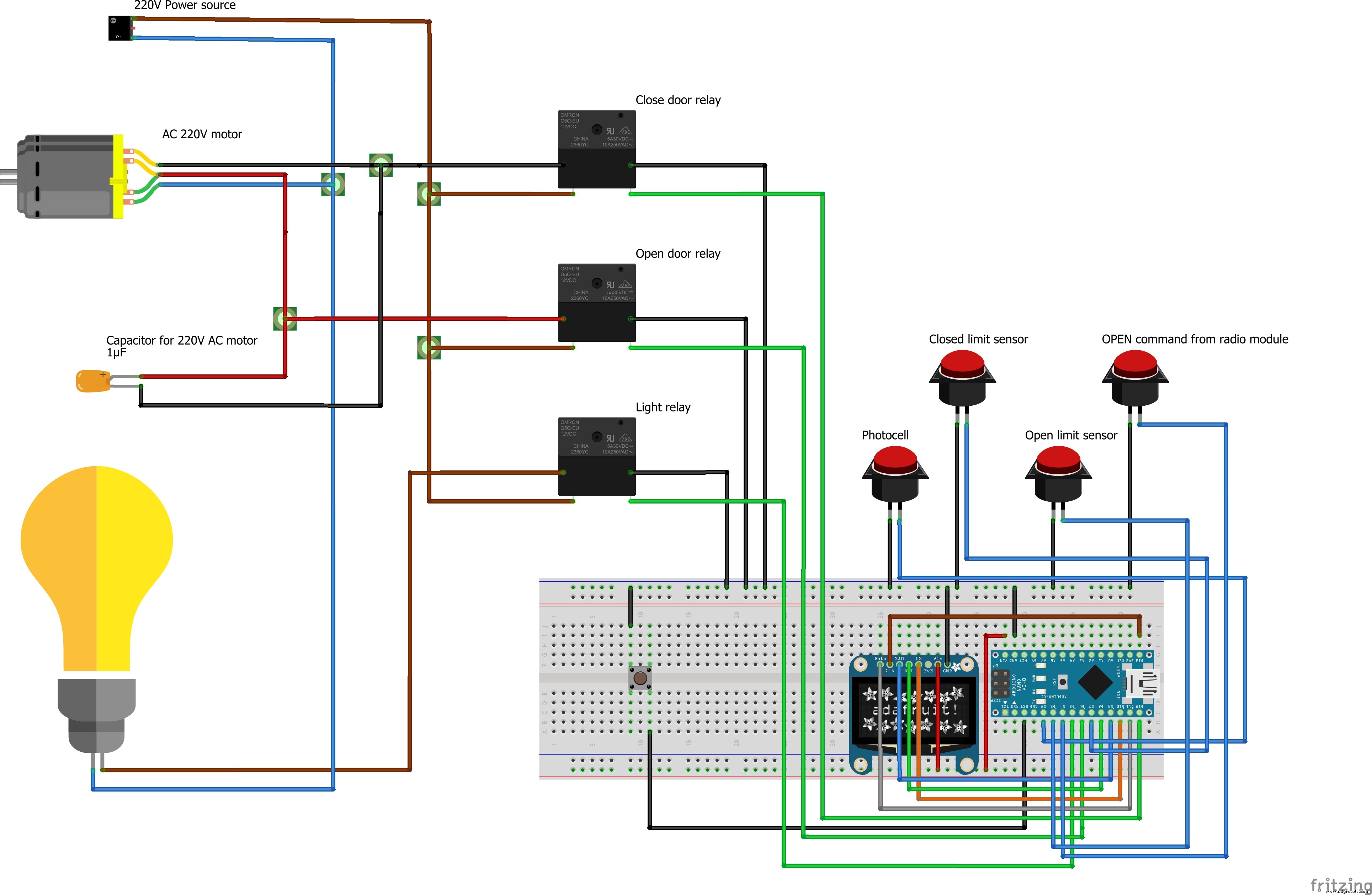 This is the list of the used Arduino pins and how to connect them to the rest of the components.pinouts_x7JmwoGJTY.txtThis hardware addon is in response to the question from irshad2318 (see the posts for this project)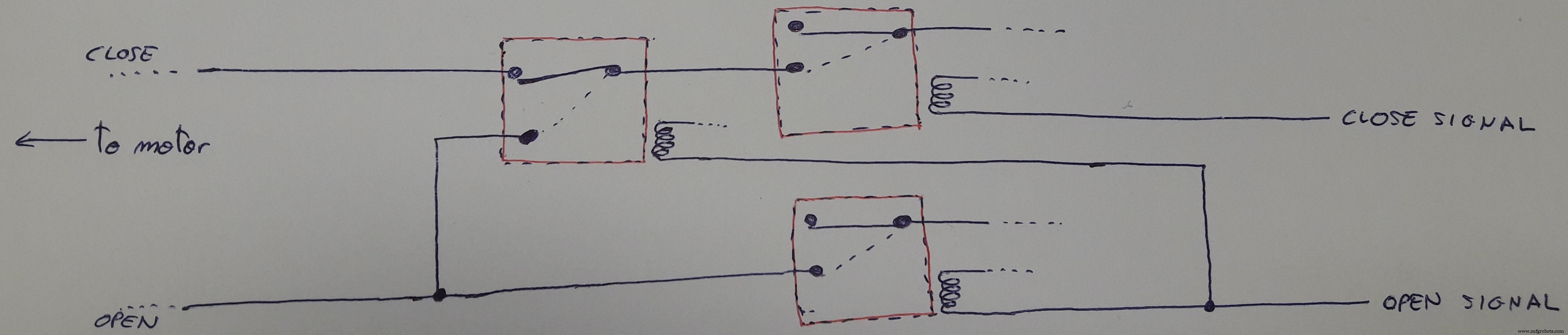
Manufacturing process
- Pentodes: The Fifth Element for Enhanced Tube Performance
- Formnext 2017: A Landmark Showcase for Additive Manufacturing Innovation
- Top Accessories to Unlock Your Raspberry Pi's Full Potential
- SIGHT: Smart Glasses Empowering the Blind
- Building an Underwater Drone with Raspberry Pi: Design, Development, and Assembly
- Complete Arduino & Intel Edison Starter Kit with Sensors, Webcam, and Essential Accessories
- HIsarna Ironmaking Process: Ultra‑Low‑Carbon Steel Production
- ROBOTRIM: Advanced Automated Vines Pruning System
- Why Smart Factories are Essential for Modern Manufacturing
- What Is an Automatic Power Press? – The Ultimate Sheet Metal Forming Machine