



Seamless IoT Data Integration into EAM for Business Central Using Power Automate—No Coding Required
This article showcases how to integrate EAM for Business Central (EAM-BC) with Azure IoT Central and allow maintenance professionals to track data from many IoT sensors in one place.
We are living in a time where everything is connected. Phones, TVs, and all equipment in your home. The same is true for manufacturing companies. Nowadays, you can connect any of your equipment. But what are the benefits? You could track all data that is critical for your machines such as vibrations, temperature, humanity, and much more.
Can you imagine that your business would stop because you did not respond to an issue in due time? Can you imagine losing production time or, even worse, orders and customers?
You can prevent such losses by monitoring IoT sensor data. Some of them are so small you would not even notice them – for instance, some of them are at the size of a pack of Tic Tacs. Price for such sensors have dropped in the past years which allows to broaden the use to many more devices. Many platforms can help you with that. One of them is Azure IoT Central (https://azure.microsoft.com/en-us/services/iot-central/).
Installing IoT device and connecting to Azure IoT Central in five minutes
After creating the application in Azure IoT Central, you can start building your dashboards in just a few minutes from provided templates, or you can build your application from scratch.
Let's see our demo example. Our customer, Foody Goodie is a manufacturer company and needs to track the temperature and humidity in their two production halls.
For that, they bought two IoT Devices and put them in the halls. The devices are very basic for this example but can track the temperature, humidity, and pressure.
IoT Device installation
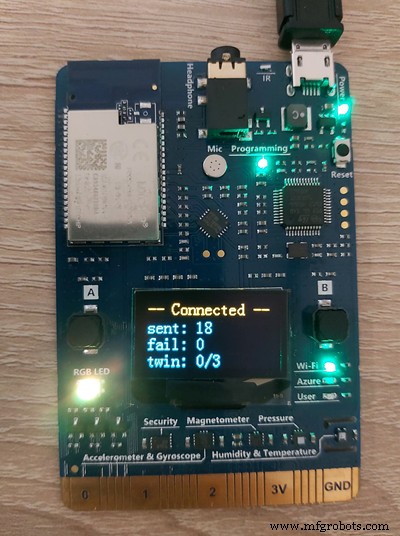
Installing the device and connecting it to Azure IoT Central took less than 5 minutes.
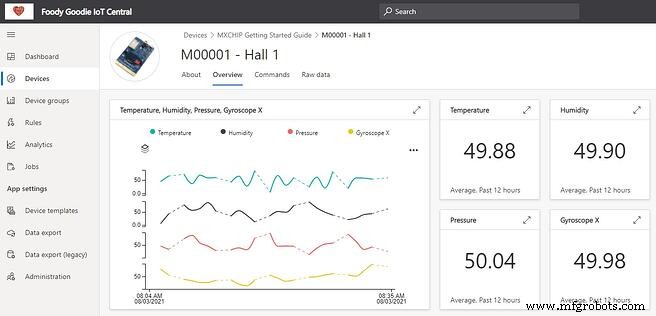
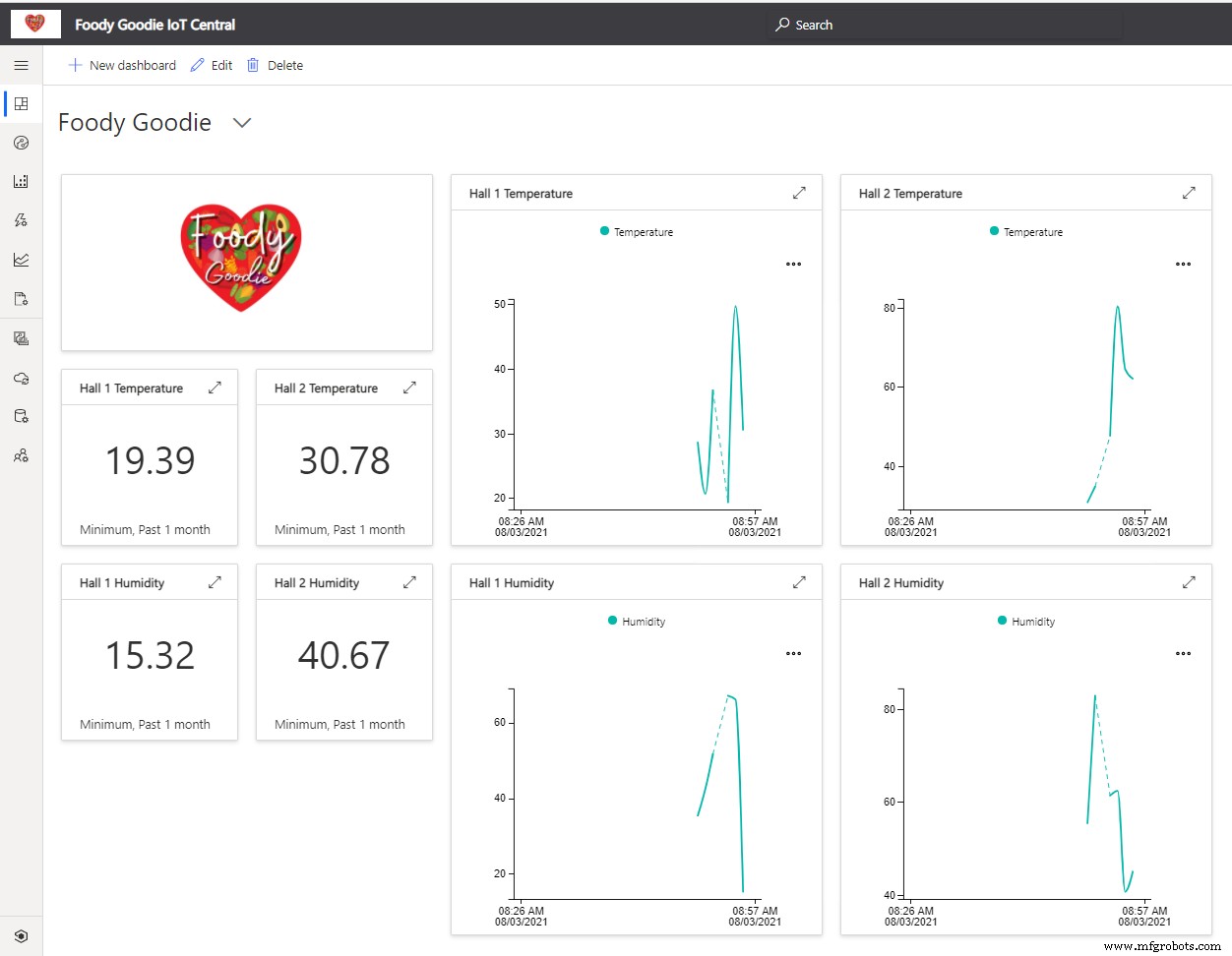
Dashboards presents all IoT data in one place
The maintenance manager easily refines his dashboard using blocks that allows him to track the most important data from all devices in one place. He can see minimum temperatures and humidity in the past month and real-time data for those factors.
Use IoT Sensor data to raise Work Orders
The raw data from the IoT sensors is important but imagine if your maintenance system can "read this data" and if needed schedule the work which needs to be done by the technicians. For that, the maintenance manager created a new rule in Azure IoT Central that if the average temperature from the last 5 minutes is below 70 F then send an email.
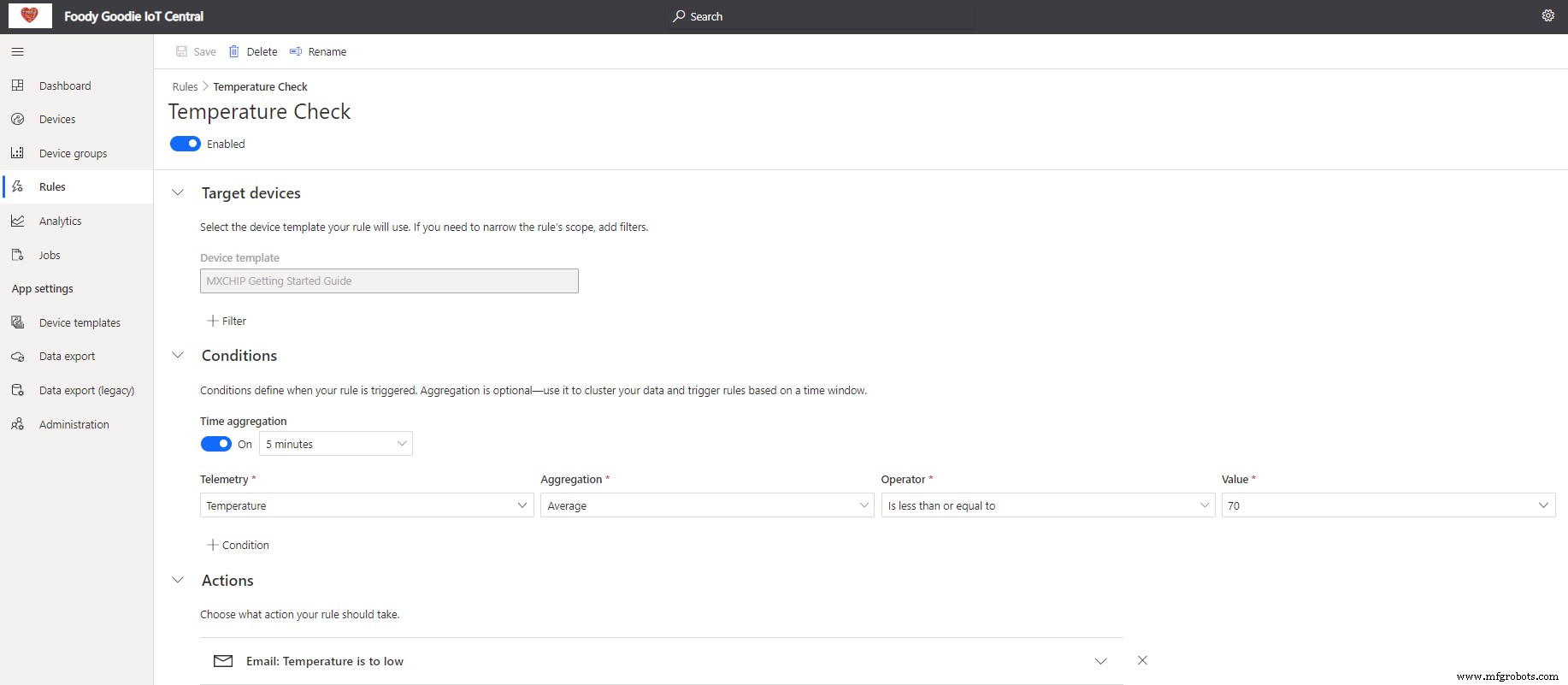
Then manager is always informed that the temperature is too low. But in the demo company also wants to create automatically the work order for the technicians.
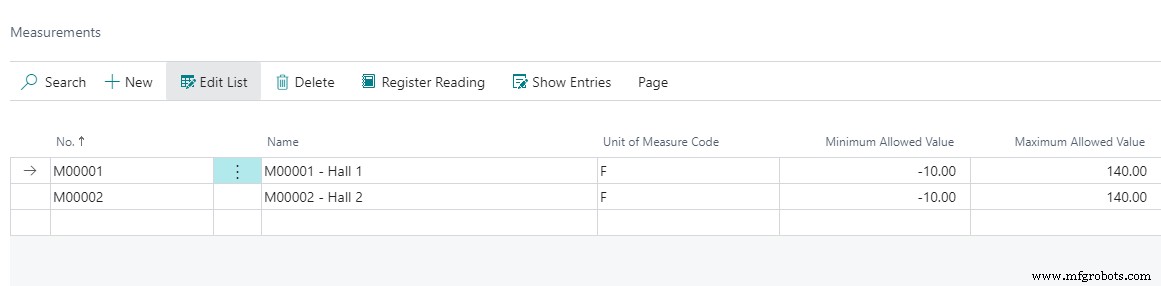
Foody Goodie uses Dynamics 365 Business Central as their ERP system (https://dynamics.microsoft.com/en-gb/business-central) with a maintenance add-on Dynaway EAM (https://www.dynaway.com/eam-bc). In the system, they defined the same devices as in Azure IoT Central.
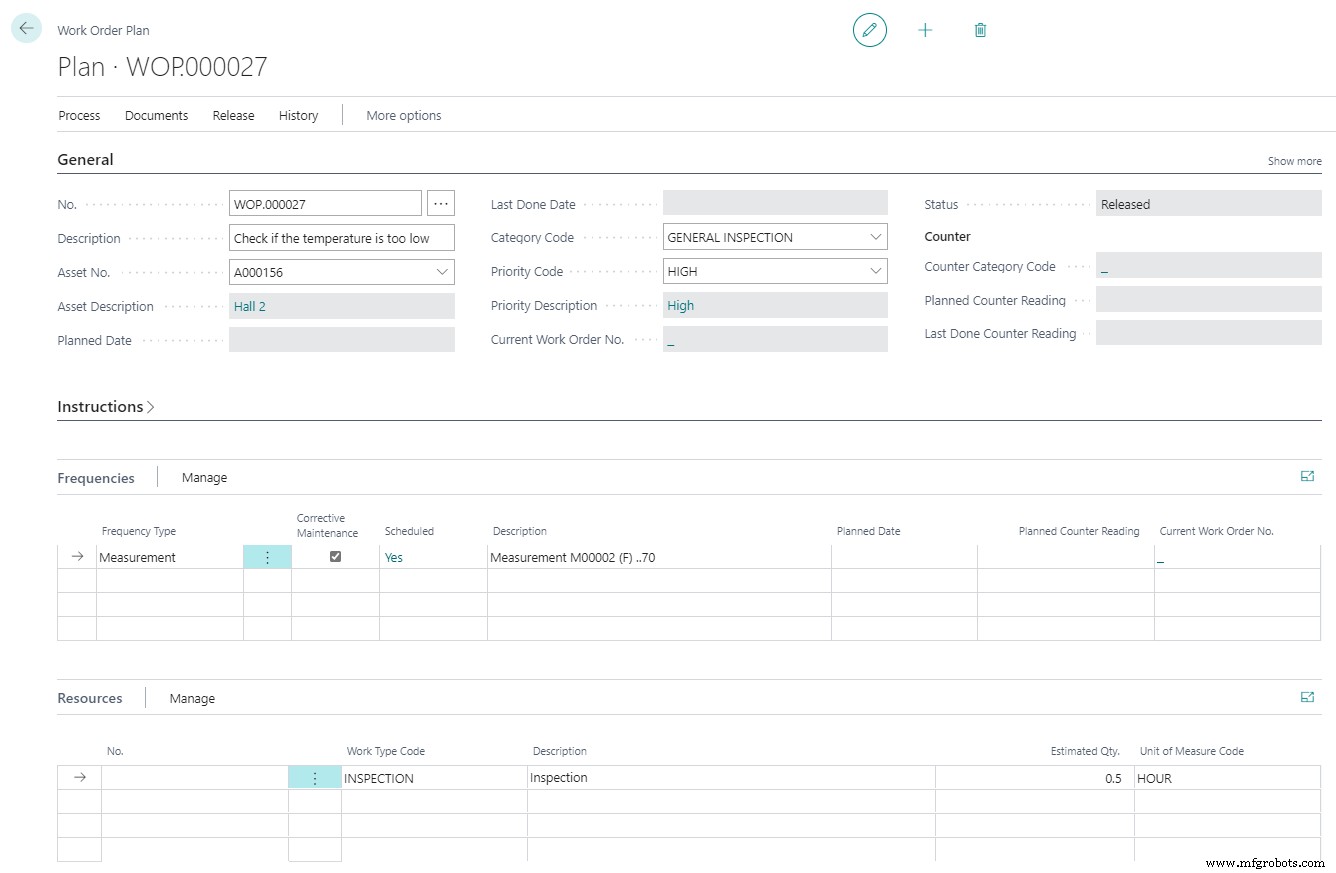
IoT data triggers Work Order Plan in EAM-BC
The manager also created the Work Order Plan that tells the system to trigger the work order whenever the temperature on Hall 1 will drop below 70 F. He also estimated that this work will take the technician 30 minutes.
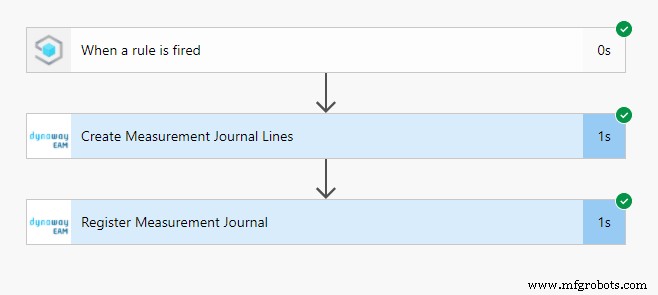
3-step data import with Power Automate
To import the data into the system company needed to use Power Automate. Power Automate is a Microsoft tool that allows the creation of automated flows without development. In just 3 steps system administrator was able to import data to Business Central from Azure IoT Central.
Data is automatically imported to the maintenance system. Data contains the number of the device from Azure IoT Central, the time when the measurement was recorded, and also the value which has been sent.

During planning the manager sees that there is some additional work based on the IoT Device measurements. Work Orders can be triggered automatically, or the manager can review them before creating work orders.
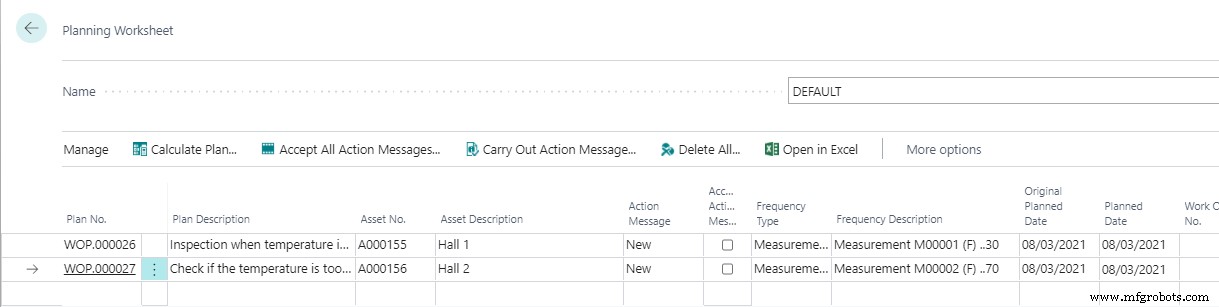
Technician sees the triggered work order
After planning the technician can pick the work order and start checking why the temperature in the main hall dropped.
Importing IoT data to Business Central – Step by step
Step by step to import IoT data to Business Central and trigger Work Orders based on IoT Sensor data:
- Install Dynaway EAM in your Dynamics 365 Business Central
- Create in Azure Portal IoT Central application
- Create a Device Template in Azure IoT Central
- Configure and connect the IoT Device to Azure IoT Central
- Create Measurement in Business Central
- Configure the rule which will trigger sending data from Azure IoT Central
- Create Work Order Plan based on measurement in Business Central
- Create Power Automate which will be triggered by Azure IoT Central – When a rule is fired. Add to it two actions Create Measurement Journal Line and Register Measurement Journal Line. Check the API specification on https://help.dynaway.com/eam-bc/api/beta/

Equipment Maintenance and Repair
- AIoT: Harnessing the Synergy of Artificial Intelligence and the Internet of Things
- IoT in the Edge Era: Growth, Data, Security, and Partner Strategy
- How Smart Cities Harness IoT, Microservices, and Dashboards for Efficient Asset Management
- IoT World: Inside Vertica’s Big‑Data Solution for IoT Analytics
- Harnessing Industrial IoT for Growth: Beyond Cost Savings
- Unlocking Real-Time Value: Why Your Business Must Embrace IoT
- Automate Home Power Outlets with Windows 10 IoT Core, Raspberry Pi, and Arduino
- Harnessing Cloud Power for IoT: Unlocking Seamless Connectivity & Data Insights
- How 5G Will Empower Continuous Intelligence Apps with Real‑Time IoT Data
- Eliminate IoT Issues with Seamless IT Automation