



Measure Reference Dimensions Directly on the Graphics Screen – A Quick Guide
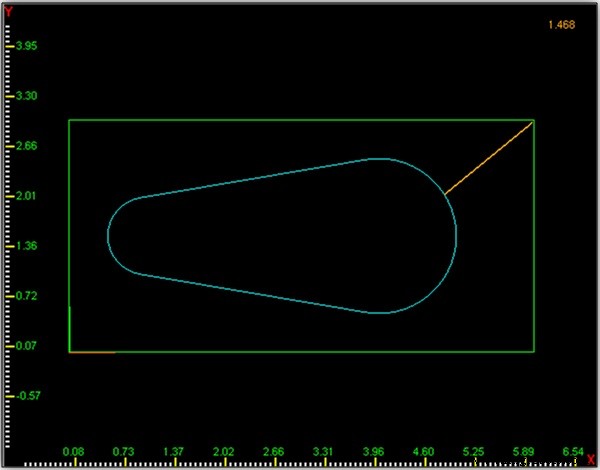 When programming a part we often need measurement data that just isn’t on the print - and short of some very involved Trigonometry, or redrawing and analyzing the part in a CAD system, there hasn't been a good way to find these reference dimensions…until now!
Hurco allows the operator to perform these reference measurements right on the graphics screen of the control, with either the supplied stylus or by using the tip of your favorite finger.
From the main graphics screen, and while viewing the part in a 2D view, simply press and hold the ALT key located on the control panel, and then click and drag on the screen. A line will appear as you drag your device, and the reference measurement will appear in the upper right hand corner of the screen.
HELPFUL TIP: if you release the ALT key first, before removing your drawing device, the data will remain displayed on the screen.
CNC Machine
- The Tetrode Tube: Design, Function, and Impact on Amplifier Performance
- How CNC Machinery Revolutionizes Manufacturing: Accuracy, Efficiency, and Reliability
- Measure Earth's Mass with Arduino: A Step‑by‑Step DIY Guide
- The CNC Machine Tool Production Journey – From Fabrication to Installation (Part 2)
- CNC Machine Tools: Evolution & Impact on Modern Manufacturing – Part 1
- Chamfer Mills: Enhancing Strength, Safety, and Aesthetics in Machining
- Overcoming the Challenges of Large Part Machining: Key Strategies and Solutions
- Distributed Manufacturing: Is It the Future of Part Production?
- Gripping Torque: Evaluating the True Measure of Toolholder Effectiveness
- Why TPU Is the Ideal Choice for Elastomeric Part Design