



Haas RSJC: Efficient Stop, Jog, and Resume for CNC Milling and Lathes
Run Stop Jog Continue (RSJC) is a cnc control feature available on Haas mills and lathes.
Haas Run Stop Jog Continue (RSJC) Overview
RSJC allows you to stop a running program, jog away from the part and then resume program execution. Once the tool is away from the part, a worn insert or broken tool can be replaced and/or a critical feature can be inspected. Then the program can be resumed.
Some Precautions!
Use caution, when the program is continued, the OLD or currently active offsets will be used for the return position and the machine will not return through the same path that you jogged away. If replacing tools, the length must be the same as the previous tool (offline tool setter recommended).
Haas Run Stop Jog Continue – Step by Step
To activate RSJC press FEED HOLD at a convenient stopping point in the program.
Press Z, X or Y on the keypad followed by the HAND JOG key to activate the selected axis.
The control will store the current X, Y, and Z positions. Axes other than X, Y, and Z cannot be jogged.
“JOG AWAY” is displayed at the bottom of the screen and the control will beep, confirming RSJC is active:
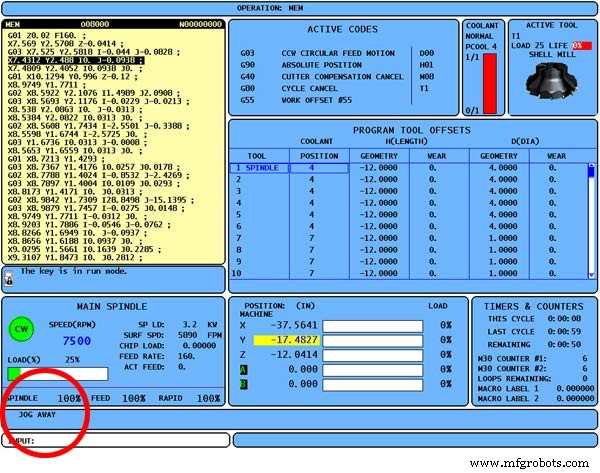
Haas Run Stop Jog Continue RSJC
Now you can use the jog handle, remote jog handle, jog, or jog-lock buttons to move away from the part.
You can use control buttons such as AUX CLNT (TSC), or COOLNT to turn on/off the coolant (AUX CLNT requires that the spindle is not rotating and the door is closed).
The spindle can be controlled by pressing CW, CCW, Stop, and Tool Release.
If necessary, tool inserts can be changed.
Jog to a position as close as possible to the stored position where RSJC was activated, or to a position where there will be an unobstructed rapid path back to the stored position.
Return to the previous mode by pressing MEM, MDI, or DNC.
The control will only continue if the mode that was in effect when stopped is re-entered.
Press Cycle Start.
The control will display the message “Jog Return” and rapid X and Y at 5% to the position where Feed Hold was pressed and then return the Z-axis.
If Feed Hold is pressed during this motion, the mill axes motion will pause and display the message “Jog Return Hold”. Pressing Cycle Start will cause the control to resume the Jog Return motion.
When the motion is completed, the control will again go into a feed hold state. Press Cycle Start again and the program resumes normal operation.
CNC Machine
- Optimizing Seam Lines in FDM 3D Printing with Insight Seam Control
- Gene Haas: Building a CNC Legacy & Motorsports Empire
- Hurco’s WinMax Integrated Control Empowers 11 Advanced Machine Tools
- Unit 6: Mastering Haas CNC Control Systems
- Your Complete Guide to Motoman Controllers: Find the Best Fit
- Haas is Hot: New Europe Flyer Unveiled
- Understanding Haas Setup and Run Modes: Enhanced Safety and Functionality
- Haas M01 Optional Program Stop – How It Works & Settings
- How to Use the Haas M00 Stop Program Command
- Haas CNC Machine Parameter List – Essential Settings for Lathes & Mills