



How to Properly Reset After Editing Programs on Fanuc TC CNC Controllers
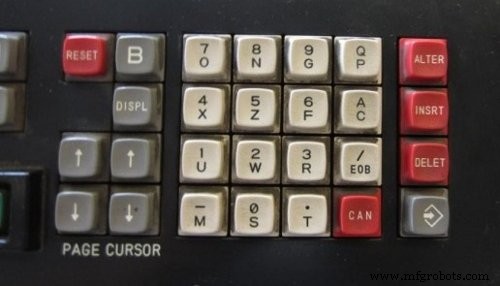
RESET after Program Edit on Fanuc TC
CNC machinists must always remember to press the RESET button before pressing CYCLE START on cnc machines with FANUC TC cnc control (e.g. Gildemeister NEF 560), in the case they make changes to their cnc part program.
Milltronics Centurion 7 G‑Code Reference: Complete List of G Codes
Prevent Screw Damage: Use the Correct Allen Key Size in CNC Work
CNC Machine
- Essential G‑Code Commands to Append After Your CNC Program Ends
- Master the Fanuc G75 Grooving Cycle: Step-by-Step CNC Program Guide
- Fanuc G73 Pattern Repeating Cycle: CNC Program Example & Guide
- Fanuc CNC Programming Guide: A Simple, Feature‑Rich Example
- Fanuc G20: Mastering Inch-Based CNC Programming – Practical Example
- Fanuc G90 Turning Cycle: CNC Program Example for Efficient Turning Operations
- Comprehensive CNC Milling Sample Program – G-Code Tutorial & Explanation
- Comprehensive Fanuc G94 Facing Cycle Example for CNC Machining
- Understanding CNC Program Blocks: A Comprehensive Guide
- Understanding the Reset Button on a CNC Operator Panel: Function and Use