



Mastering Fanuc Sub-Programming: Efficient Use of M98 for Threading Cycles
Fanuc Sub Programming
Fanuc cnc control provides the ability to access other part programs stored inside the main directory.
For a cnc program example for sub-program call read Multi Start Threads with Fanuc G76 Threading Cycle
Sub-Program Call
Sub-program is called by the use of an M98 command followed by the sub-program number preceded with a letter P.
N10 M98 P1004
In the above cnc program line the sub-program 1004 will be called, which is stored in the control memory as O1004
Sub-Program End
To return to the last program (main-program) position for the program to continue,
an M99 command on the last line of sub-program is usedN100 M99
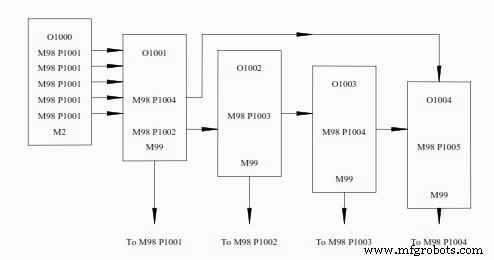
Fanuc Sub Programming
Sub-Program Repeats
The control also has the ability to contain a repeat command as part of the M98 program line.
When the program line is written with the M98 P1004 command the control actually reads
the line of information as M98 P00001004 , the first 4 digits after the P word being the
repeat amount.
To repeat a sub-program (O1004) 33 times, the program line would read as follows:
M98 P331004
Above cnc program code will call O1004 program 33 times then will return to main program.
M99 Command
Fanuc control has the ability to jump to a specific program line number on its return to the
main program using the M99 command as:
M99 P100
This command above will move the control to line number N100 in the main program.
M99 can also be written at the end of a main program, and would result in a continuous
program loop.
CNC Machine
- Microprocessor Programming Fundamentals
- Master FANUC Robot Programming: 5 Proven Expert Techniques
- Fanuc CNC Programming Guide: A Simple, Feature‑Rich Example
- Beginner-Friendly Fanuc CNC Lathe Programming Example – Straight, Taper, and Arc Cuts
- Understanding the G78 Threading Cycle in Fanuc Lathe Programming
- Fanuc G68 Coordinate Rotation G‑Code Example for CNC Machining
- Comprehensive Fanuc M-Code Reference for CNC Lathe and Mill
- Comprehensive Fanuc CNC Programming for Coolant-Driven Bar Puller with Grippex Clamp
- Heidenhain Conversational Programming: Practical Sub-Program Exercise Guide
- Fanuc CNC: Direct Programming of Profiles with Angles and Rounded Edges – Step‑by‑Step Example