



Best CAD/CAM Software for CNC Beginners: Fusion 360, Easel, Carbide Create & More
Best CAD/CAM Software for CNC Beginners
Autodesk Fusion 360 is the go‑to platform for new CNC operators, offering a fully integrated design and manufacturing workflow, an intuitive interface, and a free personal‑use license that removes upfront costs. For those focused on 2‑D routing and sign‑making, Easel and Carbide Create provide even simpler, more focused alternatives with gentle learning curves.
Introduction: The Software Gateway to CNC Machining
Computer‑Aided Design (CAD) turns ideas into digital models, while Computer‑Aided Manufacturing (CAM) translates those models into G‑code—the language your CNC machine speaks. For beginners, selecting the right software can feel daunting, but powerful, zero‑cost options exist that will keep you on a learning curve, not a price curve.
What to Look for in Beginner CAD/CAM Software
Before diving into recommendations, understand the key attributes that make a package truly beginner‑friendly:
- Low learning curve – intuitive UI, abundant tutorials, active community.
- Integrated CAD/CAM workflow – design changes automatically refresh toolpaths, saving time and reducing errors.
- Accessible pricing – free for hobbyists, students and personal use; commercial licenses can be postponed.
- Machine compatibility – built‑in post‑processors for your CNC control system.
Top CAD/CAM Software Picks for Beginners
1. Autodesk Fusion 360 – Best Overall for Serious Beginners
Type: Integrated CAD/CAM | Platform: Windows, Mac | Price: Free for personal use, paid for commercial
Fusion 360 is widely regarded as the Swiss Army knife of CNC software. It bundles professional‑grade design tools with robust manufacturing capabilities in a single cloud‑connected environment.
Why It’s Great for Beginners:
- Seamless workflow – Design and CAM coexist in the same interface; toolpaths auto‑update when you tweak your geometry.
- Adaptive clearing – Roughing strategy keeps tools constantly engaged, improving safety and efficiency.
- Free personal licence – 3‑year renewable access to 3D modelling, 2.5‑axis milling, turning, and select 5‑axis features.
- Massive learning ecosystem – YouTube tutorials, Autodesk certifications, and an active forum community.
Considerations:
- Cloud dependency – Requires internet for file storage and some functions.
- Advanced features take time – Mastering 5‑axis or generative design is a learning path, not an instant win.
- Licence restrictions – Free tier is non‑commercial; commercial use requires a paid plan.
Verdict: If you’re ready to grow beyond simple signs into functional parts and assemblies, start here. Fusion 360 is the most recommended choice among seasoned CNC users.
2. Easel – Best for Absolute Beginners in 2‑D Routing
Type: Browser‑based 2‑D CAD/CAM | Platform: Any web browser | Price: Free tier, paid pro features
Easel, developed by Inventables for X‑Carve machines, is engineered for people who have never programmed a CNC before.
Why It’s Great for Beginners:
- Instantly intuitive – Design and cut a sign within an hour of opening the software.
- Built‑in machine control – Sends G‑code directly to many routers, eliminating a separate sender program.
- Preset speeds and feeds – Select material and tool, and Easel suggests optimal parameters.
Considerations:
- Limited to 2.5‑D – 3‑D contouring and complex surfaces are outside its scope.
- Pro features cost – Advanced V‑carving and some toolpath strategies require a subscription.
- Browser‑only – Consistent internet required.
Verdict: Ideal for hobbyists making signs, plaques, and simple decorative items, especially if you own an X‑Carve or a similar router.
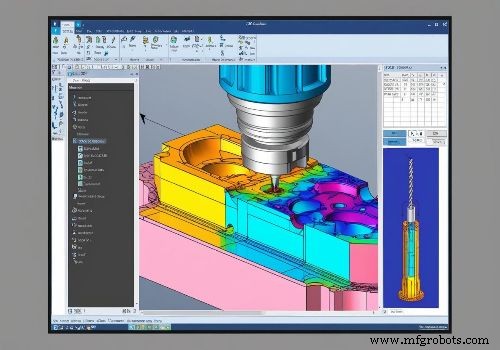
3. Carbide Create – Best Free Option for 2‑D and V‑Carving
Type: Desktop 2‑D/2.5‑D CAD/CAM | Platform: Windows, Mac | Price: Free version, paid “Pro”
Carbide Create, from the makers of Nomad and Shapeoko, offers powerful 2‑D design and V‑carving tools without a price tag.
Why It’s Great for Beginners:
- Excellent V‑carve tools – Perfect for decorative engraving and sign‑making.
- More features than Easel – Larger preset library and extra design tools, yet still user‑friendly.
- Fully free – Perform real work without paying.
Considerations:
- Export workflow – Recent releases require an extra step to generate G‑code via the website; older versions allow direct export.
- No full 3‑D CAD – Complex 3‑D modelling is better handled in Fusion 360.
Verdict: A solid choice for sign‑making, inlays, and V‑carving, stepping up from Easel without the complexity of Fusion 360.
4. Kiri:Moto – Best Free Online 3‑D CAM
Type: Browser‑based 3‑D CAM | Platform: Any web browser | Price: Free
Kiri:Moto generates toolpaths from STL files entirely in the browser, ideal for those who already own 3‑D models.
Why It’s Great for Beginners:
- No installation – Runs directly in your browser.
- Strong 3‑D capabilities – Handles reliefs, trays, and complex parts.
- Onshape integration – Works as a plugin within Onshape if you use that CAD platform.
Considerations:
- CAM‑only – Requires separate CAD software to create or acquire models.
- Browser‑only – Requires internet connectivity.
Verdict: The best free tool for users who already have 3‑D models and need to generate toolpaths for 3‑D carving.
5. FreeCAD – Best Open‑Source Option
Type: Integrated CAD/CAM | Platform: Windows, Mac, Linux | Price: Completely free (open‑source)
FreeCAD offers a parametric 3‑D CAD modeler with a built‑in “Path” workbench for CAM. It’s ideal for tech‑savvy hobbyists and open‑source enthusiasts.
Why It’s Great for Beginners:
- Unlimited free use – No commercial restrictions or license expirations.
- Cross‑platform – Runs on Windows, Mac, and Linux.
- Active community – Plenty of tutorials and forum support.
Considerations:
- Steeper learning curve – Interface less polished; workflow requires more manual steps.
- Basic CAM features – Toolpath strategies are less advanced than Fusion 360.
Verdict: A solid pick for those who prefer open‑source solutions or cannot use cloud‑based software.
6. Estlcam – Best for Hobbyist 3‑Axis Work
Type: Desktop 3‑axis CAM | Platform: Windows | Price: Free trial, paid license for full version
Estlcam, a German product, is built for hobbyist CNC users seeking simplicity and speed.
Why It’s Great for Beginners:
- Easy to start – Designed for inexperienced users with help functions and video tutorials.
- Machine control – Paired with Estlcam Controller, it can generate code and run the machine.
- Multilingual – Supports Chinese, Japanese, Korean, and more.
Considerations:
- Windows only – No Mac or Linux support.
- Limited advanced features – Best for 2.5‑D and simple 3‑D work, not complex multi‑axis machining.
Verdict: Excellent for hobbyists with 3‑axis machines who want a straightforward, fast, and affordable CAM solution.
Software Comparison Table
| Software | Best For | CAD/CAM Integration | 2D/2.5D | 3D | Price (Beginner Level) | Learning Curve |
|---|---|---|---|---|---|---|
| Fusion 360 | Serious beginners, all‑round | Full integration | Excellent | Excellent | Free personal use | Moderate |
| Easel | Absolute beginners, signs | Built‑in basic CAD | Good | Limited | Free tier | Very low |
| Carbide Create | Sign‑making, V‑carving | Built‑in CAD | Excellent | Limited | Free version | Low |
| Kiri:Moto | 3D carving from STL | CAM only | N/A | Good | Free | Low |
| FreeCAD | Open‑source users | Full integration | Good | Basic | Free | Steep |
| Estlcam | Hobbyist 3‑axis CAM | Import only | Good | Moderate | Free trial; paid license | Low |
Making Your Final Decision
Choose Fusion 360 If:
- You need a single tool for design to multi‑axis machining.
- You plan to progress beyond basic signs into functional parts and assemblies.
- You qualify for the free personal use licence or have a budget for a subscription.
- You have reliable internet access.
Choose Easel If:
- You own an X‑Carve or a similar router.
- You want to cut your first sign within an hour.
- Your focus is on 2‑D signs and simple decorative projects.
Choose Carbide Create If:
- Sign‑making and V‑carving are your primary interests.
- You want more features than Easel without the complexity of Fusion 360.
- You own a Carbide 3D machine or don’t mind the extra G‑code export step.
Choose Kiri:Moto If:
- You primarily work with downloaded or externally created 3‑D models.
- You want a free, browser‑based solution for 3‑D CAM.
- You use Onshape for CAD.
Getting Started: Your First 30 Days
Whichever software you pick, follow this structured roadmap:
- Week 1: Install the software and complete the official tutorials. Don’t design anything original yet—follow along.
- Week 2: Create a simple project (coaster, nameplate, phone stand). Master sketching and extrusion basics.
- Week 3: Generate toolpaths, run the simulation, and verify the virtual tool movement matches expectations.
- Week 4: If you have a CNC machine, test on foam or soft wood first. Reserve expensive materials for after the toolpath is confirmed.
Conclusion: The Best Software Is the One You Actually Use
For CNC beginners, Autodesk Fusion 360 remains the most powerful and accessible entry point, offering professional capabilities with a generous free licence. Yet, the “best” software ultimately aligns with your specific machine, project goals, and learning style.
Start with the recommendation that fits your needs, create your first simple project, learn from mistakes, and expand your skills gradually. The software is a tool; your willingness to learn and experiment matters far more than its logo.
As an experienced machinist once said, no software is inherently “bad” – results depend far more on training, implementation, and workflow than on the package chosen. Pick one, start cutting, and grow from there.
Ready to start your CNC journey? Download Fusion 360’s free personal use licence today and work through the built‑in tutorials. Your first perfect part is closer than you think.
Share This Photo, Choose Your Platform!
Related Posts
CNC Machine
- Step‑by‑Step CNC Lathe Programming Guide: Chamfer, Taper, Groove & Arc
- CNC vs Laser Cutting: The Ultimate Decision Guide for Precision Manufacturing
- Is Precision CNC Machining the Right Choice for Your Project?
- U.S. Client Visits Our Factory to Evaluate Leading CNC Machines
- Stored Stroke Limit Explained – CNC Dictionary Definition
- CNC Gearbox & Drive System Care: Spotting Trouble, Maintaining Performance, and Knowing When to Repair or Replace
- 2026 Complete Guide: CNC Router Costs for Furniture Manufacturing – What You Need to Know
- Maximize Titanium Machining Speed: Proven Techniques & Best Practices
- How to Install a Wood CNC Router: A Step‑by‑Step Guide
- Precise CNC G01 Angle Programming: Mastering Angles, Radii, and Chamfers