



ROS 2 and DDS Interoperability: A Practical Guide for Seamless Integration

ROS 2 relies on DDS for its underlying communication layer, yet achieving flawless interoperability between a native DDS deployment and ROS 2 can still pose subtle challenges. This guide distills the practical steps and configuration tweaks that have proven effective as of the “Bouncy Bolson” (July 2018) ROS 2 release, helping teams avoid common pitfalls and leverage the full power of Connext DDS within ROS 2.
Current State of ROS 2
ROS 2 is a rapidly evolving framework, and future releases may introduce additional interoperability nuances. However, when you run ROS 2 with the rmw_connext_cpp RMW layer, you are still using the native Connext DDS stack. That means you retain all of Connext’s advanced features—such as fine‑grained QoS control and multi‑transport support—while enjoying ROS 2’s higher‑level abstractions.
Key Interoperability Settings
Topic Names & Partitions
ROS 2 encodes the namespace of a topic in either the topic name or the DDS partition. All ROS 2 user topics reside in the “rt” (ROS Topic) namespace. In DDS this is represented as:

Topic Data Types
When the Connext RMW layer is active, ROS 2 advertises every “rt/*” topic with a generic serialization type. As a result, a pure DDS application that publishes the original, strongly‑typed data will experience a QoS mismatch and cannot connect.
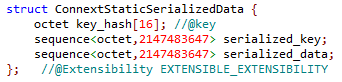
The most straightforward remedy is to suppress the automatic type‑code publication from ROS 2 participants. Add a USER_QOS_PROFILES.xml file to the directory that launches your ROS 2 nodes. A minimal configuration that hides the type code and disables type object sharing looks like this:
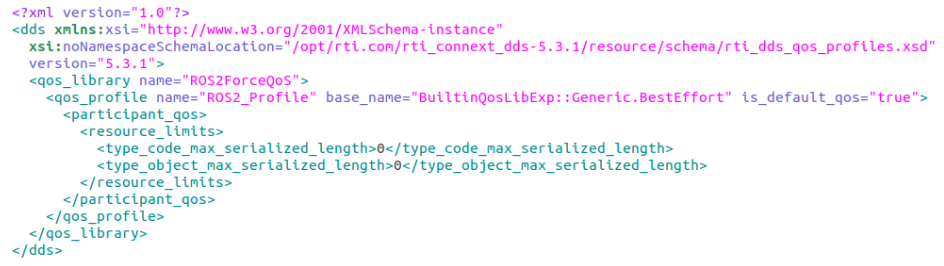
Feel free to adjust the reliability setting to suit your application; the example above uses “Best Effort” as a starting point.
Remember that this QoS file applies only to ROS 2 nodes started from the same directory. If you need isolated configurations, place a dedicated USER_QOS_PROFILES.xml next to each node’s launch folder.
Transport Selection
When a DDS system and a ROS 2 system share the same network, warnings about missing or unsupported transports (e.g., udpv6 not available on a participant that only supports udpv4) can appear. To avoid such warnings and ensure reliable connectivity, configure transport preferences explicitly.
- Define the allowed transports in
USER_QOS_PROFILES.xmlby adding a<transport_builtin>mask inside<participant_qos>:
<participant_qos>
  <transport_builtin>
    <mask>UDPV4|SHMEM</mask>
  </transport_builtin>
</participant_qos>
- Create an
NDDS_DISCOVERY_PEERSfile in the launch directory and list the peer addresses you wish to discover. A comma‑separated example that disables multicast discovery is:
localhost,192.168.1.12,shmem://
Choosing the RMW Layer in ROS 2
Always set the RMW_IMPLEMENTATION environment variable to rmw_connext_cpp before starting ROS 2 nodes:
export RMW_IMPLEMENTATION=rmw_connext_cpp
Or pass it inline when launching a node:
RMW_IMPLEMENTATION=rmw_connext_cpp ros2 run demo_nodes_cpp talker
Unbounded Sequences & Strings
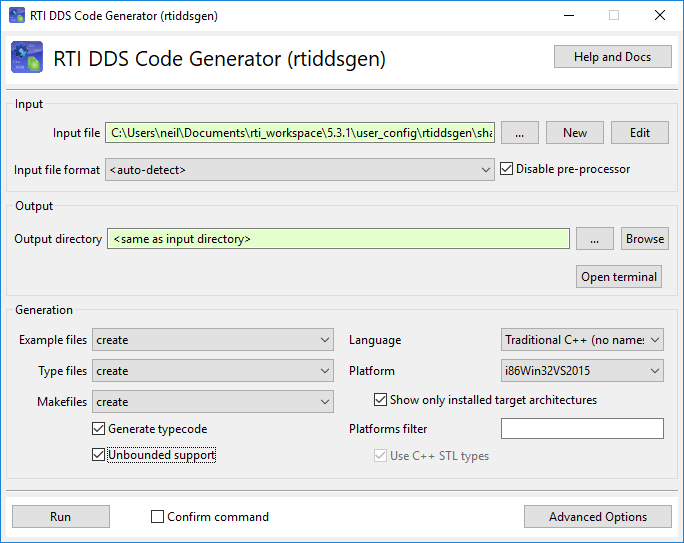
Some ROS 2 topics contain unbounded sequences or strings. If your DDS application needs to consume or publish these topics, enable “Unbounded Support” in the DDS code generator. Refer to the RTI documentation for how to toggle this option during code generation.
Next Steps with RTI
We’ll cover a temporary gap in the current ROS 2 feature set—record and replay of topic data—in the next installment of this series. In the meantime, if you’re ready to deploy a robust, DDS‑backed ROS 2 solution, reach out to our RTI experts. We’ll help you fine‑tune your configuration and accelerate time‑to‑market.
Internet of Things Technology
- OpenDDS vs. RTI Connext DDS: Choosing the Right Data Distribution Service Solution
- Replaying ROS2 LiDAR Data with RTI Recording Service and DDS
- ROS2 Bouncy Bolson Adds Free RTI Connext DDS: Boosting Connectivity & Diagnostics
- RTI Connext DDS Secure: A Deep Dive into Advanced IoT Security
- Connext DDS on Android: Empowering Industrial IoT with Reliable Publish/Subscribe
- Mastering Data Monetization: Strategies for Direct and Indirect Revenue
- The Ultimate Guide to Cellular SCADA and Telemetry
- Nanoparticle Toxicity in Biomedicine: Reactive Oxygen Species Impact
- Mastering Field Service Management: An Expert’s Blueprint for Success
- Expert Heavy Machinery Field Service & On‑Site Repairs – Get Back to Work Faster