



Understanding Image Sticking in LCDs: Causes, Tests, and Fixes
LCD (liquid crystal display) is the most widely used display technology. They are used for automotive, appliance, telecommunication, home appliance, industrial, consumer electronic, military etc. But LCD displays have some drawbacks, such as slow response, narrow viewing angle, lower contrast etc. One annoying phenomenon often complained about by users is image sticking.
What is Image Sticking
If a fixed image remains on a display for a long period of time, the faint outline of that image will persist on the screen for some time before it finally disappears. Normally, it happens to LCD and plasma screens, but for the purpose of our discussion, we will focus on TFT LCD displays. Image sticking is also referred to as “image persistence”, “image retention”, “ghosting” or “burn-in image.”
How Are LCDs Constructed?
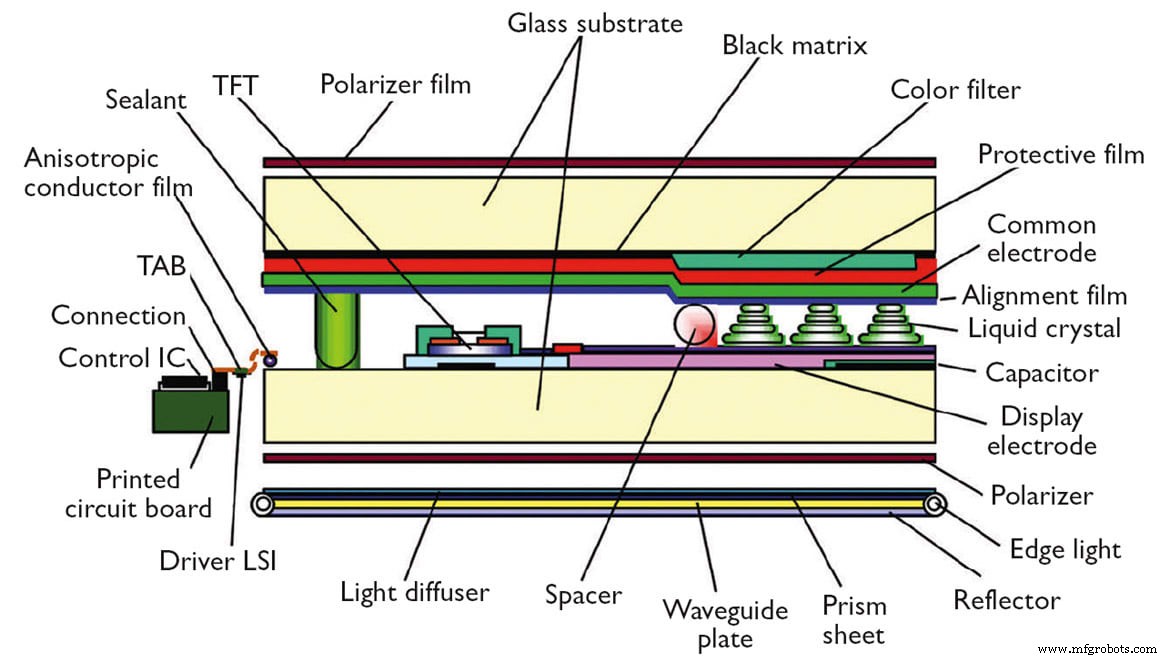
To understand better the concept of image sticking, it is necessary to understand how LCDs are constructed and how they work.
An LCD screen includes a thin layer of liquid crystal material sandwiched between two electrodes on glass substrates, with two polarizers on each side. A polarizer is an optical filter that lets light waves of a specific polarization pass through while blocking light waves of other polarizations. The electrodes need to be transparent so the most popular material is ITO (indium tin oxide). Since an LCD can’t emit light itself, normally a backlight is placed behind an LCD screen in order to be seen in a dark environment. The light sources used for a backlight can be LED (light emitting diode) or CCFL (cold cathode fluorescent lamps). The LED backlight is the most popular. Of course, if you want a color display, a layer of RGB color filter can be made into an LCD cell. A touch panel can also be added in front of an LCD display.
How LCDs Work

The first LCD panel technology in mass production is called TN (twisted nematic). The principle behind the LCDs is that when an electrical field is not applied to the liquid crystal molecules, the molecules twist 90 degrees in the LCD cell. When the light either from ambient light or from the backlight passes through the first polarizer, the light is polarized and twisted with the liquid crystal molecular layer. When it reaches the second polarizer, it gets blocked. The viewer sees the display as black.

When an electric field is applied to the liquid crystal molecules, they become untwisted. When the polarized light reaches the layer of liquid crystal molecules, the light passes straight through without being twisted. When it reaches the second polarizer, it will also pass through, meaning the viewer sees the display as bright. Because LCD technology uses electric fields instead of electric current (electron passes through), it has low power consumption.
What Causes Image Sticking?
The cause of LCD image sticking is due to an accumulation of ionic impurities inside the liquid crystal materials. When slight DC voltage occurs, the charged impurities will move the electrodes and build up a reversed voltage field. When the power is removed, the reversed voltage will kick in to make the LCD molecules twisted different from the other part of the LCD, which shows up as the image sticking. The longer the time, the more impurities will migrate, the larger the reversed voltage will be, and the imaging sticking will appear worse.
How to Test Image Sticking Quality
Using the black/white chess board image shown above:
- Static image it for 2 hours, then change to 50% gray for 1 min. Use an 8% neutral density filter to check if it is OK.
- Static image it for 8 hours, power off for 30 minutes, then change to 50% gray with an 8% neutral density filter.
How to Avoid Image Sticking
Try not to use a “fixed” image on the TFT LCD display for more than 2 hours.
Use a screen saver when the LCD screen is not used for more than 15 minutes, or power down the display if not using it for more than an hour.
If a static image must be displayed, try to use block patterns instead of distinct border lines. Try to use medium gray hues and use colors that are symmetric to the middle grey level at the boundary of two different colors. Gradually shift the border lines once in a while.
For LCD manufacturers, try to protect liquid crystal materials exposed to the air by using nitrogen gas or dried air to avoid absorbing moisture that can create a huge amount of impurities in the liquid crystal material, as water is an excellent solvent. Controlling the humidity of the fab is also very important, as is selecting the right liquid crystal materials and their manufacturers. Different liquid crystal materials have different moisture absorbing abilities. Different liquid crystal material factories have different capabilities in terms of controlling impurities. Despite the fact that high purity can mean high in cost, using higher purity liquid crystal materials and designing the circuitry to get rid of DC in LCD display drivers can avoid an image sticking issue.
How to Fix an Image Sticking Issue
Unlike the “burn-in” issue common with CRTs, an image sticking issue is not permanent. It will eventually recover after some time. One way to expedite erasing a retained image is to have a screen on in an all-black pattern for 4-6 hours. If you want to make it even faster, the display can be put into an environment with a temperature of around 35 to 50°C for 1-2 hours. As this elevated temperature is within the working temperature range, it will not damage the LCD panels.
This article was written by Bill Cheung, Engineering Lead and Marketing Manager, Orient Display (Bellevue, WA). For more information, visit here .
Sensor
- Image Sensors: Types, Operation, and Practical Applications
- New Testing Solutions Strengthen IoT Security for Faster, Safer Deployments
- Why Modular & Scalable Software Solutions Drive Cost‑Effective Test & Measurement
- E3.series Software Trials: Commercial & Qualified Testing Guide
- Master Java 8: Expert Interview Questions & Answers
- Build Engaging LCD Animation & Gaming with Arduino UNO
- Overcoming Challenges in RF PCB Design: Proven Solutions for Reliable Performance
- Top 13 Challenges in Plastic Injection Molding and How to Resolve Them
- Common 3D Printing Issues & Expert Solutions
- Open vs. Closed 3D Printing Systems: Choosing the Right Solution