



Optimal Printing Temperatures & Speeds for PLA & ABS: A Beginner’s Guide
When a user of 3D printing is starting often arise doubts about what temperature to print the PLA or ABS, which are the two most common materials to get started in 3D printing.
Since most users know 3D printing, one of the main parameters that directly affects the finished parts made with 3D printers FDM is the print speed. So the faster print speed will get worse finish and the smaller the better finish. Therefore, the finish can claim to be directly proportional to the time of printing.
While it is true that there are exceptions to the previous rule, such as when making small parts and with layers of little area, since even reducing the speed of extrusion a lot, a good finish is not achieved or even the printing fails. In this type of situation, the piece you want must be printed and a copy or another copy, such as a tower, placed away from the important one so that the layer has time to solidify completely. For materials such as PLA, PETG, CPE 100, a layer fan can be used to help quickly solidify the layers. Another possible solution is to program stops between layers in the rolling software (Cura, Simplifiy3D, etc)
The relationship between printing speed and extrusion temperature
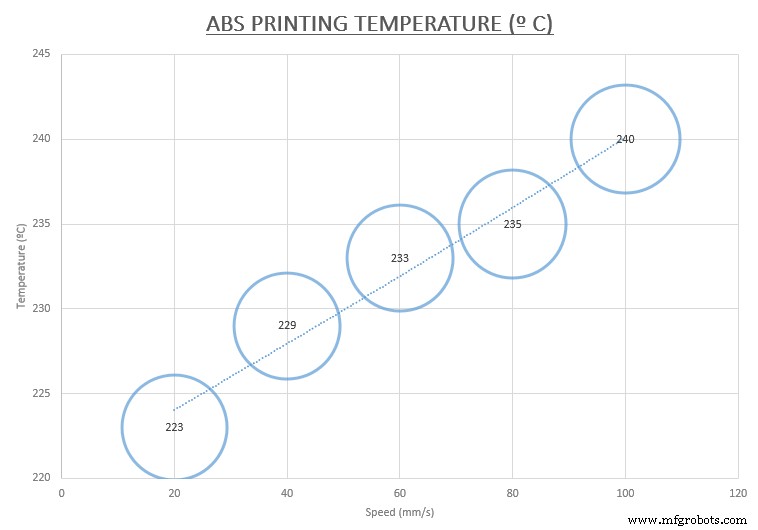
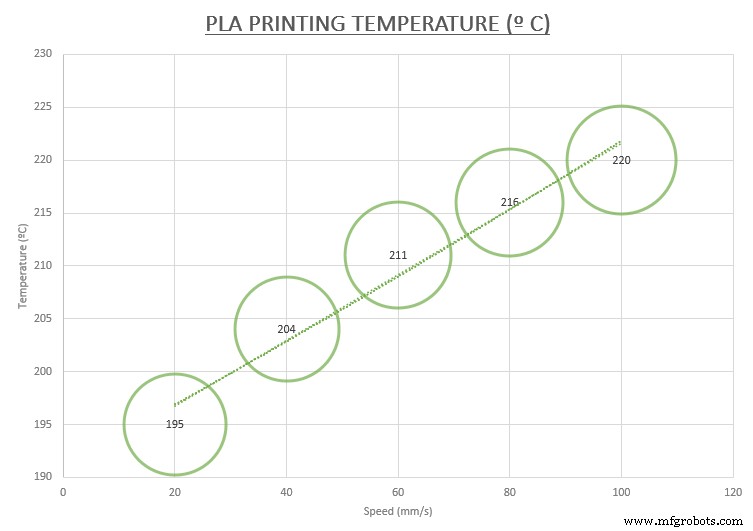
But also the print speed (measured in mm / s) affects the extrusion temperature due to the higher printing speed, higher extrusion temperature need.
To achieve the highest printing speed without requiring an increase in extrusion temperature, the original extruder of the 3D printer (v6 extruder) can be replaced by a extruder Volcano, which thanks to the heater cartbridge is in a position parallel to the flow of the filament it manages to melt more material and more efficiently with less energy consumption.
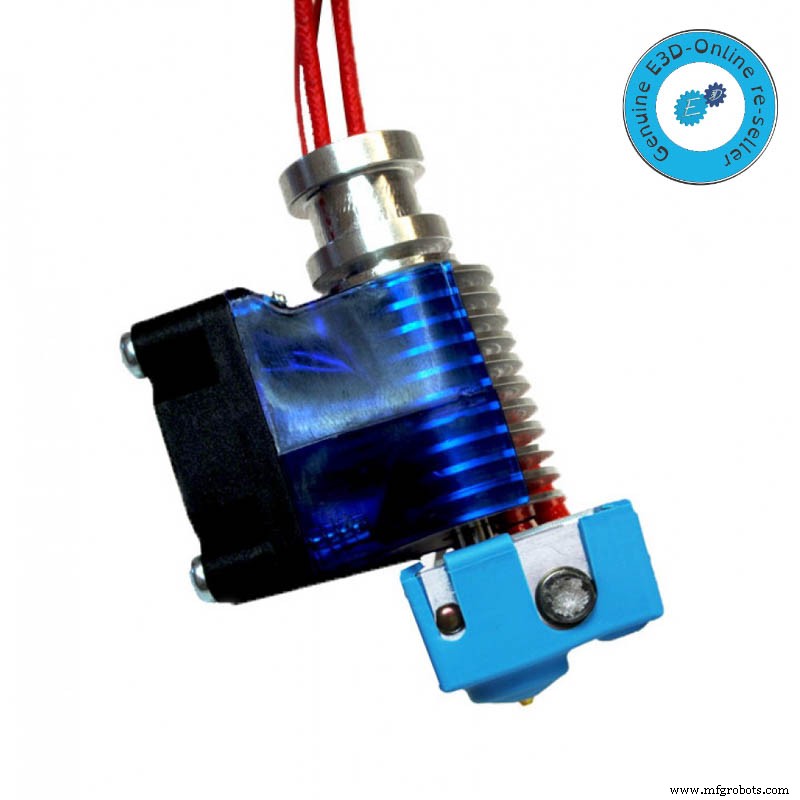
Image 1: HotEnd v6 Original. Source: E3D-Online
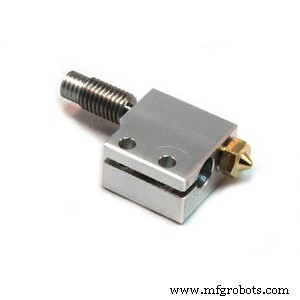
Image 2: HotEnd Volcano E3D Original. Source. E3D-Online
All manufacturers filaments provide a range of temperatures between what is optimal printing. Normally this ideal temperature should be adjusted by testing to get the best finish and adhesion, as it can vary significantly depending on whether we use for example extruder, since according to the position and status of the probe of actual temperature, this you can vary significantly.
Check our range of PLA filaments
 Basic PLA
 Filaments
 Smartfil PLA
 Filaments
 Premium PLA
 Filaments Special PLA
Filaments
Other factors that vary the extrusion temperature
There are other factors that affect the printing temperature and therefore we must take into account:
Diameter of the nozzle
Another aspect that can vary the extrusion temperature is the change in diameter of the nozzle. When going from a nozzle of 0.4 mm to another of 0.8 mm, we increase the area through which the material comes out and with this, more extrusion temperature is needed to heat the extra material that comes out compared to the nozzle of smaller diameter. To make the change of nozzle correctly visit our blog article about nozzles.
Filament type: material, color
ABS filament has a lower coefficient of friction than PLA which requires less force to be extruded, so you need a higher printing temperature. If we are not able to find the optimum temperature will appear printing printing problems. For example, if the extrusion temperature is too low, the filament does not flow properly so it can be gaps between layers and even cause the layers to separate. If excessively increase the temperature further, the hollow plastic stop points on the workpiece.
One way to get the right temperature for a material is to perform printing tests at different temperatures. In our article of Tips for before a 3D printing you can see how to make this process and many other very interesting ones.
Also keep in mind that if the color is darker strand need more extrusion temperature due to the filament coloring additives themselves. Depending on the color of the filament can vary the temperature to 5 °C at the same speed printing (both upwards and downwards).
Certain materials undergo changes of hue with the variation of temperature. The wood filaments vary the color from lighter (lower temperature) to darker (higher temperature) getting pieces with really surprising decorations.
In the graphic you can see the trend of how the extrusion temperature depending on the print speed will vary but this is not the “absolute truth” because as mentioned may vary depending on many parameters.
Other factors to take into account to achieve a good 3D impression
Finally, remember that not only the temperature of the extruder and the base influences the printing, but also the temperature that surrounds the printer also affects it. In closed 3D printers, the temperature can be kept stable by preheating the base, or can even be chosen depending on the type of material to be used, as in the 3NTR A4.
Controlling the temperature of the environment in this way, allows to make large pieces with materials such as ABS without having problems of warping and cracking.
It is also recommended to control both the interior temperature, avoiding exceeding 28 ºC, and the air currents where the 3D printer, to always obtain high quality 3D prints without errors.
Article published on 11/18/2015 and updated on 08/27/2018.
3D printing
- Top 6 FAQs About 3D Printing: Expert Answers from CADimensions
- Open‑Source 3D Printing: Empowering Innovation Through Shared Designs
- Expert Answers to Your Top 3D Printing Questions
- PLA vs. ABS in 3D Printing: Key Differences and When to Use Each
- PLA Heat Resistance Explained: Comparing ABS, ASA, PETG and Other 3D Printing Materials
- Optimal 3D Printing: Mastering Speed and Temperature Settings
- Optimal Heated Bed Temperatures for PLA and ABS 3D Printing
- Accelerate 3D Printing: Faster Prints Without Compromising Quality
- PLA vs ABS: Key 3D Printing Differences You Must Know
- Key Insights into Electronic Speed Controllers and Their Applications