



Snapmaker 2.0: The Ultimate All-In-One 3D Printer, CNC Machine, and Laser Engraver
Without a doubt, the launch of Snapmaker 2.0 is giving a lot to talk about. At first glance, this machine may seem like an ordinary 3D printer, but it contains 3 of the most sought-after functionalities for creatives, makers, teaching centres or small design or architecture studios:
- FDM 3D printing.
- CNC machining.
- Laser cutting and engraving.
Snapmaker 2.0 is the improved and advanced version of Snapmaker Original, a project born in the cradle of Kickstarter in 2017 and that had a great impact and a great success among users. Without a doubt, having immediate access to a 3D printer, a CNC machining machine and a laser engraving and cutting machine by simply changing a few parts is incredible and offers unlimited creation possibilities.
Video 1: Snapmaker 2.0 presentation. Source: Snapmaker.
Snapmaker 2.0 - 3 in 1 is a multifunctional desktop 3D printer that can fit into any workspace. The manufacturing technologies it houses are completely different, so they can complement each other.
While FDM 3D printing is an additive manufacturing technology in which a plastic material is added layer by layer, CNC machining would be the antithesis, as it starts from a solid part and carves it until the desired result is achieved.
FDM 3D printing materials always start with a base polymer, although this may be added with other materials or fibres, even achieving finishes similar to wood or stone, as is the case with PLA Easy Wood or PLA Stonefil filaments.
CNC machining opens up the possibility of working with materials such as hardwood, PCB, acrylic, POM, carbon fibre sheet and many other materials, making it possible to obtain solid parts with a professional finish and great repeatability. In the following video you can see a project carried out using CNC machining of a carbon fibre sheet:
Video 2: CNC cutting of carbon fibre sheet for drone. Source: Snapmaker.
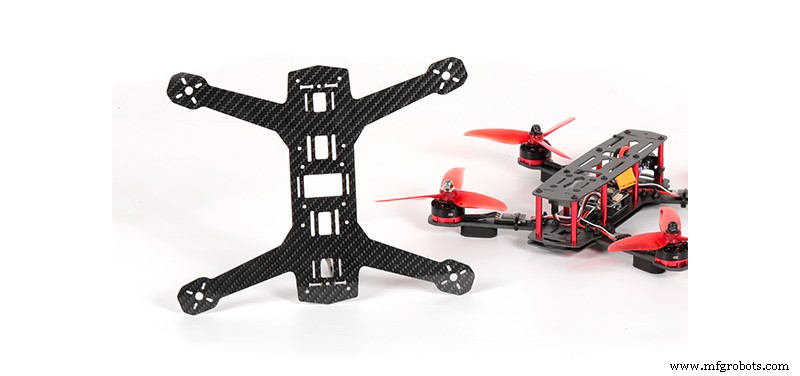
Image 2: Drone made with Snapmaker 2.0. Source: Snapmaker.
Finally, Snapmaker 2.0 - 3 in 1 includes the possibility to turn the machine into a professional quality laser cutter and engraver. This mode allows cutting and engraving of a wide range of materials such as plywood, leather, acrylic, cardboard, paper, fabric and even foodstuffs such as biscuits and coconuts.
Below you can see two projects combining 3D printing and laser cutting and engraving:
Video 3: How to make illuminated letters with Snapmaker 2.0. Source: Snapmaker.
Video 4: How to make a lamp with laser cutting and 3D printing. Source: Snapmaker.
Snapmaker 2.0 comes in 3 formats with different dimensions to suit the needs of each user: A150, A250 and A350.
Without a doubt, a machine as versatile as Snapmaker 2.0 increases the production power and expands the user's field of work by being able to complement 3D printed parts with cut, laser engraved or CNC machined parts. This not only saves time and space, but also saves manufacturing costs, allowing the manufacturing process to be carried out from start to finish without requiring the services of third parties.
Moreover, because of its ease of use and potential applications, Snapmaker 2.0 is ideal for schools, allowing children and teenagers to reinforce STEAM (Science, Technology, Engineering, Art and Mathematics) skills through a hands-on learning experience, improving problem-solving skills and fostering creativity.
3D printing
- Your Comprehensive Predictive Maintenance Checklist: Boost Efficiency, Cut Downtime & Drive ROI
- Industrial IoT: A Practical Guide to Successful Implementation
- The Three‑Barrier Solution: Enhancing Bearing Longevity in Harsh Environments
- AIaaS Demystified: The Definitive Guide to AI as a Service
- Master Maintenance Management: Boost Efficiency & Cut Costs
- The Ultimate 3D Printing Glossary: All Key Terms Explained
- Ultimate 3D Printer Maintenance Checklist: Keep Your Printer Running Smoothly
- Mastering LED Drivers: A Comprehensive Guide to Efficient Lighting
- AC-DC Converters: Your Reliable Source for Consistent DC Power
- Comprehensive Guide to CNC Machining: Techniques, Applications & Best Practices