



Mintion Beagle V2 Camera Review: Pro‑Grade 3D Printing Timelapse & Remote Monitoring
The Mintion Beagle V2 Camera builds on the success of its predecessor, delivering a suite of upgrades that cater to both novice hobbyists and seasoned professionals. With 1080p video, dual‑band Wi‑Fi, and an intuitive app interface, it streamlines the monitoring and control of 3D prints.
Key Features at a Glance
- Manual focus with adjustable lens
- Dual‑band 2.4/5 GHz Wi‑Fi connectivity
- Plug‑and‑play USB installation
- Remote control via BeaglePrint app or browser
- Four dedicated timelapse modes
- Color night‑vision support
- 1 GB RAM for smooth multitasking
- Broad Marlin firmware compatibility
- Included compact tripod
- Redesigned, lightweight chassis
Manual Focus for Sharp Detail
The adjustable lens lets you fine‑tune focus on the print surface, ensuring that every layer is captured crisply in 1080p resolution. Digital zoom adds a layer of inspection, making it easier to spot defects before they compromise the build.
Dual‑Band Wi‑Fi for Reliable Streaming
Unlike the original Beagle, the V2 operates on both 2.4 GHz and 5 GHz bands. This flexibility reduces congestion, delivers higher throughput, and keeps your remote feed uninterrupted even in a busy network environment.
Easy Setup & Intuitive Use
Unboxing is straightforward: plug the power cable, connect the USB to your printer, and follow the on‑screen QR‑code prompts. No firmware tweaks or printer disassembly are required, making the camera ready for action within minutes.
Remote Control & Monitoring
From any device—phone, tablet, or desktop—you can view live footage, track layer progress, monitor bed and hot‑end temperatures, and receive push notifications when a print finishes. The app also allows direct G‑code uploads and real‑time printer adjustments.
Four Timelapse Modes for Every Need
- Clean Timelapse – pauses after each layer, moves the hot‑end out of frame, and captures a clear image of the model.
- Normal Timelapse – records each layer without moving the hot‑end, showing the extruder in motion.
- Beagle UV Timelapse – designed for resin printers, triggers on UV sensor input.
- Timer Timelapse – independent of the printer, useful for outdoor or non‑3D‑print scenes.
Color Night Vision
Beyond black‑and‑white night mode, the V2 offers low‑light color capture by concentrating directed LEDs on the print area, enabling vivid monitoring without excessive lighting.
Upgraded Memory for Smooth Operation
With 1 GB of RAM (up from 512 MB), the camera handles simultaneous tasks—multiple printer feeds, live analytics, and continuous recording—without lag.
Wider Compatibility & Firmware Updates
The camera supports the majority of Marlin‑based printers and slicers. Mintion releases firmware updates roughly every two weeks, patching bugs and expanding printer compatibility automatically.
Refined Design & Included Tripod
The new chassis is slimmer and more ergonomic, while the built‑in tripod ensures steady, vibration‑free footage, whether mounted on the printer or positioned elsewhere.
Specifications
- Resolution: 1080p
- Compression: H.264/MJPEG
- Auto‑timelapse: Yes
- Frame rate: Up to 25 fps
- Chipset: V300
- RAM: 1 GB
- RJ45 extension: Yes
- Night vision: Yes
- Wi‑Fi: 2.4/5 GHz
- Compatibility: Marlin printers & slicers
- Control: App & browser
- Printer connection: USB
- Storage: 32 GB micro‑SD
- Supported files: G‑code
- Temperature monitoring: Yes
- Power: 5 V 1 A DC
- Dimensions: 18 × 9.5 × 16.5 cm
- Weight: 500 g
Pros
- Fast, plug‑and‑play setup
- Full remote control from any location
- Broad printer compatibility
- 1 GB RAM for multitasking
- Tripod included for stable shots
- Manual focus for precise framing
- Dual‑band Wi‑Fi for reliable streaming
Cons
- No power‑loss recovery during printing
- Premium price point relative to basic models
- Firmware updates occasionally contain bugs
- Cannot remotely power‑off the camera
What Users Are Saying
Many reviewers praise the Beagle V2’s reliability and ease of use. One user noted a significant performance improvement over his previous camera and recommended it for anyone needing robust remote monitoring. Another highlighted the quick 20‑minute setup and high‑quality timelapse output, while acknowledging occasional firmware hiccups that were resolved with support.
For a visual walkthrough, check out Ricky Impey’s review video linked below.
Unboxing & Assembly
The package arrives in a compact box weighing 500 g, containing:
- Beagle V2 camera
- Power cable & adapter
- Tripod
- Micro‑SD card
- USB cable for printer connection
- Operating manual & stickers
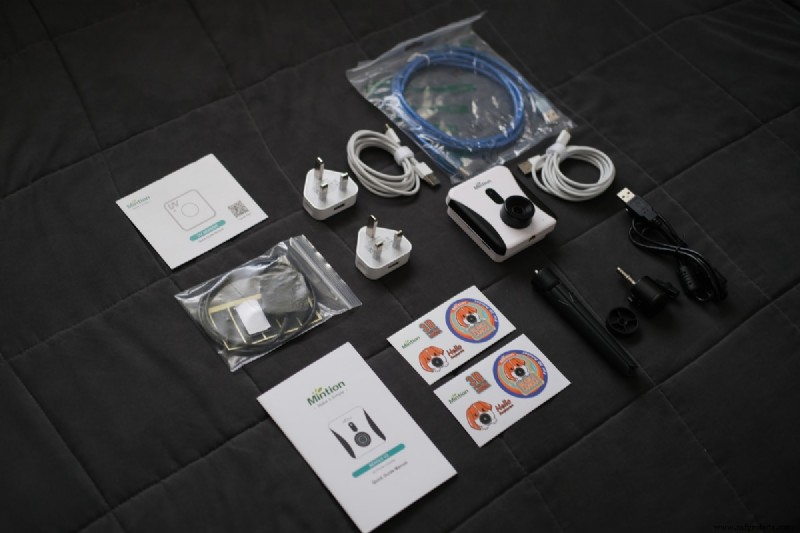
The camera’s reset button is conveniently located on the side, eliminating the need for a separate reset pin. Follow the step‑by‑step instructions below to connect Wi‑Fi and the printer.
Setup Checklist
- Connect the power cable; wait for the voice prompt indicating readiness.
- Scan the QR code in the manual with your smartphone to download the BeaglePrint app.
- Create a user profile in the app.
- Use the “Add device” button and select “QR scan connection.”
- Confirm the voice notification that the camera is ready.
- Enter your Wi‑Fi SSID and password; choose either 2.4 GHz or 5 GHz.
- When the QR code appears on screen, position the camera in front of your phone and wait for the beep.
- Confirm you heard the beep and proceed.
- After a moment, you’ll hear “Successfully connected to Wi‑Fi.”
- Attach the USB cable to your 3D printer.
Mount the camera on the included tripod, adjust the lens, and position it for optimal framing. You’re now ready to capture high‑quality timelapse footage and monitor prints in real time.
For a deeper dive, watch Mintion’s official setup guide video.
Verdict
The Mintion Beagle V2 Camera is a standout accessory for any 3D printing setup. Its blend of professional‑grade video, robust remote control, and user‑friendly design offers excellent value. Whether you’re a hobbyist or a seasoned printer operator, the Beagle V2 delivers reliable performance and creative flexibility that justify its price.
Purchase the Beagle V2 directly from Mintion’s official website for the latest firmware and customer support.

Michael Dwamena
Founder of 3D Printerly, author of 900+ articles, and owner of 20+ filament and resin printers.
3D printing
- How 3D Printing Reduces Manufacturing Costs: 6 Proven Strategies
- How to Select the Best 3D Printing Technology: FDM, SLA, and SLS Compared
- Reflecting on 2020: Resilience, Innovation, and Additive Manufacturing Milestones
- 3D Printing Plastic in Space – Made in Space’s Archinaut Breakthrough
- Revolutionizing Aerospace: Advanced 3D Printing Materials, Processes, and Classifications
- How to Achieve Vibrant Color in 3D Printing: Direct vs Post-Processing Methods
- Master ABS 3D Printing: Proven Settings for Superior Quality
- Leveraging 3D Printing Simulations for Superior Quality and Accuracy
- How Digital Inventory Enhances Additive Manufacturing: 4 Key Advantages
- Formnext 2018 Highlights: 10 Additive Manufacturing Technologies to Watch