



Choosing Between SOLIDWORKS and AutoCAD for Mechatronics Design
SOLIDWORKS
Originally founded in 1993 by Jon Hirschtick, an acclaimed member of the Massachusetts Institute of Technology (MIT) Blackjack team, SOLIDWORKS was launched in 1995 with the goal to provide an affordable, easy-to-use 3D modeling software that can be run on the (at the time) new Windows desktop. Purchased by Dassault Systems in 1997, SOLIDWORKS quickly saw revenues north of $100 million dollars and became a widely known software in the mechatronics industry (mechanics, robotics, electronics, and control systems).
Figure 1. Video used courtesy of SOLIDWORKS
SOLIDWORKS offers various applications that can be incorporated into an engineering project, such as the following.
- SOLIDWORKS 3D CAD: One of SOLIDWORKS’ most popular functions and a powerful tool for designing, developing, and manufacturing physical objects.
- SOLIDWORKS Product Data Management (PDM) and 3DExperience: Upgradable packages that connect users across a project by keeping and storing data in a centralized location, decreasing collaboration time, and increasing team effectiveness.
- SOLIDWORKS Electrical: Provides users with the option to design electrical schematics, and is supposedly the only software package that can be linked directly to the 3D mechanical environment.
- SOLIDWORKS Composer: Create instruction manuals, procedural guides, maintenance manuals, high-quality visualizations, interactive content, movies, and virtual reality environments.
- SOLIDWORKS Simulation: Allows users to test their designs under real-world conditions, reducing the need for continuous prototyping and redesign.
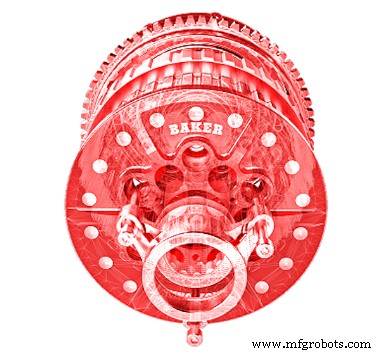
Figure 2. A 3D motor made in SOLIDWORKS 3D CAD. Image used courtesy of SOLIDWORKS
With a diverse set of features, Dassault Systems mainly targets product design (medical, machinery, consumer products, etc.), construction, aerospace, and automotive industries as consumers of their SOLIDWORKS software.
Product Design: Saving time and money continues to drive engineering teams to be faster, smarter, and more agile in their design projects. SOLIDWORKS 3D allows companies to ensure prototypes and parts are viable before development. Users can create full assemblies from all the individual parts of a project to prove that all fittings, parts, and constraints work together before a company spends a penny on costly manufacturing.
Construction: Implementing SOLIDWORKS’ photo-realistic visualization software gives construction and development companies the ability to create 3D mock-ups and renderings that can be explored in virtual reality and provide a visual concept that would normally be difficult to communicate with non-technical clients.
Aerospace/Automotive: Both the aerospace and automotive industries are characterized by high-grade complex components that would be very difficult to design without a 3D CAD platform. Engineers can use SOLIDWORKS to create these designs while meeting rigorous safety standards and performance metrics.
AutoCAD
Predating SOLIDWORKS and even Microsoft Windows, AutoCAD was initially developed in 1982 by John Walker and a group of 12 other programmers when they formed AutoDesk and began working on several CAD-related programs. AutoCAD was the first of these programs and was launched at the 1982 COMDEX trading show in Las Vegas. Within four years of launching, AutoCAD became the most widely used computer design application in the world and continues to hold the largest market share in that space today.

Figure 3. Highway on-ramp-and off-ramp design using AutoCAD. Image used courtesy of Autodesk
There are many additional packages that AutoDesk offers to enhance AutoCAD and expand the disciplines that AutoCAD can be applied to.
- Advance Steel: An AutoCAD platform focusing on steel structures and steel design, widely used in the structural field. It includes large libraries of beams, bolts, plates, and welds, with advanced tools for collision detection.
- AutoCAD Architecture: Provides a full AutoCAD foundation with specific capabilities for architecture work, such as built-in constraints for windows, walls, floors, and ceilings, allowing the user to draft full residential and commercial buildings from the ground up.
- AutoCAD MEP: A mechanical, electrical, and plumbing (MEP) platform that allows engineers to design HVAC, plumbing, and lighting systems for the interior of commercial and residential buildings.
- AutoCAD MAP 3D: Provides an easy-to-use package for GIS (geographic information system) mapping used for various scenarios and is mainly used by surveyors and civil engineers to bring in topographical information into AutoCAD construction projects.
- Autodesk Civil 3D: A package used for layering GIS, grading, roadways, and buildings. It is used primarily by civil engineers for roadway design and land development.
The Differences Between SOLIDWORKS and AutoCAD
Both programs can create similar deliverables and offer comparable features, but the overarching theme is that AutoCAD is best utilized for 2D and 3D drafting while SOLIDWORKS is more capable of designing and visualizing advanced 3D models. With limited 2D functionality, SOLIDWORKS primarily relies on parametric 3D designing, and AutoCAD focuses on 2D drafting with direct design.
The parametric or direct design describes the foundation of the design software. Parametric design relies on adding features and constraints to define an object, allowing an engineer to alter individual features or constraints and update the model automatically without re-creating the model.
Direct modeling allows for direct manipulation of the model’s geometry by pushing, pulling, and twisting. Direct modeling can be thought of as modeling with a block of clay.
Parametric designing is most convenient when the designer is developing an individual part or component of a system, and direct is better utilized when drafting, such as land grading or roadway design.
There are significant visual differences that should be considered when choosing between the two programs. SOLIDWORKS offers rendering abilities of parts, assemblies, and systems that are unmatched by AutoCAD. They continue to add new visual enhancements in their 2022 SOLIDWORKS release with a match camera feature. AutoCAD, on the other hand, offers more functionality in importing and exporting PDF designs, 2D construction plans, and floor plans for coordination and drafting.
Beyond the capabilities, the two programs have differences in their operating platform capabilities. AutoCAD can work on both Microsoft Windows and macOS, while SOLIDWORKS only runs on Microsoft Windows and requires virtual machines to run on any macOS system.
In short, if you are looking for a program to design 3D manufactured parts and assemblies, and hope to simulate them in real-world scenarios, then SOLIDWORKS is the better option. If you are looking to draft floor plans, construction documents, detail diagrams, and civil designs, then AutoCAD will most likely have the right packages for you.
Automation Control System
- Mastering C# For Loops: Syntax, Flow, and Practical Examples
- Mastering the C for Loop: Syntax, Mechanics, and Practical Examples
- Mastering For Loops in Verilog: Build Reusable Hardware Logic
- Unlock Advanced Simulation for SOLIDWORKS with 3DEXPERIENCE Works
- AutoCAD Explained: How It Works and Its Applications
- Ericsson's 5G Solutions Drive Manufacturing Digital Transformation
- SolidWorks for 3D Printing: What You Need to Know
- Automation Made Accessible: Boost Efficiency for All Manufacturers
- A Heartfelt Farewell: My 40-Year Journey in Publishing
- Are Manufacturers Ready for XR? A Guide to VR, AR, and MR.