



Mastering C# For Loops: Syntax, Flow, and Practical Examples
Mastering C# For Loops
Learn how to use the for loop in C#, understand its execution flow, and see practical examples that cover common use cases and edge scenarios.
What Is a For Loop?
A for loop repeats a block of code a specified number of times. It’s the most common way to iterate when the number of repetitions is known or can be calculated.
Syntax
for (initialization; condition; iterator) {
    // loop body
}
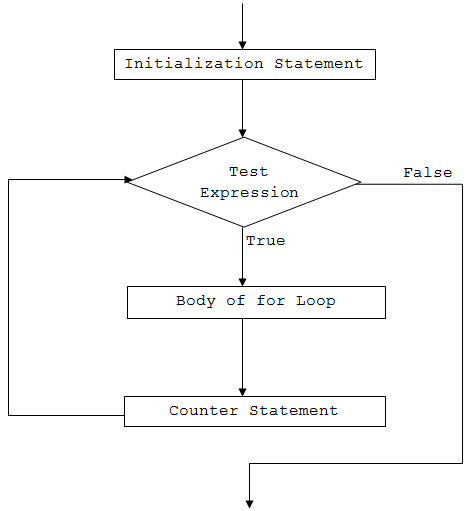
How It Executes
- The
initializationruns once, setting up loop variables. - Next, the
conditionis evaluated. If it’strue, the loop body runs. - After the body, the
iteratorexecutes, usually modifying the loop variable. - The
conditionis checked again; the cycle repeats until the condition becomesfalse. - If the condition is initially
false, the loop body never runs.
Execution Flow Diagram
Practical Examples
Example 1: Basic Iteration
using System;

class ForLoopDemo {
    static void Main() {
        for (int i = 1; i <= 5; i++) {
            Console.WriteLine($\"C# For Loop: Iteration {i}\");
        }
    }
}
Output:
C# For Loop: Iteration 1
C# For Loop: Iteration 2
C# For Loop: Iteration 3
C# For Loop: Iteration 4
C# For Loop: Iteration 5Example 2: Sum of First N Natural Numbers
using System;

class SumDemo {
    static void Main() {
        int n = 5, sum = 0;
        for (int i = 1; i <= n; i++) {
            sum += i;
        }
        Console.WriteLine($\"Sum of first {n} natural numbers = {sum}\");
    }
}
Output:
Sum of first 5 natural numbers = 15Example 3: Multiple Initialization and Iterator Expressions
using System;

class MultiExprDemo {
    static void Main() {
        for (int i = 0, j = 0; i + j <= 5; i++, j++) {
            Console.WriteLine($\"i = {i} and j = {j}\");
        }
    }
}
Output:
i = 0 and j = 0
i = 1 and j = 1
i = 2 and j = 2Omitting Parts of the Loop
All three parts of a for statement are optional. A for loop with missing pieces behaves like a while loop.
Example 4: No Initialization or Iterator
using System;

class OmitPartsDemo {
    static void Main() {
        int i = 1;
        for (; i <= 5; ) {
            Console.WriteLine($\"C# For Loop: Iteration {i}\");
            i++;
        }
    }
}
Output:
C# For Loop: Iteration 1
C# For Loop: Iteration 2
C# For Loop: Iteration 3
C# For Loop: Iteration 4
C# For Loop: Iteration 5Infinite For Loops
When the condition never becomes false, the loop runs forever.
Example 5: Explicit Infinite Loop
for (int i = 1; i > 0; i++) {
    Console.WriteLine($\"C# For Loop: Iteration {i}\");
}
Or the classic:
for (;;) {
    // endless loop
}
Key Takeaways
- The
forloop is ideal when the iteration count is known or calculable. - Proper placement of
initialization,condition, anditeratorensures correct execution. - Use multiple expressions when you need to manage more than one variable.
- Be cautious with infinite loops; always include a terminating condition.
Mastering C# While and Do‑While Loops: Syntax, Examples, and Best Practices
C# Break Statement: How & When to Use It
C Language
- C# foreach Loops: Iterate Arrays and Collections with Ease
- Master C++ For Loops: A Step-by-Step Guide
- Mastering the C for Loop: Syntax, Mechanics, and Practical Examples
- Mastering Python For Loops: Syntax, Examples, and Advanced Patterns
- Master Java For Loops: Syntax, Examples, and Best Practices
- C++ For Loops Explained: Syntax, Workflow, and Practical Examples
- Master C Loops: For, While, and Do‑While Explained with Practical Examples
- Java Program to Identify Armstrong Numbers Using For Loop
- Mastering For Loops in Verilog: Build Reusable Hardware Logic
- IoT for Predictive Maintenance: Proactive Strategies to Cut Downtime and Costs