



Mastering Python For Loops: Syntax, Examples, and Advanced Patterns
Python For Loops
Discover how to traverse lists, tuples, strings, and other iterables in Python with clear, step‑by‑step examples.
Video: Python for Loop
What Is a For Loop in Python?
A for loop iterates over an iterable—such as a list, tuple, or string—executing a block of code once per item.
Syntax of a For Loop
for val in sequence:
    # loop body
Here, val captures each element from sequence during the iteration.
The loop terminates automatically after the final element. Proper indentation separates the loop body from surrounding code.
Flowchart of a For Loop
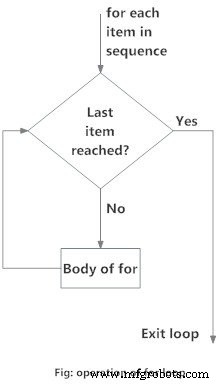
Example: Summing a List of Numbers
# Program to find the sum of all numbers stored in a list

# List of numbers
numbers = [6, 5, 3, 8, 4, 2, 5, 4, 11]

# variable to store the sum
sum = 0

# iterate over the list
for val in numbers:
    sum = sum + val

print("The sum is", sum)
When you run the program, the output will be:
The sum is 48
The range() Function
The range() function generates a sequence of numbers. range(10) produces 0 through 9.
It accepts optional start, stop, and step parameters: range(start, stop, step). If step is omitted, it defaults to 1.
Internally, range is lazy—it calculates each number on demand rather than storing all of them. This makes it memory‑efficient for large sequences.
To materialize the entire sequence, wrap it with list():
print(range(10))

print(list(range(10)))

print(list(range(2, 8)))

print(list(range(2, 20, 3)))
Output
range(0, 10)
[0, 1, 2, 3, 4, 5, 6, 7, 8, 9]
[2, 3, 4, 5, 6, 7]
[2, 5, 8, 11, 14, 17]
Using range() in a for loop is common for numeric iteration or when you need the index of each element:
# Program to iterate through a list using indexing

genre = ['pop', 'rock', 'jazz']

# iterate over the list using index
for i in range(len(genre)):
    print("I like", genre[i])
Output
I like pop
I like rock
I like jazz
For Loop with else
A for loop can include an optional else clause. The else block runs only if the loop completes normally (i.e., without hitting break).
Example:
digits = [0, 1, 5]

for i in digits:
    print(i)
else:
    print("No items left.")
Output:
0
1
5
No items left.
When combined with break, the else clause can signal that a search failed:
# Program to display a student's marks from a record
student_name = 'Soyuj'

marks = {'James': 90, 'Jules': 55, 'Arthur': 77}

for student in marks:
    if student == student_name:
        print(marks[student])
        break
else:
    print('No entry with that name found.')
Output
No entry with that name found.
Python
- Mastering C# For Loops: Syntax, Flow, and Practical Examples
- Master C++ For Loops: A Step-by-Step Guide
- Mastering the C for Loop: Syntax, Mechanics, and Practical Examples
- Mastering Python's While Loop: Syntax, Examples, and Best Practices
- Mastering Python Loop Control: break & continue
- Master Java For Loops: Syntax, Examples, and Best Practices
- Master Python Loops: For, While, Break, Continue, and Enumerate Explained
- Mastering Python's range() Function: From Basics to Advanced Use Cases
- Mastering For Loops in Verilog: Build Reusable Hardware Logic
- Master Python Loops: Control Flow & Repetition Techniques