



Mastering Python If…Else Statements
Mastering Python If…Else Statements
Discover how to use Python’s if, elif, and else statements to create clear, logical decision paths in your programs.
Video: Python if…else Statement
What Is an if…else Statement in Python?
Decision making is a core programming skill. In Python, the if…elif…else construct lets you execute code blocks only when specific conditions are met.
Python if Statement Syntax
if test_expression:
    statement(s)
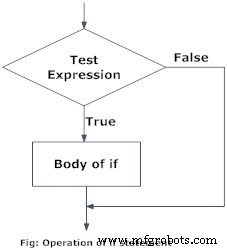
The interpreter evaluates test_expression. If it resolves to True, the indented block runs; otherwise it is skipped. Indentation defines the block’s boundaries.
Python treats any non‑zero value as True, while None and 0 are considered False.
Python if Statement Flowchart
Example: Simple if Statement
# If the number is positive, we print an appropriate message
num = 3
if num > 0:
    print(num, "is a positive number.")
print("This is always printed.")

num = -1
if num > 0:
    print(num, "is a positive number.")
print("This is also always printed.")
Running this program produces:
3 is a positive number
This is always printed
This is also always printed.
In the first block, num > 0 is True, so the message is printed. In the second block, the condition is False, so the print inside the if is skipped, but the final print still runs.
Python if…else Statement
Syntax of if…else
if test_expression:
    # code when True
else:
    # code when False
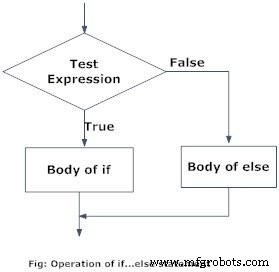
The else branch executes only when the if condition evaluates to False. Proper indentation keeps the blocks distinct.
Python if…else Flowchart
Example of if…else
# Determine whether a number is positive or negative
num = 3
# Try changing to -5 or 0 to see different outputs
if num >= 0:
    print("Positive or Zero")
else:
    print("Negative number")
Output
Positive or Zero
When num is 3, the if condition is true, so the first message is printed and the else block is skipped. Adjusting num to -5 or 0 flips the outcome accordingly.
Python if…elif…else Statement
Syntax of if…elif…else
if test_expression:
    # code for first condition
elif test_expression:
    # code for second condition
else:
    # code if all above are False
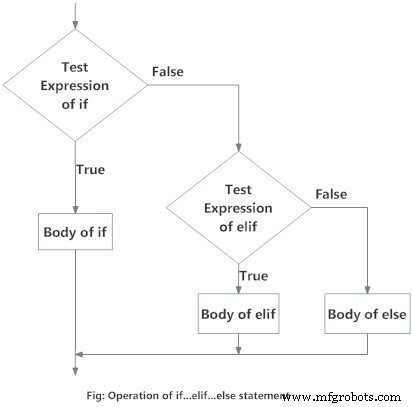
The elif keyword (short for “else if”) allows you to evaluate multiple, mutually exclusive conditions. Only the first block whose condition is true runs.
Flowchart of if…elif…else
Example of if…elif…else
'''Check if a number is positive, zero, or negative and display a message'''
num = 3.4
# Try changing to 0 or -4.5 to test other branches
if num > 0:
    print("Positive number")
elif num == 0:
    print("Zero")
else:
    print("Negative number")
Depending on the value of num, the corresponding message appears:
- Positive: Positive number
- Zero: Zero
- Negative: Negative number
Python Nested if Statements
You can place an if…elif…else block inside another. This nesting lets you create complex decision trees but can reduce readability, so use it judiciously.
Nested if Example
'''Prompt for a number and determine if it is positive, zero, or negative using nested ifs'''
num = float(input("Enter a number: "))
if num >= 0:
    if num == 0:
        print("Zero")
    else:
        print("Positive number")
else:
    print("Negative number")
Sample Runs
Enter a number: 5
Positive number
Enter a number: -1
Negative number
Enter a number: 0
Zero
These examples illustrate how Python’s indentation rules make nested logic straightforward while keeping the code readable.
Python
- Mastering Conditional Logic in C#: If, If‑Else, If‑ElseIf, and Nested If Statements
- Master C++ Conditional Statements: if, if...else, and Nested if...else Explained
- Mastering C Conditional Statements: If, Else, and More
- Python Statements, Indentation, and Comments: A Clear Guide
- Mastering the Python Pass Statement: A Practical Guide
- Mastering Java if…else: Control Flow Explained
- Python Print() Function: A Practical Guide with Examples
- Master Python Conditional Statements: IF, ELSE, ELIF, and Switch‑Like Logic
- Python Decision Making: Mastering Conditional Logic
- Master Python Loops: Control Flow & Repetition Techniques