



Mastering Conditional Logic in C#: If, If‑Else, If‑ElseIf, and Nested If Statements
Mastering Conditional Logic in C#: If, If‑Else, If‑ElseIf, and Nested If Statements
In this article, we will learn how to use if, if...else, if...else if statements in C# to control the flow of program execution.
Testing conditions is a core part of any programming language. In C#, conditional statements allow you to evaluate Boolean expressions and decide which blocks of code should run. These conditions are often driven by user input, system state, time, or other runtime factors.
C# if (If‑Then) Statement
The simplest form of conditional logic in C# is the if statement, which executes a block of code when its Boolean expression evaluates to true. The syntax is straightforward:
if (booleanExpression)
{
    // code executed when booleanExpression is true
}
- The
booleanExpressionmust return either true or false. - If it returns true, the statements inside the braces run.
- If it returns false, those statements are skipped.
Example:
if (number < 5)
{
    number += 5;
}
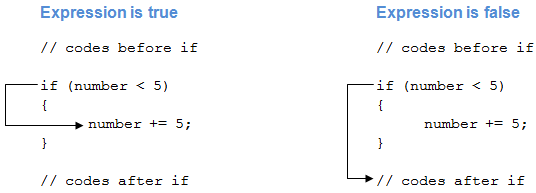
Here, number += 5; runs only when number is less than 5.
How an if statement works
Example 1: Basic if Statement
using System;

namespace Conditional
{
    class IfStatement
    {
        public static void Main(string[] args)
        {
            int number = 2;
            if (number < 5)
            {
                Console.WriteLine($"{number} is less than 5");
            }

            Console.WriteLine("This statement is always executed.");
        }
    }
}
Output:
2 is less than 5
This statement is always executed.
Changing number to 10 produces:
This statement is always executed.
Because number < 5 evaluates to false, the if block is skipped.
C# if...else (If‑Then‑Else) Statement
When you need to handle both outcomes of a Boolean test, add an else block:
if (booleanExpression)
{
    // executed when true
}
else
{
    // executed when false
}
Example:
if (number < 5)
{
    number += 5;
}
else
{
    number -= 5;
}
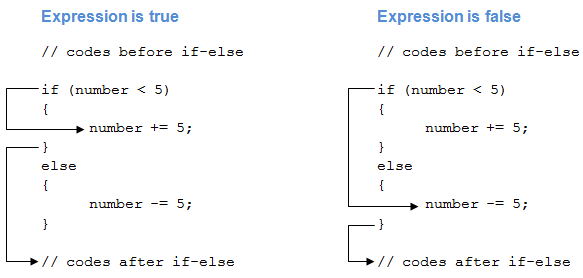
The first branch runs if number is less than 5; otherwise, the second branch runs.
How an if...else statement works
Example 2: Using if...else
using System;

namespace Conditional
{
    class IfElseStatement
    {
        public static void Main(string[] args)
        {
            int number = 12;

            if (number < 5)
            {
                Console.WriteLine($"{number} is less than 5");
            }
            else
            {
                Console.WriteLine($"{number} is greater than or equal to 5");
            }

            Console.WriteLine("This statement is always executed.");
        }
    }
}
Output when number is 12:
12 is greater than or equal to 5
This statement is always executed.
With number set to 2, the output becomes:
2 is less than 5
This statement is always executed.
For a concise alternative, the ternary operator can replace simple if...else constructs.
C# if...else if (If‑Then‑Else If) Statement
When multiple conditions need evaluation, chain else if clauses after the initial if:
if (condition1)
{
    // code for condition1
}
else if (condition2)
{
    // code for condition2
}
else if (condition3)
{
    // code for condition3
}
else
{
    // code if all conditions are false
}
The chain is evaluated top‑to‑bottom; execution stops at the first true condition. If none match, the else block runs.
Alternatively, a switch statement can handle discrete values more cleanly.
Example 3: Using if...else if
using System;

namespace Conditional
{
    class IfElseIfStatement
    {
        public static void Main(string[] args)
        {
            int number = 12;

            if (number < 5)
            {
                Console.WriteLine($"{number} is less than 5");
            }
            else if (number > 5)
            {
                Console.WriteLine($"{number} is greater than 5");
            }
            else
            {
                Console.WriteLine($"{number} is equal to 5");
            }
        }
    }
}
Output for number = 12:
12 is greater than 5
Changing number to 4 or 5 will adjust the output accordingly.
Nested if...else Statements
A nested if...else places one conditional block inside another, allowing multi‑level decision logic. The general pattern is:
if (outerCondition)
{
    if (innerCondition1)
    {
        // code when both outer and inner are true
    }
    else
    {
        // code when outer is true but inner is false
    }
}
else
{
    if (innerCondition2)
    {
        // code when outer is false but inner2 is true
    }
    else
    {
        // code when both outer and inner2 are false
    }
}
Nested conditions are handy for step‑by‑step checks, such as validating a series of user inputs or computing the maximum of multiple values.
Example 4: Finding the Largest of Three Numbers
using System;

namespace Conditional
{
    class Nested
    {
        public static void Main(string[] args)
        {
            int first = 7, second = -23, third = 13;
            if (first > second)
            {
                if (first > third)
                {
                    Console.WriteLine($"{first} is the largest");
                }
                else
                {
                    Console.WriteLine($"{third} is the largest");
                }
            }
            else
            {
                if (second > third)
                {
                    Console.WriteLine($"{second} is the largest");
                }
                else
                {
                    Console.WriteLine($"{third} is the largest");
                }
            }
        }
    }
}
Running the program yields:
13 is the largest
Adjust the input values to see how the logic adapts.
C Language
- Master C++ Conditional Statements: if, if...else, and Nested if...else Explained
- C++ While and Do‑While Loops – Mastering Repetition in Your Code
- Mastering C++ Continue Statement: Practical Examples & Loop Control
- Mastering C Conditional Statements: If, Else, and More
- Mastering C Control Flow: Break and Continue Statements Explained
- Mastering the C Goto Statement: Syntax, Practical Use, and Best Practices
- Python Statements, Indentation, and Comments: A Clear Guide
- Mastering Python If…Else Statements
- Mastering Java if…else: Control Flow Explained
- Mastering C Conditional Statements: IF, IF-ELSE, and Nested IF-ELSE Explained