



Mastering Java if…else: Control Flow Explained
Java if…else Statements
Master Java control flow with clear examples of if, if‑else, else‑if, and nested statements.
In programming, the if…else construct determines which block of code runs based on a Boolean test. It’s the foundation for making decisions in Java.
For instance, assigning letter grades from a numeric score:
- If the score is above 90, the grade is A
- If the score is above 75, the grade is B
- If the score is above 65, the grade is C
1. Java if (if‑then) Statement
The syntax of an if‑then statement is:
if (condition) {
    // statements
}
Here, condition is a Boolean expression, such as age >= 18.
- If condition evaluates to
true, the statements run. - If condition evaluates to
false, the statements are skipped.
How the if Statement Works
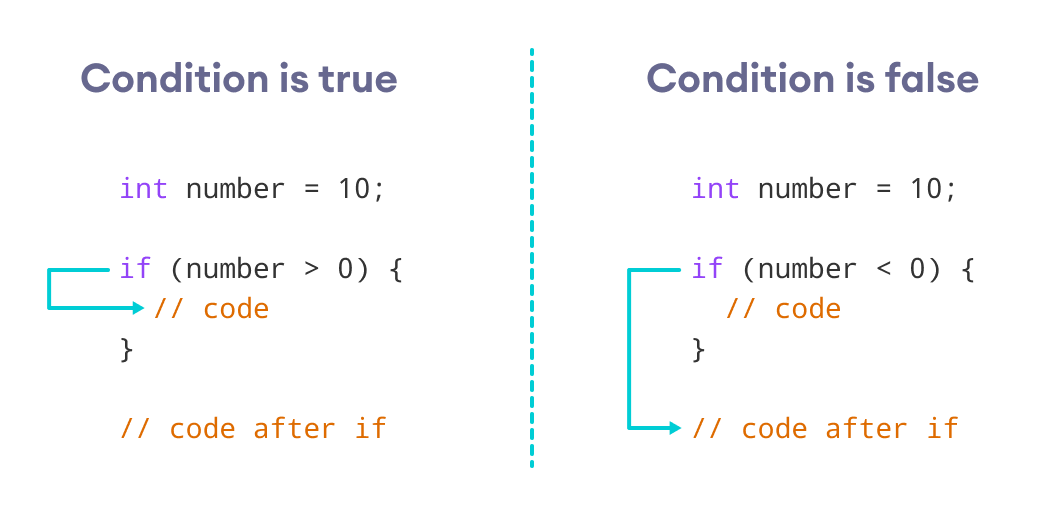
Example 1: Java if Statement
class IfStatement {
    public static void main(String[] args) {
        int number = 10;
        // check if number is negative
        if (number < 0) {
            System.out.println("The number is negative.");
        }
        System.out.println("Statement outside if block");
    }
}
Output
Statement outside if block
Because number < 0 is false, the code inside the if block is skipped.
Tip: Learn more about test conditions in Java Relational Operators and Java Logical Operators.
Java can also use String values in the test condition.
Example 2: Java if with String
class Main {
    public static void main(String[] args) {
        String language = "Java";
        if (language == "Java") {
            System.out.println("Best Programming Language");
        }
    }
}
Output
Best Programming Language
This example demonstrates comparing two strings inside an if block.
2. Java if…else (if‑then‑else) Statement
The if block executes when the test expression is true; otherwise, the optional else block runs.
The syntax is:
if (condition) {
    // code for true
} else {
    // code for false
}
This structure allows a single decision to branch into two distinct paths.
How the if…else Statement Works
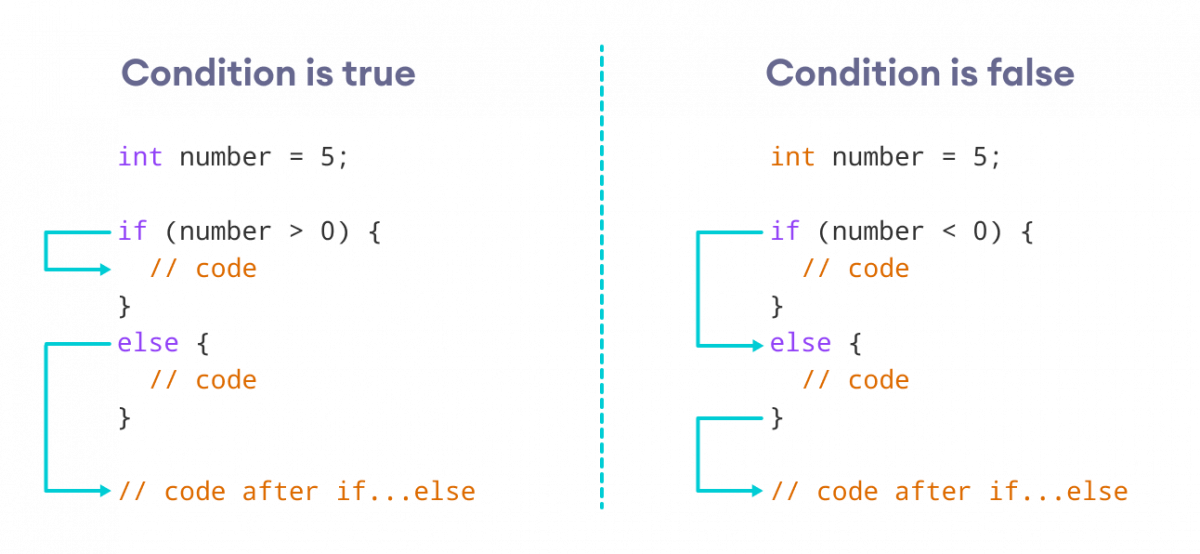
Example 3: Java if…else Statement
class Main {
    public static void main(String[] args) {
        int number = 10;
        if (number > 0) {
            System.out.println("The number is positive.");
        } else {
            System.out.println("The number is not positive.");
        }
        System.out.println("Statement outside if…else block");
    }
}
Output
The number is positive.
Statement outside if…else block
Changing number to -5 flips the outcome, demonstrating the else branch.
3. Java if…else…if Ladder
The if…else…if chain evaluates each condition in order, executing the first block whose condition is true. If none match, the final else runs.
if (condition1) {
    // code
} else if (condition2) {
    // code
} else if (condition3) {
    // code
} else {
    // default code
}
This pattern is ideal for multi‑way branching.
How the if…else…if Ladder Works
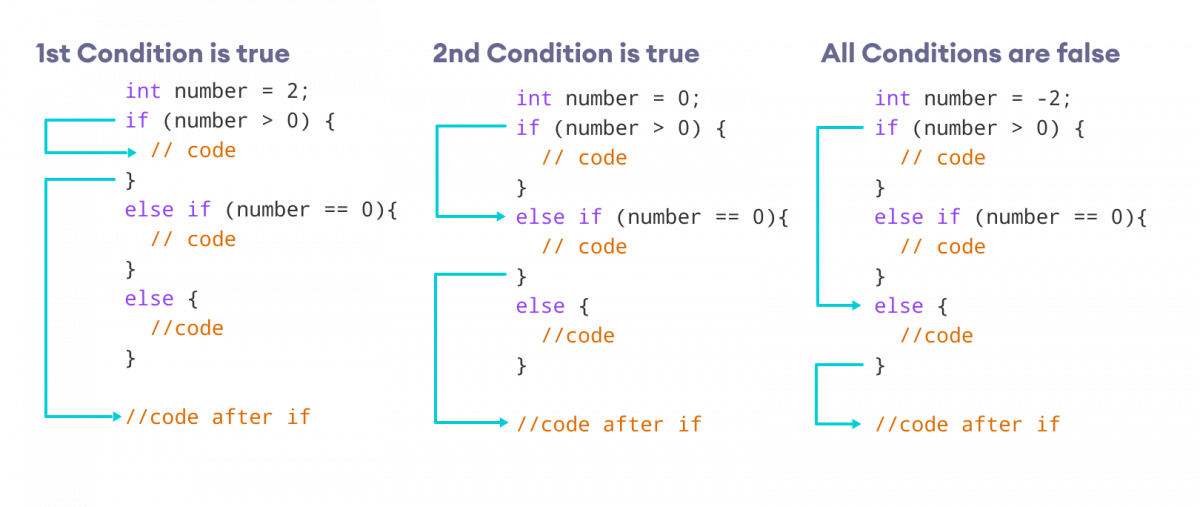
Example 4: Java if…else…if Statement
class Main {
    public static void main(String[] args) {
        int number = 0;
        if (number > 0) {
            System.out.println("The number is positive.");
        } else if (number < 0) {
            System.out.println("The number is negative.");
        } else {
            System.out.println("The number is 0.");
        }
    }
}
Output
The number is 0.
With number set to zero, both preceding conditions fail, so the else block executes.
Note: Java’s ternary operator offers a concise form of if…else…if; see Java Ternary Operator for details.
4. Nested if…else Statements
Nested if…else blocks allow hierarchical decision making, useful for comparing multiple values.
Example 5: Finding the Largest of Three Numbers
class Main {
    public static void main(String[] args) {
        Double n1 = -1.0, n2 = 4.5, n3 = -5.3, largest;
        if (n1 >= n2) {
            if (n1 >= n3) {
                largest = n1;
            } else {
                largest = n3;
            }
        } else {
            if (n2 >= n3) {
                largest = n2;
            } else {
                largest = n3;
            }
        }
        System.out.println("Largest Number: " + largest);
    }
}
Output
Largest Number: 4.5
In practice, the values often come from user input, files, or network sources rather than hard‑coded constants.
Java
- Mastering Conditional Logic in C#: If, If‑Else, If‑ElseIf, and Nested If Statements
- Mastering C Conditional Statements: If, Else, and More
- Mastering Python If…Else Statements
- Master Java Operators: Types, Syntax, & Practical Examples
- Mastering the Java Switch Statement: Syntax, Usage, and Best Practices
- Java Break Statement: How, When, and Labeled Breaks Explained
- Java Continue Statement – Mastering Loop Control with Examples
- Mastering Java's super Keyword: Advanced Usage & Practical Examples
- Mastering Java Loop Control: Efficient Repetition Techniques
- Java Decision-Making: Mastering Conditional Statements for Robust Programming