



Mastering Java Polymorphism: Concepts, Examples, and Best Practices
Java Polymorphism
Explore Java polymorphism through clear explanations and practical code examples, and understand how it enhances code flexibility and reusability.
Polymorphism—an essential pillar of object‑oriented programming—means a single entity can take on multiple forms.
That is, the same entity (method, operator, or object) can perform different operations depending on the context.
Example: Java Polymorphism
class Polygon {

  // method to render a shape
  public void render() {
    System.out.println("Rendering Polygon...");
  }
}

class Square extends Polygon {

  // renders Square
  public void render() {
    System.out.println("Rendering Square...");
  }
}

class Circle extends Polygon {

  // renders circle
  public void render() {
    System.out.println("Rendering Circle...");
  }
}

class Main {
  public static void main(String[] args) {

    // create an object of Square
    Square s1 = new Square();
    s1.render();

    // create an object of Circle
    Circle c1 = new Circle();
    c1.render();
  }
}
Output
Rendering Square...
Rendering Circle...
In the example above, we create a superclass: Polygon and two subclasses: Square and Circle. The render() method is inherited by both subclasses, but each overrides it to provide shape‑specific rendering logic.
The key takeaway is that render() behaves differently depending on the actual object type, which is the essence of polymorphism.
Why Polymorphism?
Polymorphism allows developers to write clean, consistent code. Instead of defining separate methods such as renderSquare() or renderCircle(), a single render() method adapts to each shape, reducing redundancy and improving maintainability.
While separate methods would work, they quickly lead to code duplication and a fragmented API. Polymorphism unifies behavior under a common contract, ensuring that any new shape can be integrated by simply overriding render().
Note: The print() method also demonstrates polymorphism—it can output char, int, String, and more without requiring multiple overloads.
We can achieve polymorphism in Java using the following techniques:
- Method Overriding
- Method Overloading
- Operator Overloading
Java Method Overriding
When a subclass defines a method with the same signature as a method in its superclass, the subclass method overrides the superclass method. This allows the same method name to perform different operations based on the object's runtime type.
Example 1: Polymorphism using method overriding
class Language {
  public void displayInfo() {
    System.out.println("Common English Language");
  }
}

class Java extends Language {
  @Override
  public void displayInfo() {
    System.out.println("Java Programming Language");
  }
}

class Main {
  public static void main(String[] args) {

    // create an object of Java class
    Java j1 = new Java();
    j1.displayInfo();

    // create an object of Language class
    Language l1 = new Language();
    l1.displayInfo();
  }
}Output:
Java Programming Language
Common English Language
Here, Language serves as the base class and Java as a subclass. The displayInfo() method is defined in both classes, but each implementation delivers context‑appropriate information.
The method that executes is determined at runtime, which is why this pattern is called runtime polymorphism.
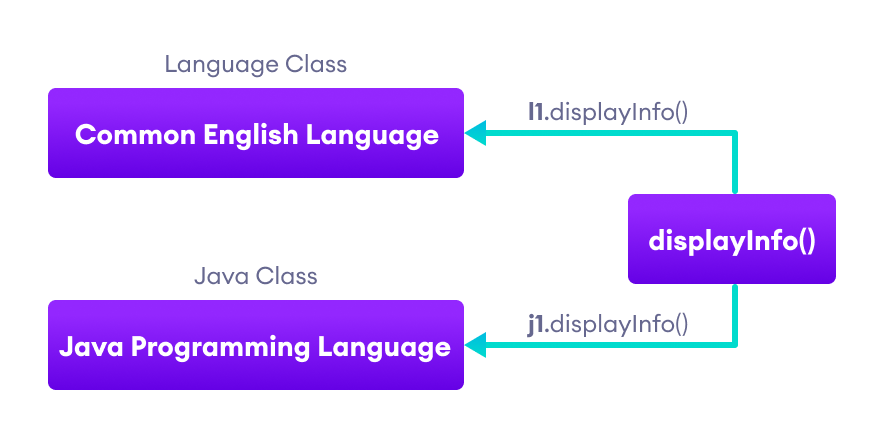
Note: The method that is called is determined during the execution of the program. Hence, method overriding is a run-time polymorphism.
2. Java Method Overloading
Method overloading allows a class to have multiple methods with the same name but different parameter lists. The compiler resolves which method to invoke based on the arguments supplied.
void func() { ... }
void func(int a) { ... }
float func(double a) { ... }
float func(int a, float b) { ... }
This technique enables the same logical operation to accept varied inputs.
Example 3: Polymorphism using method overloading
class Pattern {

  // method without parameter
  public void display() {
    for (int i = 0; i < 10; i++) {
      System.out.print("*");
    }
  }

  // method with single parameter
  public void display(char symbol) {
    for (int i = 0; i < 10; i++) {
      System.out.print(symbol);
    }
  }
}

class Main {
  public static void main(String[] args) {
    Pattern d1 = new Pattern();

    // call method without any argument
    d1.display();
    System.out.println("\n");

    // call method with a single argument
    d1.display('#');
  }
}Output:
**********

##########
In this example, the Pattern class contains two overloaded display() methods. The version without parameters prints ten asterisks, while the one accepting a char prints ten copies of the supplied symbol.
Because the compiler selects the method at compile time, this form of polymorphism is often referred to as compile‑time polymorphism.
Note: The method that is called is determined by the compiler. Hence, it is also known as compile-time polymorphism.
3. Java Operator Overloading
Java’s operators can exhibit different behaviors based on operand types. For example, the + operator performs numeric addition when used with numbers and string concatenation when used with strings.
+can add numbers or concatenate strings.- Logical and bitwise operators such as
&,|, and!also behave differently depending on operand types.
Below are illustrative snippets showing how + adapts to its operands.
1. With numbers:
int a = 5;
int b = 6;

// + with numbers
int sum = a + b;  // Output = 11
2. With strings:
String first = "Java ";
String second = "Programming";

// + with strings
String name = first + second;  // Output = Java Programming
Thus, + is overloaded in Java to perform both addition and concatenation.
Note: While languages like C++ allow user-defined operator overloading, Java restricts operator overloading to built‑in operators only.
Polymorphic Variables
A variable is considered polymorphic when it can refer to objects of different types during program execution. In Java, object references enable this behavior, allowing a reference of a base type to point to instances of subclasses.
Example: Polymorphic Variables
class ProgrammingLanguage {
  public void display() {
    System.out.println("I am Programming Language.");
  }
}

class Java extends ProgrammingLanguage {
  @Override
  public void display() {
    System.out.println("I am Object-Oriented Programming Language.");
  }
}

class Main {
  public static void main(String[] args) {

    // declare an object variable
    ProgrammingLanguage pl;

    // create object of ProgrammingLanguage
    pl = new ProgrammingLanguage();
    pl.display();

    // create object of Java class
    pl = new Java();
    pl.display();
  }
}Output:
I am Programming Language.
I am Object-Oriented Programming Language.
In this illustration, the reference pl is declared with the base type ProgrammingLanguage but is assigned objects of both the base class and its subclass. This demonstrates upcasting and runtime polymorphism.
Java
- Java Methods: How to Define, Call, and Use Them Effectively
- Java Recursion: Understanding, Examples, and Trade‑Offs
- Mastering Method Overriding in Java
- Java Annotation Types: A Comprehensive Guide to Predefined, Custom, and Meta Annotations
- Mastering Java's Iterator Interface: Practical Guide with Code Example
- Polymorphism in Java: A Comprehensive Guide with Practical Examples
- Mastering Java Methods: Create, Invoke, and Abstraction
- Java Method Overriding: Customizing Superclass Behavior
- Understanding Polymorphism in Java: Concepts and Practical Use
- Mastering Java 8: A Comprehensive Guide to Method References