



Mastering the Java Switch Statement: Syntax, Usage, and Best Practices
Java switch Statement
Discover how the Java switch statement directs program flow with clear examples and best practices.
The switch statement enables you to execute a single block of code from multiple alternatives based on the value of an expression.
The syntax of the switch statement in Java is:
switch (expression) {

  case value1:
    // code
    break;

  case value2:
    // code
    break;

  ...
  ...

  default:
    // default statements
  }
How does the switch-case statement work?
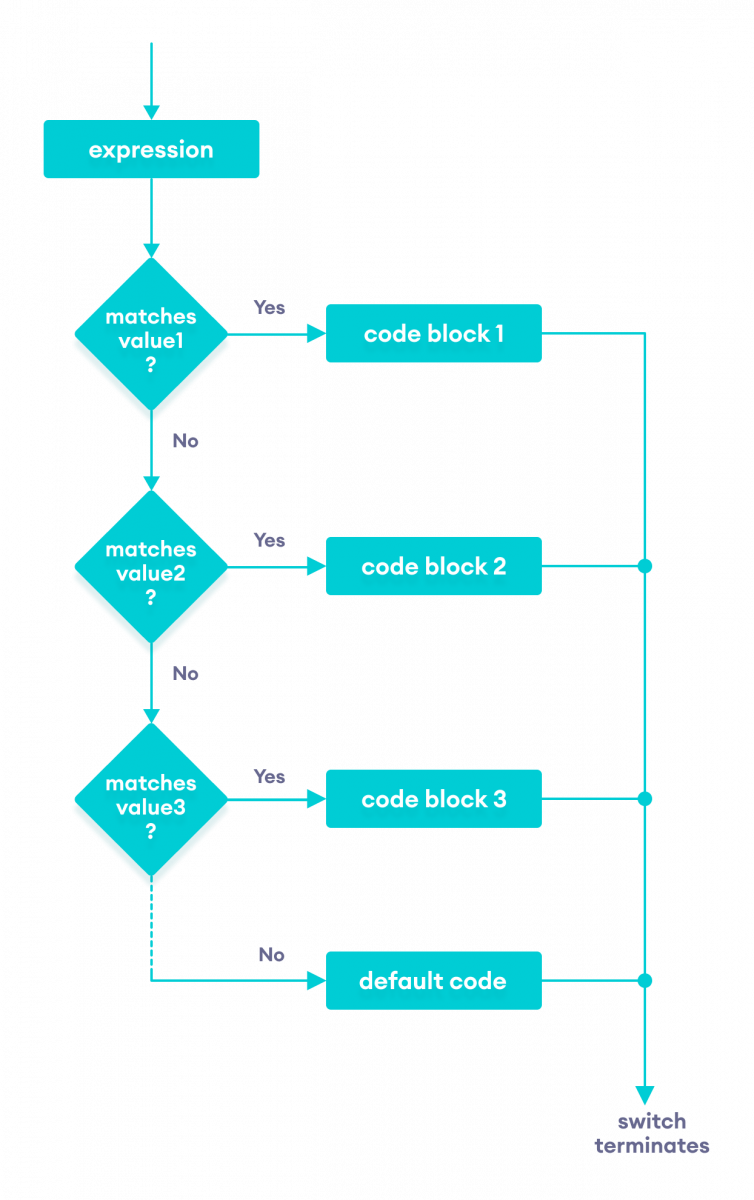
The expression is evaluated once and compared with the values of each case.
- If expression matches value1, the code inside
case value1runs. Similarly, if it matches value2, the corresponding block executes. - If no match is found, the default block runs.
Note: While functionally similar to an if…else ladder, switch offers a cleaner, more readable syntax.
Example: Java switch Statement
// Java Program to check the size
// using the switch...case statement

class Main {
  public static void main(String[] args) {

    int number = 44;
    String size;

    // switch statement to check size
    switch (number) {

      case 29:
        size = "Small";
        break;

      case 42:
        size = "Medium";
        break;

      // match the value of week
      case 44:
        size = "Large";
        break;

      case 48:
        size = "Extra Large";
        break;

      default:
        size = "Unknown";
        break;

    }
    System.out.println("Size: " + size);
  }
}
Output:
Size: Large
In the example above, the variable number is compared against each case. When number equals 44, the block for case 44 runs, assigning Large to size.
Here, the size variable receives the value Large and the program outputs Size: Large.
Recommended Reading: Create a Simple Calculator Using the Java switch Statement
Flowchart of switch Statement
Break statement in Java switch…case
Each case block typically ends with a break to prevent accidental fall‑through.
 ...
case 29:
  size = "Small";
  break;
...
Without break, execution continues into subsequent cases, even after a match. For instance:
class Main {
  public static void main(String[] args) {

    int expression = 2;

    // switch statement to check size
    switch (expression) {
      case 1:
        System.out.println("Case 1");

        // matching case
      case 2:
        System.out.println("Case 2");

      case 3:
        System.out.println("Case 3");

      default:
        System.out.println("Default case");
    }
  }
}
Output
Case 2
Case 3
Default case
Because break was omitted, after matching case 2 the program executed case 3 and the default block as well. Including break after each case guarantees that only the matching block runs.
To learn more, visit Java break Statement.
Default case in Java switch‑case
The default clause is optional and runs when none of the case values match. For example:
class Main {
  public static void main(String[] args) {
    int expression = 9;

    switch(expression) {

      case 2:
        System.out.println("Small Size");
        break;

      case 3:
        System.out.println("Large Size");
        break;

      // default case
      default:
        System.out.println("Unknown Size");
    }
  }
}
Output
Unknown Size
Since expression (9) did not match any case, the default block executed, printing Unknown Size.
Note: The Java switch statement supports the following types:
- Primitive data types: byte, short, char, and int
- Enumerated types (enums)
- String class
- Wrapper classes: Character, Byte, Short, and Integer
Java
- Mastering the C# Switch Statement: Syntax, Examples & Best Practices
- Mastering the C++ Switch‑Case Statement: Syntax, Workflow, and Practical Examples
- Mastering the C Switch Statement: Syntax, Flow, and Practical Example
- Mastering Java if…else: Control Flow Explained
- Java Break Statement: How, When, and Labeled Breaks Explained
- Java Continue Statement – Mastering Loop Control with Examples
- Understanding Switch‑Case in C: Syntax, Examples, and Best Practices
- Java Switch‑Case Statement Explained: Syntax, Examples, and Best Practices
- Understanding Verilog Case Statements: Efficient Multiplexer Implementation
- Mastering Java Loop Control: Efficient Repetition Techniques