



Mastering the C++ Switch‑Case Statement: Syntax, Workflow, and Practical Examples
Mastering the C++ Switch‑Case Statement
Explore the C++ switch‑case statement with clear syntax, step‑by‑step workflow, and a hands‑on calculator example that demonstrates real‑world usage.
The switch statement is a concise control‑flow tool that executes a single block from many alternatives based on an expression’s value.
The syntax of the switch statement in C++ is:
switch (expression)  {
    case constant1:
        // code to be executed if
        // expression is equal to constant1;
        break;

    case constant2:
        // code to be executed if
        // expression is equal to constant2;
        break;
        .
        .
        .
    default:
        // code to be executed if
        // expression doesn't match any constant
}
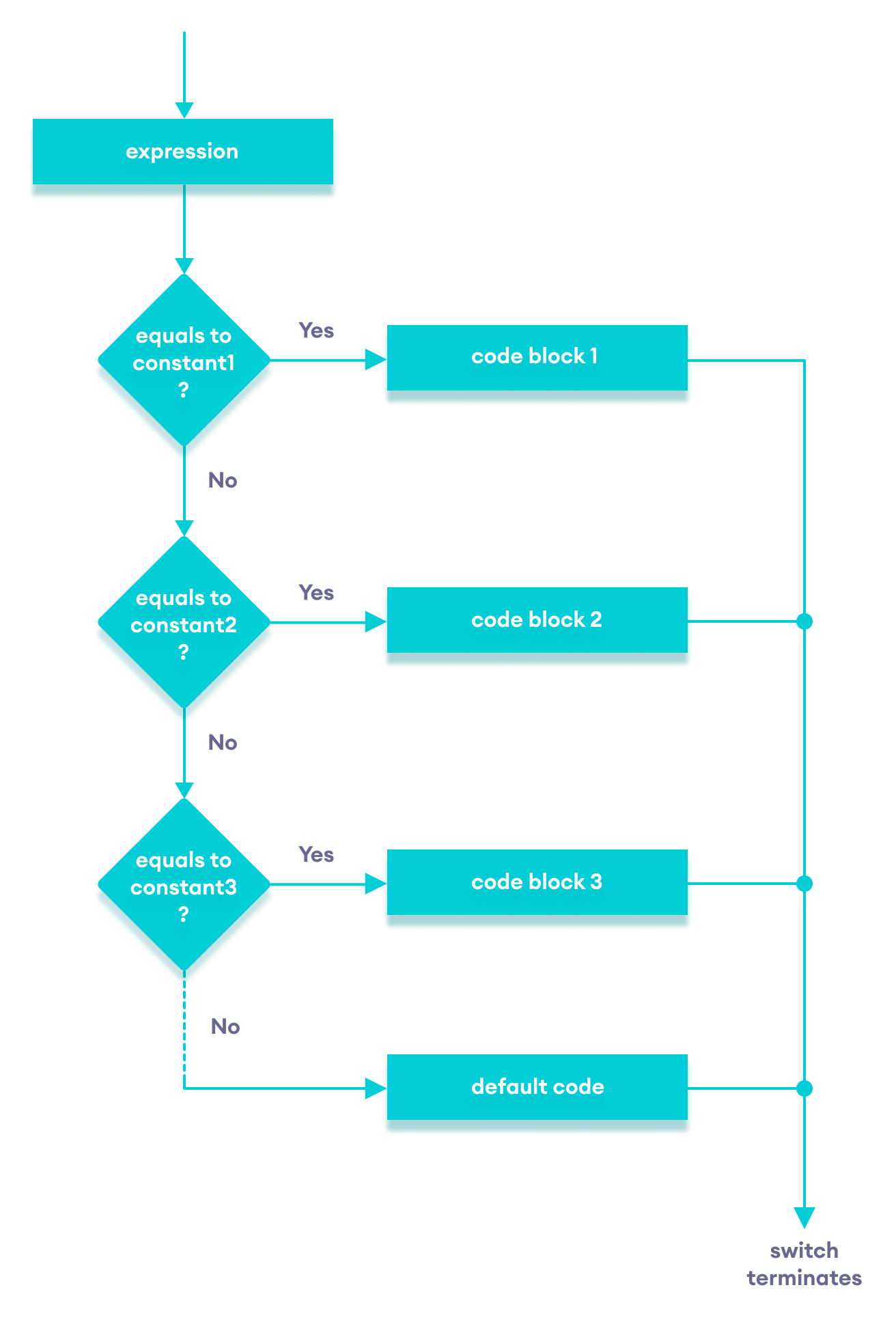
How does the switch statement work?
The expression is evaluated once and compared against each case label.
- If there is a match, the code following that label runs until a
breakis encountered. - If no match occurs, the
defaultblock runs.
Note: While an if…else if ladder can achieve the same result, the switch syntax is cleaner and easier to read.
Flowchart of Switch Statement
Example: Simple Calculator Using Switch
#include <iostream>
using namespace std;

int main() {
    char oper;
    float num1, num2;
    cout << "Enter an operator (+, -, *, /): ";
    cin >> oper;
    cout << "Enter two numbers: " << endl;
    cin >> num1 >> num2;

    switch (oper) {
        case '+':
            cout << num1 << " + " << num2 << " = " << num1 + num2;
            break;
        case '-':
            cout << num1 << " - " << num2 << " = " << num1 - num2;
            break;
        case '*':
            cout << num1 << " * " << num2 << " = " << num1 * num2;
            break;
        case '/':
            cout << num1 << " / " << num2 << " = " << num1 / num2;
            break;
        default:
            cout << "Error! The operator is not correct";
            break;
    }

    return 0;
}
Output 1
Enter an operator (+, -, *, /): +
Enter two numbers:
2.3
4.5
2.3 + 4.5 = 6.8
Output 2
Enter an operator (+, -, *, /): -
Enter two numbers:
2.3
4.5
2.3 - 4.5 = -2.2
Output 3
Enter an operator (+, -, *, /): *
Enter two numbers:
2.3
4.5
2.3 * 4.5 = 10.35
Output 4
Enter an operator (+, -, *, /): /
Enter two numbers:
2.3
4.5
2.3 / 4.5 = 0.511111
Output 5
Enter an operator (+, -, *, /): ?
Enter two numbers:
2.3
4.5
Error! The operator is not correct.
In this program, the switch…case construct directs the flow to perform addition, subtraction, multiplication, or division based on the user’s choice.
How This Program Works
- Prompt the user to input the desired operator, stored in
char oper. - Request two numeric values, stored in
float num1andfloat num2. - Use
switchto evaluateoper:+– perform addition.-– perform subtraction.*– perform multiplication./– perform division.- Any other character triggers the
defaultcase, printing an error.
The break statement after each case terminates the switch block. Omitting it causes “fall‑through,” executing subsequent cases unintentionally.
C Language
- Mastering the C# Switch Statement: Syntax, Examples & Best Practices
- Mastering the C++ break Statement
- Mastering C++ Continue Statement: Practical Examples & Loop Control
- Mastering the C Switch Statement: Syntax, Flow, and Practical Example
- Mastering the Java Switch Statement: Syntax, Usage, and Best Practices
- Mastering C++ Switch‑Case: Syntax, Usage, and Practical Examples
- Understanding Switch‑Case in C: Syntax, Examples, and Best Practices
- Java Switch‑Case Statement Explained: Syntax, Examples, and Best Practices
- Understanding Verilog Case Statements: Efficient Multiplexer Implementation
- Understanding C++ Loop Types: For, While, Do-While Explained