



Mastering C++ Functions: From Basics to Advanced Usage
Mastering C++ Functions
This tutorial walks you through the fundamentals of C++ functions—including user‑defined functions, prototypes, parameters, return types, and built‑in library functions—using clear, real‑world examples.
A function is a self‑contained block of code that performs a specific task. By breaking complex problems into smaller, reusable functions, you improve readability, maintainability, and testability.
In C++ you’ll encounter two categories of functions:
- Standard Library Functions – predefined by the language (e.g.,
sqrt(),abs()). - User‑Defined Functions – written by you to encapsulate custom logic.
We’ll focus on user‑defined functions and cover their syntax, invocation, and best practices.
User‑Defined Functions in C++
C++ lets you define functions with a clear signature: return type, name, and optional parameters.
Function Declaration Syntax
returnType functionName(parameter1, parameter2, ...) {
    // function body
}
Example: void greet() prints a greeting. The empty parentheses indicate no parameters.
// function declaration
void greet() {
    cout << "Hello World";
}
Key points:
- Function name:
greet() - Return type:
void(no value returned) - Parameters: none (empty parentheses)
- Body: code inside
{}
Note: Return types and parameters will be explored later.
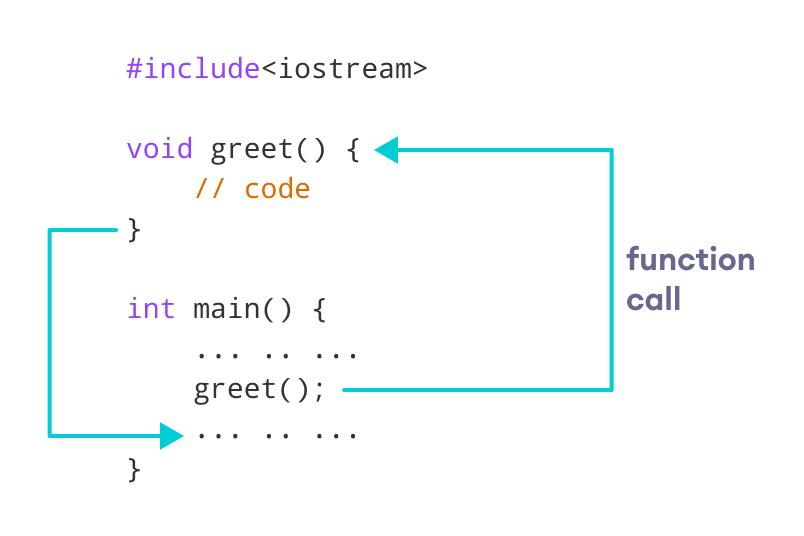
Calling a Function
To use greet(), simply invoke it where needed.
int main() {
    greet();
}
Example 1: Display Text
#include <iostream>
using namespace std;

void greet() {
    cout << "Hello there!";
}

int main() {
    greet();
    return 0;
}
Output
Hello there!
Function Parameters
Parameters are placeholders for values passed to a function.
void printNum(int num) {
    cout << num;
}
When calling printNum, supply an argument:
int main() {
    int n = 7;
    printNum(n);
    return 0;
}
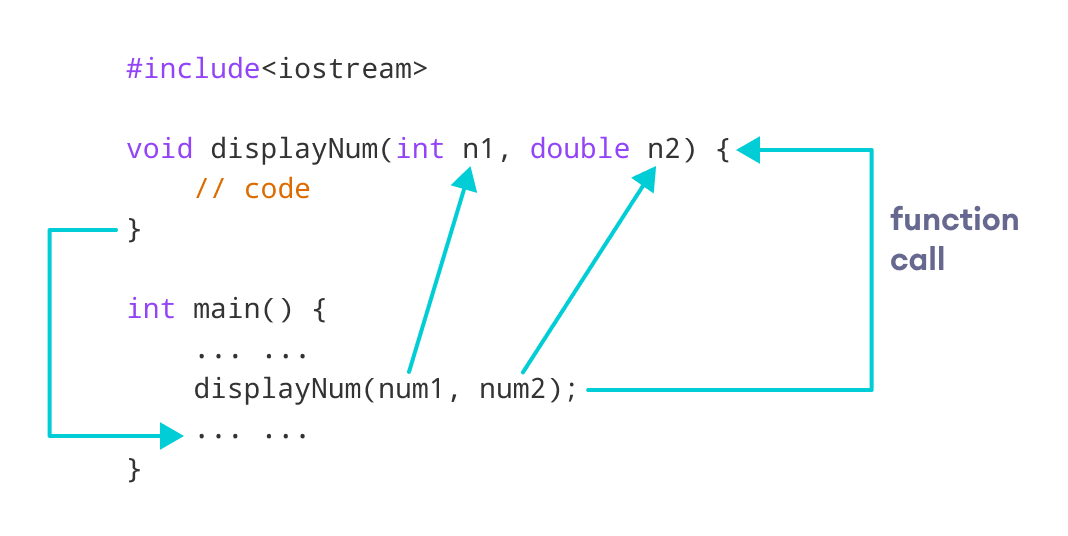
Example 2: Function with Multiple Parameters
#include <iostream>
using namespace std;

void displayNum(int n1, float n2) {
    cout << "The int number is " << n1;
    cout << "The double number is " << n2;
}

int main() {
    int num1 = 5;
    double num2 = 5.5;
    displayNum(num1, num2);
    return 0;
}
Output
The int number is 5
The double number is 5.5
Ensure argument types match the declared parameters.
Return Statements
Functions can return values. Specify the return type and use return to provide the result.
int add(int a, int b) {
    return a + b;
}
Calling add and storing the result:
int sum = add(100, 78);
cout << "100 + 78 = " << sum << endl;
Example 3: Adding Two Numbers
#include <iostream>
using namespace std;

int add(int a, int b) {
    return a + b;
}

int main() {
    int sum = add(100, 78);
    cout << "100 + 78 = " << sum << endl;
    return 0;
}
Output
100 + 78 = 178
Function Prototypes
When a function is defined after its first use, a prototype informs the compiler of its signature.
// Prototype
void add(int, int);

int main() {
    add(5, 3);
    return 0;
}

// Definition
void add(int a, int b) {
    cout << (a + b);
}
Prototype syntax:
returnType functionName(paramType1, paramType2, ...);Example 4: Using a Prototype
#include <iostream>
using namespace std;

int add(int, int);

int main() {
    int sum = add(100, 78);
    cout << "100 + 78 = " << sum << endl;
    return 0;
}

int add(int a, int b) {
    return a + b;
}
Output
100 + 78 = 178
Benefits of User‑Defined Functions
- Encapsulation: Group related code into a single, reusable block.
- Readability: Break complex logic into descriptive functions.
- Maintainability: Update logic in one place without touching every call.
- Testability: Isolate functionality for unit testing.
Standard Library Functions
The C++ Standard Library offers a wealth of ready‑made functions that simplify common tasks. Examples include sqrt(), abs(), and isdigit().
To use a library function, include the header where it’s declared. For mathematical operations, #include <cmath> brings in sqrt(), pow(), etc.
Example 5: Calculating a Square Root
#include <iostream>
#include <cmath>
using namespace std;

int main() {
    double number = 25.0;
    double squareRoot = sqrt(number);
    cout << "Square root of " << number << " = " << squareRoot;
    return 0;
}
Output
Square root of 25 = 5
The sqrt() function’s declaration resides in the cmath header, which is why the #include <cmath> directive is required.
For a deeper dive into C++ library functions, see the C++ Standard Library reference.
C Language
- C++ Function Overloading: A Practical Guide
- C++ Function Overriding Explained – Practical Examples & Best Practices
- Mastering C++ Virtual Functions: Concepts, Examples, and the Override Keyword
- Mastering C Functions: User-Defined and Standard Library Basics
- Mastering User-Defined Functions in C: A Step‑by‑Step Guide
- Master Python Functions: Syntax, Types, and Practical Examples
- C++ Functions Explained with Practical Code Examples
- Mastering Verilog Functions for Efficient RTL Design
- Mastering C Functions: Structure, Declaration, and Best Practices
- MATLAB Functions: Definition, Workspace, Inputs & Outputs