



C++ Functions Explained with Practical Code Examples
What Is a Function in C++?
A function in C++ is a self‑contained block of code that accepts input, processes it, and returns a result. By encapsulating repeated tasks in a function, developers avoid duplicating code and can easily reuse logic across a program by supplying different parameters.
Every C++ application contains at least one function: main(). The rest of the code can be organized into smaller, purpose‑specific functions, improving readability and maintainability.
Modern C++ provides a rich set of built‑in functions in the standard library. You can call these directly without writing the implementation yourself.
In this tutorial you will discover:
- What a function is in C++
- Why functions are essential
- Built‑in library functions
- User‑defined functions
- Function declaration and prototype
- Function definition
- Syntax and structure
- How to call a function
- Passing arguments
Why Use Functions?
Functions offer multiple advantages:
- They group related statements, making code easier to read and understand.
- They eliminate repetition, reducing the chance of errors.
- They enable code reuse across different parts of a program—or even across projects—by simply calling the same function.
Built‑in Functions
Standard library functions are pre‑defined and ready to use. You simply invoke them; you do not need to provide an implementation.
Example 1: Using sqrt() from cmath
#include <iostream>
#include <cmath>
using namespace std;

int main() {
    double num, squareRoot;
    cout << "Enter number: ";
    cin >> num;
    squareRoot = sqrt(num);
    cout << "The square root of " << num << " is: " << squareRoot;
    return 0;
}
Output:

Screenshot of the running program:

Code Breakdown:
- Include
iostreamfor input/output functions. - Include
cmathto access thesqrt()function. - Use the
stdnamespace to avoid prefixing standard names. - Define the
main()function where program logic resides. - Declare
numandsquareRootasdouble. - Prompt the user for a number.
- Read the user’s input into
num. - Call
sqrt()to compute the square root ofnum. - Display the result.
- Return 0 to signal successful execution.
User‑Defined Functions
Developers can create custom functions to encapsulate logic that is specific to their application.
Example 2: A Simple Greeting Function
#include <iostream>
using namespace std;

void sayHello() {
    cout << "Hello!";
}

int main() {
    sayHello();
    return 0;
}
Output:

Code screenshot:
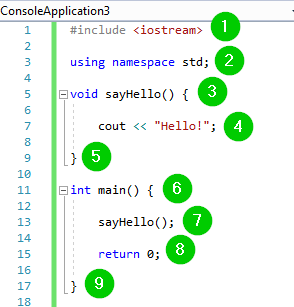
Explanation:
- Include
iostreamfor console I/O. - Bring the
stdnamespace into scope. - Define
sayHello(), a function that prints a greeting. - Invoke
sayHello()frommain(). - Return 0 to indicate successful termination.
Function Declaration / Prototype
When a function is defined after main(), the compiler needs to know its signature beforehand. A prototype provides this information without the function body.
Example of a prototype:
int addFunc(int, int);
Only the return type, function name, and parameter types are required; parameter names are optional.
Function Definition
While a prototype informs the compiler of a function’s interface, the definition supplies the executable body.
Example definition:
int addFunc(int num1, int num2) {
    return num1 + num2;
}
Syntax
return_datatype function_name(parameter_list) {
    // function body
}
Key components:
- return_datatype – the type of value returned (use
voidif none). - function_name – identifier that forms part of the function signature.
- parameter_list – zero or more typed parameters.
- function body – the statements that perform the task.
Calling a Function
To execute a function, you must invoke it by name and provide any required arguments.
Example call:
int result = addFunc(3, 5);
Passing Arguments
Arguments must match the function’s parameter list in both count and type. Mismatched arguments trigger compile‑time errors.
Default parameter values can be specified, allowing callers to omit those arguments.
Example 3: Adding Two Numbers with a Prototype
#include <iostream>
using namespace std;

int addFunc(int, int); // prototype

int main() {
    int x, y, sum;
    cout << "Enter two numbers: ";
    cin >> x >> y;
    sum = addFunc(x, y);
    cout << "The sum of " << x << " and " << y << " is: " << sum;
    return 0;
}

int addFunc(int num1, int num2) {
    return num1 + num2;
}
Output:

Screenshot:
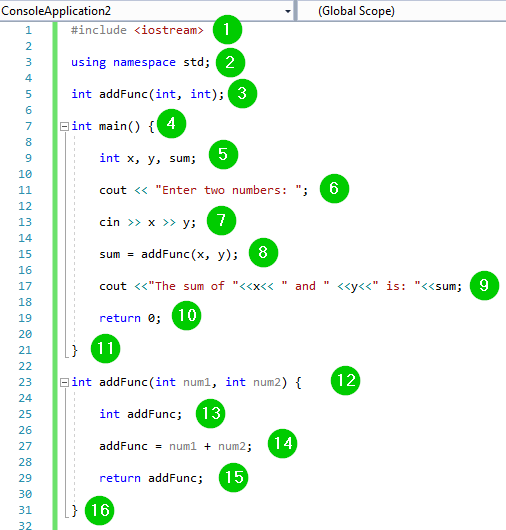
Explanation:
- Include necessary headers and namespaces.
- Declare a prototype for
addFunc(). - Read two integers from the user.
- Invoke
addFunc()with those values and store the result. - Display the sum.
- Define
addFunc()aftermain(), providing the logic to add the two parameters.
Summary
- Functions group related code into reusable blocks.
- They reduce duplication and improve code clarity.
- Built‑in library functions are available via headers; user‑defined functions require declaration and definition.
- Function prototypes inform the compiler before the actual definition.
- Matching argument counts and types is mandatory; default arguments offer flexibility.
C Language
- Mastering C++ Functions: From Basics to Advanced Usage
- Mastering C++ Virtual Functions: Concepts, Examples, and the Override Keyword
- Mastering C Functions: User-Defined and Standard Library Basics
- C++ do‑while Loop: Syntax, Practical Examples, and Nested Loops
- Mastering C++ Pointers: Concepts, Examples & Practical Applications
- C++ Operator Overloading – A Practical Guide with Code Examples
- C++ Polymorphism Explained: Practical Examples & Key Concepts
- Understanding C# Access Modifiers (Specifiers) with Practical Examples
- Master C Functions: Practical Examples of Recursion & Inline Techniques
- Master Python Lambda Functions: Practical Examples & Best Practices