



Mastering std::list in C++: Syntax, Functions & Practical Examples
What is std::list?
In C++, std::list is a sequence container that stores elements as a doubly‑linked list. This structure allows you to insert or remove items at any position in constant time, while iterating over the list in either direction. Although it does not provide fast random access like std::vector, it excels at scenarios where frequent insertions or deletions occur.
The container automatically manages memory through an allocator, so it can grow or shrink from both ends during runtime.
Why Use std::list?
- Constant‑time insertion and deletion anywhere in the sequence.
- Efficient for algorithms that move elements around frequently.
- Ideal when the size of the container changes unpredictably.
Defining a List
To use std::list, include the <list> header:
#include <list>

// Template definition
// template<class T, class Alloc = std::allocator<T>> class list;
Parameters:
T– Type of elements stored. Any copy‑constructible type is allowed.Alloc– Allocator type. The defaultstd::allocatoris usually sufficient.
Example 1: Basic Iteration
#include <iostream>
#include <list>

int main() {
    std::list<int> my_list{12, 5, 10, 9};
    for (int x : my_list) {
        std::cout << x << '\n';
    }
}
Output:

Common std::list Operations
| Function | Description |
|---|---|
insert() | Insert an element before the iterator position. |
push_back() | Add an element to the end. |
push_front() | Add an element to the front. |
pop_front() | Remove the first element. |
size() | Return the number of elements. |
front() | Access the first element. |
back() | Access the last element. |
reverse() | Reverse the order of elements. |
merge() | Merge two sorted lists into one. |
Constructors
std::list()– Default constructor; creates an empty list.std::list(n)– Fill constructor; createsndefault‑constructed elements.std::list(first, last)– Range constructor; copies elements from another range.std::list(const list&)– Copy constructor.std::list(list&&)– Move constructor.std::list(std::initializer_list<T>)– Initializer‑list constructor.
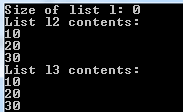
Example 2: Constructor Variants
#include <iostream>
#include <list>

int main() {
    std::list<int> l; // empty
    std::list<int> l1{10, 20, 30};
    std::list<int> l2(l1.begin(), l1.end()); // range copy
    std::list<int> l3(std::move(l1)); // move

    std::cout << "Size of l: " << l.size() << '\n';
    std::cout << "Contents of l2:\n";
    for (int x : l2) std::cout << x << '\n';
    std::cout << "Contents of l3:\n";
    for (int x : l3) std::cout << x << '\n';
}
Output:
Container Properties
- Sequence – Elements are stored in a linear order accessible by position.
- Doubly‑linked list – Each node knows its predecessor and successor, enabling constant‑time insertions/deletions.
- Allocator‑aware – Uses an allocator to request memory as needed.
Inserting Elements
Use push_front, push_back, or insert to add items.
Example 3: Mixed Insertions
#include <algorithm>
#include <iostream>
#include <list>

int main() {
    std::list<int> my_list{12, 5, 10, 9};
    my_list.push_front(11); // front
    my_list.push_back(18);  // back
    auto it = std::find(my_list.begin(), my_list.end(), 10);
    if (it != my_list.end()) {
        my_list.insert(it, 21); // before 10
    }
    for (int x : my_list) std::cout << x << '\n';
}
Output:

Deleting Elements
Use erase to remove single elements or ranges.
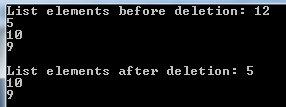
Example 4: Erase Demonstration
#include <iostream>
#include <list>

int main() {
    std::list<int> my_list{12, 5, 10, 9};
    std::cout << "Before deletion:\n";
    for (int x : my_list) std::cout << x << '\n';

    my_list.erase(my_list.begin()); // remove first

    std::cout << "After deletion:\n";
    for (int x : my_list) std::cout << x << '\n';
}
Output:
Key Takeaways
std::listis a doubly‑linked sequence container.- It offers constant‑time insertions/deletions from any position.
- Sequential traversal is supported in both directions.
- Random access is not efficient; use
std::vectorwhen you need fast indexing. - Constructors, iterators, and allocator awareness make
std::listversatile for dynamic data sets.
C++ Polymorphism Explained: Practical Examples & Key Concepts
C++ Functions Explained with Practical Code Examples
C Language
- C++ Operators Explained: Types, Examples, and Sample Programs
- C++ For Loops Explained: Syntax, Workflow, and Practical Examples
- Mastering C++ Switch‑Case: Syntax, Usage, and Practical Examples
- Master C++ Dynamic Array Allocation: A Practical Guide with Code Examples
- Mastering std::stack in C++: A Comprehensive Guide with Practical Examples
- C++ Structs Explained with a Practical Example
- Mastering std::map in C++: Comprehensive Guide with Code Examples
- C++ Classes & Objects: A Practical Guide with Code Examples
- C++ Polymorphism Explained: Practical Examples & Key Concepts
- Python List index() – How to Find Element Positions with Practical Examples