



Mastering std::stack in C++: A Comprehensive Guide with Practical Examples
What Is std::stack?
std::stack is a container adapter that implements the LIFO (Last In, First Out) principle. It allows insertion and removal of elements only from one end – the top. By default, it uses std::deque as the underlying container, but any sequence container (e.g., std::vector or std::list) can be supplied.
Container adapters do not expose iterators, so you cannot traverse a stack directly. Instead, you interact with it through its member functions.
Learning Objectives
- Define std::stack and understand its LIFO behavior
- Learn the syntax for declaring a stack
- Explore member types and key operations
- Work through push, pop, top, empty, size, emplace, and swap
- Implement a stack in the Standard Template Library (STL)
Syntax
Include the <stack> header and declare a stack with the following template:
template<class T, class Container = std::deque<T>> class stack;
- T – Element type; any valid C++ type, including user‑defined classes.
- Container – Underlying container; defaults to
std::deque.
Member Types
value_type– The element typeT.container_type– The type of the underlying container.size_type– Unsigned integral type for container size.
Core Operations
push()– Add an element to the top.pop()– Remove the top element.top()– Access the top element without removal.empty()– Check if the stack has no elements.size()– Return the number of elements.emplace()– Construct and insert an element directly at the top.swap()– Exchange contents with another stack.
Implementation Overview
Below is a visual representation of stack operations (top of stack indicated by the pointer).
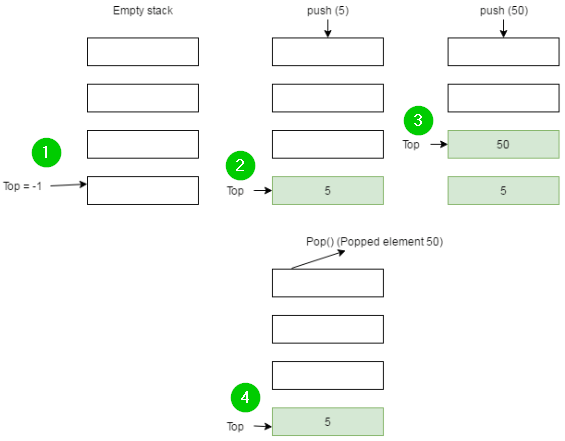
push() and pop()
The push() method appends a new element, increasing the size by one:
stack.push(value);Conversely, pop() removes the top element and reduces the size:
stack.pop();Example 1: Basic Stack Manipulation
#include <iostream>
#include <stack>
using namespace std;

int main() {
    stack<int> st;
    st.push(10);
    st.push(20);
    st.push(30);
    st.push(40);
    st.pop(); // removes 40
    st.pop(); // removes 30

    while (!st.empty()) {
        cout << ' ' << st.top();
        st.pop();
    }
    return 0;
}
Output: 20 10
empty(), size(), top()
These utility functions provide quick insights into the stack’s state.
Example 2: Inspecting Stack State
#include <iostream>
#include <stack>
using namespace std;

void display(stack<int> s) {
    while (!s.empty()) {
        cout << '\t' << s.top();
        s.pop();
    }
    cout << '\n';
}

int main() {
    stack<int> st;
    st.push(32); st.push(21); st.push(39); st.push(89); st.push(25);

    cout << "The stack st is: ";
    display(st);
    cout << "\n st.size() : " << st.size();
    cout << "\n st.top() : " << st.top();
    st.pop();
    cout << "\n st after pop: ";
    display(st);
    return 0;
}
Output: shows stack contents, size, top element, and state after a pop.
emplace() and swap()
• emplace() constructs an element in place, avoiding an extra copy.
• swap() exchanges the contents of two stacks efficiently.
Example 3: Using emplace() and swap()
#include <iostream>
#include <stack>
using namespace std;

int main() {
    stack<int> st1, st2;
    st1.emplace(12); st1.emplace(19);
    st2.emplace(20); st2.emplace(23);
    st1.swap(st2);

    cout << "st1 = ";
    while (!st1.empty()) { cout << st1.top() << " "; st1.pop(); }
    cout << endl << "st2 = ";
    while (!st2.empty()) { cout << st2.top() << " "; st2.pop(); }
}
Output: demonstrates the stack contents before and after swapping.
Using std::stack in STL
Implement a stack with a single line:
std::stack<T> st;Example:
#include <iostream>
#include <stack>
using namespace std;

int main() {
    stack<int> st;
    st.push(12); st.push(19); st.push(20);
    cout << st.top();   // 20
    cout << st.size();  // 3
    return 0;
}
Summary
- std::stack implements LIFO and only allows access to the top element.
- It is a container adapter; default underlying container is
std::deque, but can be customized. - Core functions:
push,pop,top,empty,size,emplace,swap. - Stack is a lightweight, efficient tool for scenarios requiring temporary storage of elements.
C Language
- C++ For Loops Explained: Syntax, Workflow, and Practical Examples
- Mastering C++ Switch‑Case: Syntax, Usage, and Practical Examples
- Master C++ Dynamic Array Allocation: A Practical Guide with Code Examples
- C++ Structs Explained with a Practical Example
- Mastering C++ Vectors: Dynamic Arrays, Iterators, and Practical Examples
- Mastering std::map in C++: Comprehensive Guide with Code Examples
- C++ Classes & Objects: A Practical Guide with Code Examples
- C++ Polymorphism Explained: Practical Examples & Key Concepts
- Mastering std::list in C++: Syntax, Functions & Practical Examples
- Mastering C# Stack: Push, Pop, and Practical Examples