



Mastering C++ Streams: cout, cin, cerr, clog – Practical Guide
What Are Streams in C++?
C++ abstracts input and output through a family of stream classes that transfer data as byte sequences. These streams are the backbone of every I/O operation in the language.
Streams fall into two categories:
Types of Streams
- Input Streams – Receive data from devices such as keyboards or files and place it into memory.
- Output Streams – Send data from memory to devices like monitors or files.
This tutorial will cover:
- Stream fundamentals
- How streams operate under the hood
- Key stream classes and their functions
- C++ header files for I/O
- Using std::cout, std::cin, std::cerr, and std::clog
- Error handling with stream objects
How Streams Work
The typical flow of a C++ stream operation is:
- Instantiate a stream object of the appropriate type.
- Associate the stream with a device or file using get/put pointers.
- Perform I/O via the extraction (>> ) or insertion (<< ) operators.
Stream Functions Overview
The streambuf header provides several classes that manage file buffers:
| Class | Description |
|---|---|
| filebuf | Manages file buffers for read/write. Provides open() and close(). |
| fstreambase | Base for ifstream, fstream, and ofstream – common file stream operations. |
| ifstream | Input file stream for reading data. |
| ofstream | Output file stream for writing data. |
| fstream | Combined input/output stream. |
C++ Header Files for I/O
- iostream – Provides
cin,cout,cerr, andclog. - iomanip – Offers manipulators such as
setwandsetprecision. - fstream – Handles file-based streams.
All of these objects are defined in iostream; omitting the header triggers a compilation error.
std::cout
The cout object writes to the standard output stream, usually the console. It is used with the insertion operator (<<).
Example
#include <iostream>
using namespace std;
int main() {
    char welcome[] = "Welcome to Guru99";
    cout << welcome << endl;
    return 0;
}
Output:

Code walkthrough:
- Include
iostreamto accesscout. - Use the
stdnamespace to avoid prefixing. - Define a character array holding the message.
- Print the message with
endlto insert a newline. - Return
0to indicate success.
std::cin
The cin object reads from the standard input stream, typically the keyboard. It pairs with the extraction operator (>>).
Example
#include <iostream>
using namespace std;
int main() {
    int number;
    cout << "Enter a number:";
    cin >> number;
    cout << "\nYou entered: " << number;
    return 0;
}
Output:
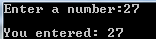
Code explanation:
- Include
iostreamforcinandcout. - Use
stdnamespace. - Declare an integer variable.
- Prompt the user.
- Read input with
>>. - Echo the entered value.
- Return
0on success.
std::cerr
The cerr stream outputs error messages immediately because it is unbuffered. Use it for critical errors that must be shown at once.
Example
#include <iostream>
using namespace std;
int main() {
    cerr << "An Error occurred!";
    return 0;
}
Output:

Explanation:
- Include
iostreamforcerr. - Use
stdnamespace. - Print an error message immediately.
- Return
0.
std::clog
Unlike cerr, clog is buffered, storing messages until the buffer is flushed. It’s useful for logging that can be delayed.
Example
#include <iostream>
using namespace std;
int main() {
    clog << "An Error occurred!";
    return 0;
}
Output:

Explanation:
- Include
iostreamforclog. - Use
stdnamespace. - Write a buffered error message.
- Return
0.
Error Handling with Stream Objects
Streams can be evaluated in a boolean context to check their validity. Additionally, member functions provide granular status checks:
good()– true if no errors have occurred.bad()– true if a fatal error is set.fail()– true after an unsuccessful operation.eof()– true when the end of the stream is reached.
Example – verifying a file open:
ifstream file("myfile.txt");
if (!file) {
    cout << "File NOT opened!" << endl;
}
Example – validating user input:
int p;
if (cin >> p) {
    cout << "Enter valid number" << endl;
}
Summary
- In C++, I/O is performed through streams that transfer byte sequences.
- Input streams move data from a device to memory; output streams move data from memory to a device.
cin(istream) reads keyboard input.cout(ostream) writes to the console.cerr(ostream) displays immediate error messages.clog(ostream) buffers error output for later flushing.- Buffered streams can be checked with
good(),bad(),fail(), andeof().
C Language
- C# Fundamentals: Input and Output Essentials
- Mastering C++ Input and Output: A Practical Guide
- Mastering C Input and Output (I/O): scanf() and printf() Explained
- Master Java Input & Output: Print, Read, and Format Your Data
- C++ Structs Explained with a Practical Example
- Mastering std::list in C++: Syntax, Functions & Practical Examples
- Mastering C# File Streams: StreamReader & StreamWriter – Step‑by‑Step Guide
- Mastering D Latches: Design, Operation, and Key Differences
- Mastering Input and Output in C Programming
- Understanding C++: Core Syntax and Object‑Oriented Foundations