



C++ Operator Overloading – A Practical Guide with Code Examples
What is Operator Overloading?
Using operator overloading in C++, you can assign multiple meanings to an operator within the same scope. The goal is to give a custom behavior to an operator for a user‑defined type.
With operator overloading, you can redefine most C++ operators and perform different operations using a single symbol.
In this tutorial you will learn:
- What operator overloading is
- Syntax
- Different approaches to overload operators in C++
- Which operators cannot be overloaded
- Key considerations
- Rules for operator overloading
- How to overload an operator in practice
Syntax
To overload a C++ operator, define a special member function inside a class as follows:
class class_name
{
    ...
    public:
        return_type operator symbol (argument(s))
        {
            ...
        }
    ...
};
The components are:
- return_type – the type returned by the operator function.
- operator – the keyword that starts the declaration.
- symbol – the operator you want to overload, e.g.
+,-,<,++. - argument(s) – parameters, just like any other function.
Example 1:
#include <iostream>
using namespace std;

class TestClass {
private:
    int count;
public:
    TestClass() : count(5) {}
    void operator --() {
        count = count - 3;
    }
    void Display() {
        cout << "Count: " << count;
    }
};

int main() {
    TestClass tc;
    --tc;
    tc.Display();
    return 0;
}
Output:

Here is a screenshot of the code:
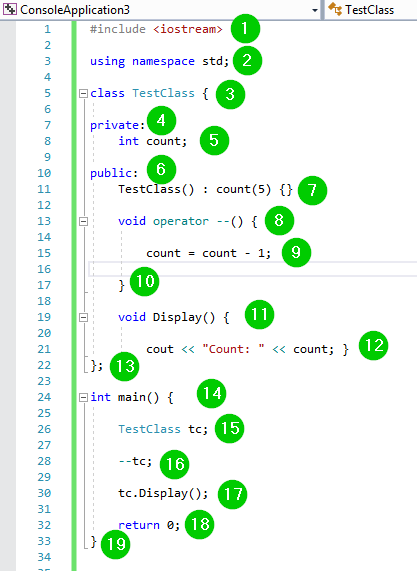
Code Explanation:
- Include
<iostream>to access input/output facilities. - Use the
stdnamespace for brevity. - Define a class
TestClass. - Make
counta private data member. - Provide a public constructor that initializes
countto 5. - Overload the prefix
--operator to subtract 3 fromcount. - Implement
Display()to print the current value. - In
main(), create an instance, apply the overloaded operator, and display the result.
Different Approaches to Operator Overloading in C++
Overloading can be achieved through:
- Member functions
- Non‑member functions (friend or free functions)
- Friend functions (when private data access is needed)
- If the left operand is an object of the class, a member function is typically used.
- When the left operand is of a different type, a non‑member function is required.
- Friend functions are useful when the operator needs to access private or protected members.
Can All C++ Operators be Overloaded?
No. The following operators are not overloadable:
::– scope resolution?:– ternary conditional.– member accesssizeof– size query*(member pointer selector)
Things to Remember
- Overloading only affects user‑defined types; built‑in types retain their original behavior.
- The assignment (
=) and address‑of (&) operators are automatically overloaded for classes that provide copy constructors or assignment operators. - Operator precedence remains unchanged; you can use parentheses to enforce evaluation order.
- Three operators—
::,.,?:—are explicitly forbidden from overloading.
Rules for Operator Overloading
- At least one operand must be a user‑defined class type.
- Only existing operators can be overloaded; you cannot introduce new operator symbols.
- Some operators (e.g.,
new,delete) cannot be overloaded as friend functions but can be overloaded as member functions.
How to Overload an Operator
Example 1: Increment Operator
#include <iostream>
using namespace std;

class OperatorOverload {
private:
    int x;
public:
    OperatorOverload() : x(10) {}
    void operator ++() {
        x += 2;
    }
    void Print() {
        cout << "The Count is: " << x;
    }
};

int main() {
    OperatorOverload ov;
    ++ov;
    ov.Print();
    return 0;
}
Output:

Screenshot of the code:
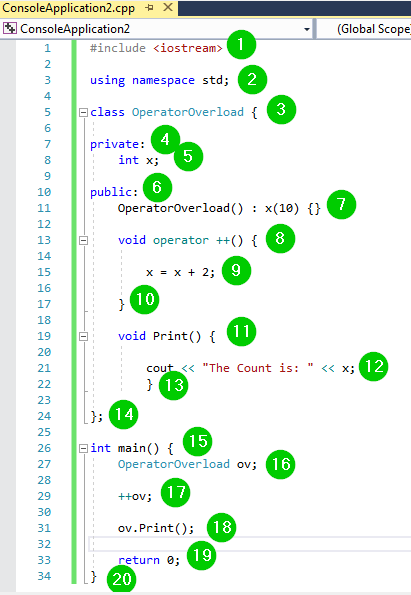
Code Explanation:
- Include
<iostream>and use thestdnamespace. - Define class
OperatorOverloadwith a privateint x. - Constructor initializes
xto 10. - Overload the prefix
++operator to add 2 tox. - Implement
Print()to display the updated value. - In
main(), create an object, invoke the overloaded operator, and print the result.
Example 2: Complex Number Addition
#include <iostream>
using namespace std;

class TestClass {
private:
    int real, over;
public:
    TestClass(int rl = 0, int ov = 0) : real(rl), over(ov) {}

    TestClass operator + (TestClass const &obj) {
        TestClass result;
        result.real = real + obj.real;
        result.over = over + obj.over;
        return result;
    }
    void print() {
        cout << real << " + i" << over << endl;
    }
};

int main() {
    TestClass c1(9, 5), c2(4, 3);
    TestClass c3 = c1 + c2;
    c3.print();
}
Output:

Screenshot of the code:
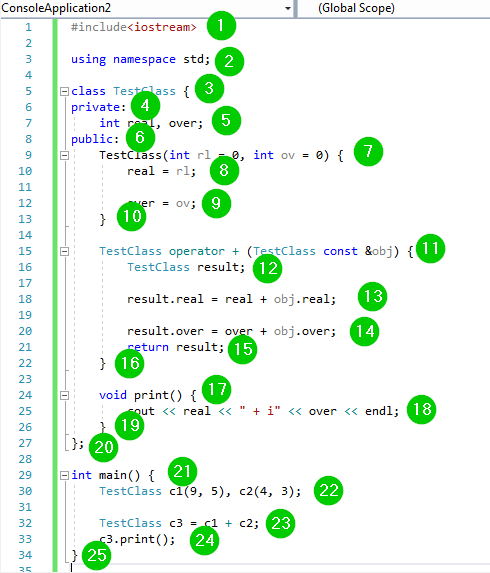
Code Explanation:
- Include
<iostream>and use thestdnamespace. - Define
TestClasswithrealandovercomponents. - Provide a constructor for initialization.
- Overload the
+operator to perform complex‑number addition. - Return a new
TestClassinstance containing the sum. - Implement
print()to display the complex number. - In
main(), create two instances, add them, and print the result.
Summary
- Operator overloading allows multiple meanings for an operator within a scope.
- It provides custom behavior for user‑defined types.
- Most C++ operators can be overloaded, but a few cannot.
- At least one operand must be a user‑defined type.
- Only existing operators are overloadable.
C++ File Handling: Mastering Open, Read, Write, and Close Operations
Mastering C++ Streams: cout, cin, cerr, clog – Practical Guide
C Language
- C++ Function Overloading: A Practical Guide
- Master C++ Operator Overloading: Practical Examples & Best Practices
- C++ do‑while Loop: Syntax, Practical Examples, and Nested Loops
- Mastering C++ Pointers: Concepts, Examples & Practical Applications
- Mastering C++ Char Data Types: Declaration, ASCII, and Conversion Techniques
- C++ Polymorphism Explained: Practical Examples & Key Concepts
- C++ Functions Explained with Practical Code Examples
- Python round() Function Explained with Practical Examples
- Mastering Python's map() Function: Syntax, Examples, and Best Practices
- Mastering C++ Overloading: Functions & Operators Explained