



C++ File Handling: Mastering Open, Read, Write, and Close Operations
What is file handling in C++?
File handling lets you persist program data on storage devices. By directing program output to a file, you can perform further manipulation, analysis, or archival on that data.
A stream is an abstraction that represents a continuous source or destination of characters. C++ supplies a robust fstream library that offers classes and functions to work seamlessly with files.
In this tutorial you will learn:
- Definition of file handling in C++
- The
fstreamlibrary and its classes - Opening files in various modes
- Closing files safely
- Writing data to files
- Reading data from files
The fstream Library
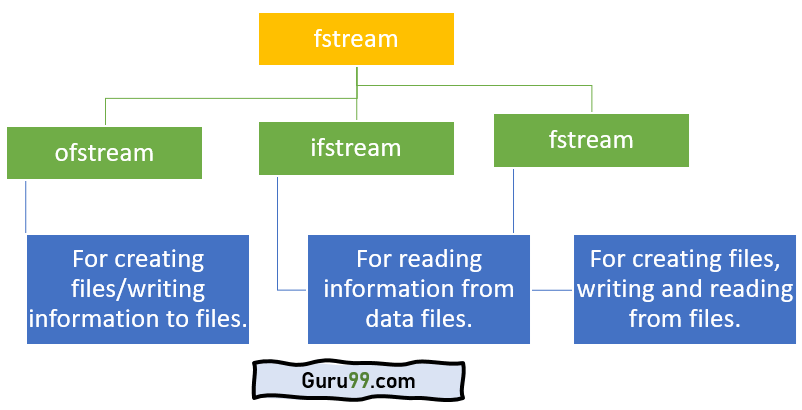
The fstream library supplies three core classes:
- ofstream – an output stream for creating and writing files.
- ifstream – an input stream for reading existing files.
- fstream – a combined stream that supports both input and output operations.
Below is a quick visual reference:
To use these classes, include the fstream header and, if you wish to output to the console, iostream as well.
How to Open Files
Before any file operation, the file must be opened. Use ofstream for write‑only access, ifstream for read‑only, and fstream for both. Each class provides an open() member:
open(file_name, mode);
- file_name – the path or name of the target file.
- mode – optional; specifies access type. Common flags include:
| Value | Description |
|---|---|
| ios::app | Append mode – writes are added to the file end. |
| ios::ate | Open and immediately seek to the end. |
| ios::in | Open for reading. |
| ios::out | Open for writing. |
| ios::trunc | Truncate an existing file to zero length. |
Multiple flags can be combined using the bitwise OR operator (|).
Example 1: Creating a File
#include <iostream>
#include <fstream>
using namespace std;
int main() {
    fstream my_file;
    my_file.open("my_file", ios::out);
    if (!my_file) {
        cout << "File not created!";
    }
    else {
        cout << "File created successfully!";
        my_file.close();
    }
    return 0;
}
Output:

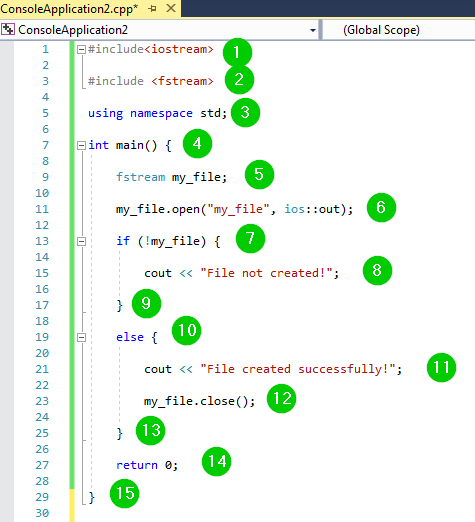
Screenshot of the running program:
Code Walk‑through:
- Include
iostreamfor console I/O. - Include
fstreamfor file streams. - Use the
stdnamespace for brevity. - Instantiate a
fstreamobject namedmy_file. - Open the file in write mode (
ios::out). - Check for successful opening; otherwise report failure.
- On success, print confirmation and close the file.
- Return
0to indicate normal termination.
How to Close Files
While C++ automatically flushes and closes streams at program exit, explicitly closing a file after its last operation is considered good practice.
The close() member is available on fstream, ofstream, and ifstream:
void close();
How to Write to Files
Write operations use the stream insertion operator (<<). Text to be stored must be quoted or streamed directly.
Example 2: Writing Text
#include <iostream>
#include <fstream>
using namespace std;
int main() {
    fstream my_file;
    my_file.open("my_file.txt", ios::out);
    if (!my_file) {
        cout << "File not created!";
    }
    else {
        cout << "File created successfully!";
        my_file << "Guru99";
        my_file.close();
    }
    return 0;
}
Output:

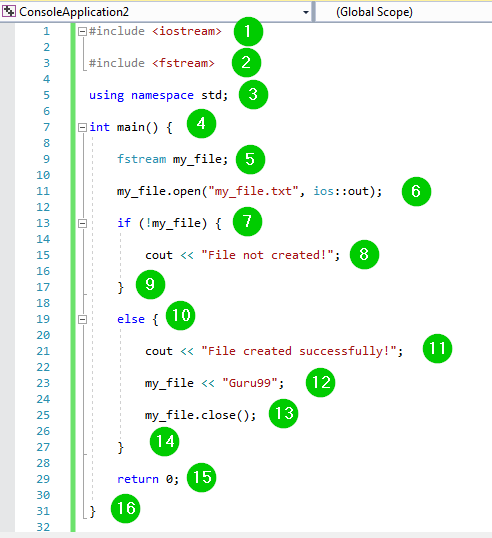
Code screenshot:
Code Walk‑through:
- Include necessary headers.
- Create a
fstreamobject. - Open the target file in write mode.
- Validate the file stream.
- Insert the string "Guru99" into the file.
- Close the stream.
- Return
0.
How to Read from Files
Reading uses the stream extraction operator (>>) just like cin. The data is streamed into variables of appropriate types.
Example 3: Reading Characters
#include <iostream>
#include <fstream>
using namespace std;
int main() {
    fstream my_file;
    my_file.open("my_file.txt", ios::in);
    if (!my_file) {
        cout << "No such file";
    }
    else {
        char ch;
        while (1) {
            my_file >> ch;
            if (my_file.eof())
                break;
            cout << ch;
        }
    }
    my_file.close();
    return 0;
}
Output:

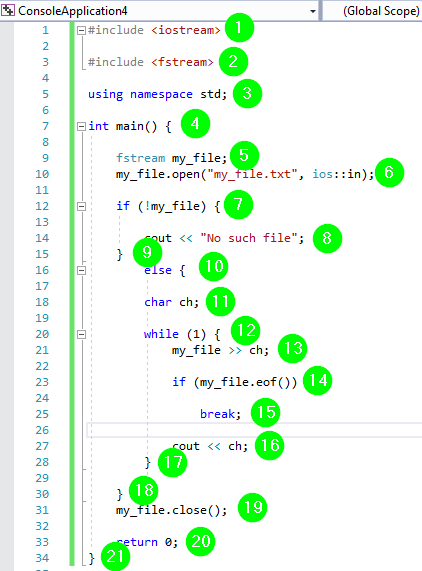
Screenshot of the running code:
Code Walk‑through:
- Include
iostreamandfstream. - Open the file for reading (
ios::in). - Check for existence; if absent, notify the user.
- Read characters one by one until EOF is reached.
- Print each character to the console.
- Close the stream.
- Return
0.
Summary
- File handling persists program output to durable storage.
- Streams abstract input and output devices.
- The
fstreamlibrary supplies classes for all common file operations. - Always include
<fstream>(and<iostream>if needed) at the top of your source. - Open files with appropriate modes, perform desired actions, then close the streams.
C Language
- C File Handling: Mastering I/O with fopen, fprintf, fread, and fseek
- Initializing FPGA Block RAM from Text Files Using VHDL’s TEXTIO Library
- Mastering C File I/O: Create, Open, Read, Write, and Close Files with Confidence
- Reading Files in Java with BufferedReader – A Practical Guide with Examples
- Master Python File Handling: Create, Read, Write, and Open Text Files with Ease
- How to Read and Write CSV Files in Python: A Comprehensive Guide
- Understanding C Header Files: Types, Usage, and Best Practices
- Mastering File I/O in C++: Reading and Writing with fstream
- Mastering C++ Exception Handling: A Comprehensive Guide
- Master C++ Signal Handling: Safe Interrupt Management and Clean Program Termination