



Mastering C File I/O: Create, Open, Read, Write, and Close Files with Confidence
C File Management Overview
In C, the standard library stdio.h offers a comprehensive suite of functions for working with persistent data on disk. By mastering these tools you can reliably create, read, write, and close files while ensuring data integrity and program stability.
Key File‑Handling Functions
| Function | Purpose |
|---|---|
fopen() | Open an existing file or create a new one. |
fclose() | Close an open file and release resources. |
fprintf() | Write formatted text to a file. |
fscanf() | Read formatted data from a file. |
getc() | Retrieve a single character from a file. |
putc() | Write a single character to a file. |
fgets() | Read an entire line into a buffer. |
fputs() | Write a string to a file without formatting. |
fseek() | Move the file pointer to a specified location. |
ftell() | Retrieve the current file pointer position. |
rewind() | Reset the file pointer to the beginning. |
File Modes Explained
| Mode | Description |
|---|---|
"r" | Open for reading; fails if file does not exist. |
"w" | Open for writing; truncates existing file or creates a new one. |
"a" | Open for appending; writes are added to the end of the file. |
"r+" | Open for reading and writing from the beginning. |
"w+" | Open for reading and writing; truncates existing file. |
"a+" | Open for reading and writing; appends new data. |
Creating a File
To create or open a file you first declare a file pointer, then call fopen() with the desired filename and mode:
FILE *fp;
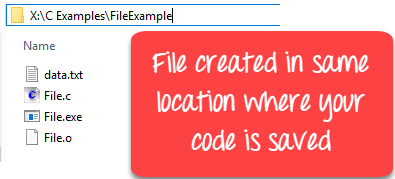
fp = fopen("data.txt", "w");
If the file does not exist, fopen() creates it. If it already exists, the mode determines whether its contents are preserved or overwritten.
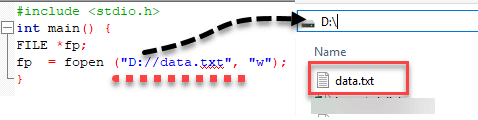
You can also specify an absolute path:
fp = fopen("D:/data.txt", "w");
Images illustrating the file creation step:
Closing a File
After you finish all file operations, always call fclose() to release the file descriptor and flush buffers:
fp = fopen("data.txt", "r");
...
fclose(fp);
The function returns 0 on success and EOF on error. While the operating system automatically closes files when a program exits, explicit closure is considered best practice.
Writing to a File
When writing, remember to add newline characters (\n) explicitly where needed. Below are the most common write functions:
fputc(char, FILE*)– Write a single character.fputs(const char*, FILE*)– Write a null‑terminated string.fprintf(FILE*, const char*, …)– Write formatted output.
Example: fputc()
#include <stdio.h>
int main() {
    int i;
    FILE *fptr;
    const char *str = "Guru99 Rocks\n";
    fptr = fopen("fputc_test.txt", "w");
    for (i = 0; str[i] != '\n'; i++) {
        fputc(str[i], fptr);
    }
    fclose(fptr);
    return 0;
}
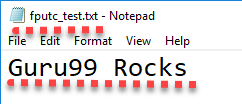
Output file fputc_test.txt contains the text:
Example: fputs()
#include <stdio.h>
int main() {
    FILE *fp = fopen("fputs_test.txt", "w+");
    fputs("This is Guru99 Tutorial on fputs,", fp);
    fputs("We don't need to use for loop\n", fp);
    fputs("Easier than fputc function\n", fp);
    fclose(fp);
    return 0;
}
Resulting file fputs_test.txt:

Example: fprintf()
#include <stdio.h>
int main() {
    FILE *fptr = fopen("fprintf_test.txt", "w");
    fprintf(fptr, "Learning C with Guru99\n");
    fclose(fptr);
    return 0;
}
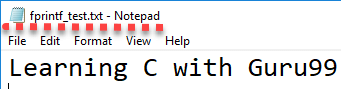
Resulting file fprintf_test.txt:
Reading from a File
Three primary functions read data:
fgetc(FILE*)– Return the next character.fgets(char*, int, FILE*)– Read up ton-1characters into a buffer.fscanf(FILE*, const char*, …)– Parse formatted input.
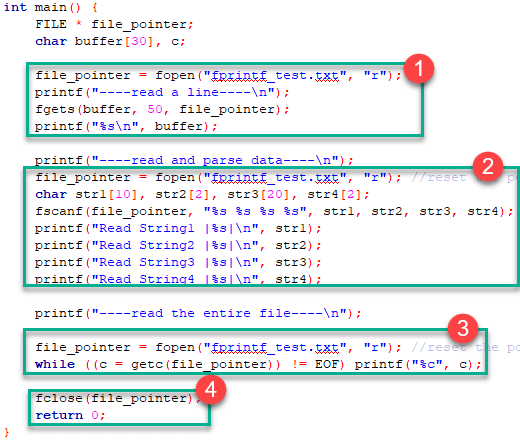
Below is a complete demonstration that reads fprintf_test.txt using all three methods:
#include <stdio.h>
int main() {
    FILE *fp;
    char buffer[50], c;
    fp = fopen("fprintf_test.txt", "r");
    printf("----read a line----\n");
    fgets(buffer, 50, fp);
    printf("%s\n", buffer);
    fclose(fp);

    fp = fopen("fprintf_test.txt", "r");
    printf("----read and parse data----\n");
    char str1[10], str2[2], str3[20], str4[2];
    fscanf(fp, "%s %s %s %s", str1, str2, str3, str4);
    printf("Read String1 |%s|\n", str1);
    printf("Read String2 |%s|\n", str2);
    printf("Read String3 |%s|\n", str3);
    printf("Read String4 |%s|\n", str4);
    fclose(fp);

    fp = fopen("fprintf_test.txt", "r");
    printf("----read the entire file----\n");
    while ((c = fgetc(fp)) != EOF) {
        putchar(c);
    }
    fclose(fp);
    return 0;
}
Program output:
----read a line----
Learning C with Guru99

----read and parse data----
Read String1 |Learning|
Read String2 |C|
Read String3 |with|
Read String4 |Guru99|
----read the entire file----
Learning C with Guru99
Interactive Character‑by‑Character I/O with getc and putc
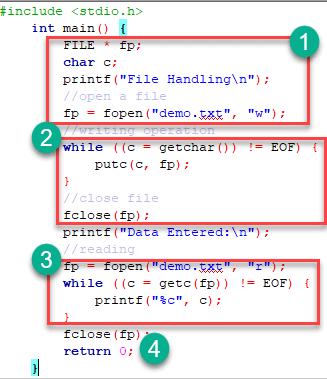
This minimal example demonstrates reading user input, writing it to a file, and then reading it back:
#include <stdio.h>
int main() {
    FILE *fp;
    int c;
    printf("File Handling\n");
    fp = fopen("demo.txt", "w");
    while ((c = getchar()) != EOF) {
        putc(c, fp);
    }
    fclose(fp);
    printf("Data Entered:\n");
    fp = fopen("demo.txt", "r");
    while ((c = fgetc(fp)) != EOF) {
        putchar(c);
    }
    fclose(fp);
    return 0;
}
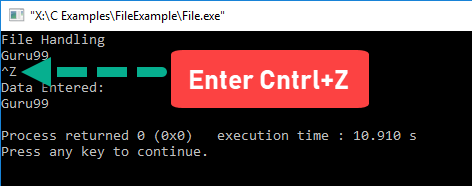
Sample run:
Takeaway
- A file is a persistent storage space on disk.
- The C standard library provides
fopen,fclose,fprintf,fscanf, and related functions for reliable file manipulation. - Always open a file in the correct mode to control reading, writing, or appending behavior.
- Explicitly close files to flush buffers and release system resources.
- Use
fgetcandputcfor simple character streams, andfgets/fscanffor line‑based or formatted input. - When writing, remember to terminate strings with
\nif you intend line breaks. - Proper error handling (checking
NULLpointers and return values) is essential for robust applications.
C Language
- Python File I/O: Mastering File Operations, Reading, Writing, and Management
- C++ File Handling: Mastering Open, Read, Write, and Close Operations
- File Operations in C# – A Practical Guide
- Master Python File Handling: Create, Read, Write, and Open Text Files with Ease
- Mastering Java I/O: Files, Streams, and Input/Output Fundamentals
- Mastering File I/O in C: Creating, Opening, and Managing Files
- Mastering File I/O in C++: Reading and Writing with fstream
- Mastering C# File I/O: Reading, Writing, and Managing Streams
- Python File I/O: Mastering Input and Output Operations
- Use gRPC in Python to Read and Write Process Data on an AXC F 3152