



C++ do‑while Loop: Syntax, Practical Examples, and Nested Loops
What Is a do‑while Loop?
The do‑while loop is a control‑flow construct that executes a block of code at least once and repeats it as long as a specified condition remains true. Unlike a standard while loop, the condition is evaluated after the loop body, guaranteeing one execution regardless of the initial value of the condition.
When to Use a do‑while Loop?
Use a do‑while loop when you need:
- At least one execution of the loop body.
- The number of iterations to be determined at runtime.
- A prompt‑first approach, such as reading user input until a sentinel value is entered.
Syntax
do {
    // code
} while (condition);
The loop body precedes the while condition, so the compiler executes the body first and then checks the condition to decide whether to iterate again.
How It Works

Flow‑chart steps:
- Start the loop.
- Execute the loop body.
- Evaluate the condition.
- If true, repeat from step 2.
- If false, exit the loop and continue with subsequent statements.
Example 1: Counting with a do‑while Loop
#include <iostream>
using namespace std;
int main() {
    int x = 1;
    do {
        cout << "X is: " << x << endl;
        ++x;
    } while (x < 5);
    return 0;
}
Output:

The loop prints values 1 through 4 because the condition x < 5 becomes false after x reaches 5.
Example 2: Summing Numbers Until Zero Is Entered
#include <iostream>
using namespace std;
int main() {
    int num, sum = 0;
    do {
        cout << "Enter a number: ";
        cin >> num;
        sum += num;
    } while (num != 0);
    cout << "Sum is " << sum;
    return 0;
}
Output:
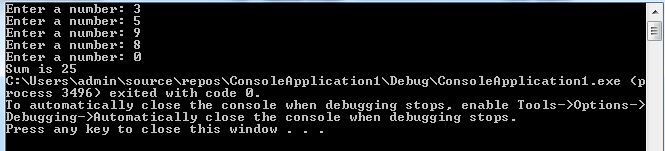
In this example, the loop continues until the user enters 0, ensuring that at least one number is processed.
Nested do‑while Loops
Placing a do‑while loop inside another creates a nested structure, useful for multi‑dimensional iterations such as printing a grid or performing compound calculations.
Syntax
do {
    // outer body
    do {
        // inner body
    } while (inner_condition);
} while (outer_condition);
How It Works
Execution proceeds as follows:
- Initialize outer variables.
- Enter the outer loop body.
- Enter the inner loop body.
- After each inner iteration, evaluate
inner_conditionto decide whether to continue the inner loop. - Once the inner loop ends, update outer variables and evaluate
outer_conditionto decide whether to repeat the outer loop.
Example
#include <iostream>
using namespace std;
int main() {
    int a = 1;
    do {
        int b = 1;
        do {
            cout << a << "\n";
            ++b;
        } while (b <= 3);
        ++a;
    } while (a <= 3);
    return 0;
}
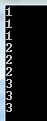
Output:
Key Takeaways
- The do‑while loop guarantees at least one execution of the loop body.
- Use it when the iteration count is unknown until runtime.
- The loop’s condition is checked after the body, not before.
- Nested loops enable multi‑level iteration, but beware of complexity and readability.
C Language
- Master C++ For Loops: A Step-by-Step Guide
- C++ For Loops Explained: Syntax, Workflow, and Practical Examples
- Mastering C++ Pointers: Concepts, Examples & Practical Applications
- Mastering C++ Char Data Types: Declaration, ASCII, and Conversion Techniques
- C++ Operator Overloading – A Practical Guide with Code Examples
- C++ Functions Explained with Practical Code Examples
- C# Hashtable Explained: Key-Value Storage, Operations, and Practical Examples
- While vs. Do‑While Loops: Clear Comparison with Practical Examples
- Python Loop Control: break, continue, and pass Statements Explained with Practical Examples
- Understanding C++ Loop Types: For, While, Do-While Explained