



Python Loop Control: break, continue, and pass Statements Explained with Practical Examples
Loops are the backbone of most programming languages, enabling repetition over sequences such as lists, tuples, strings, dictionaries, and sets. In Python, two looping constructs—for and while—serve this purpose. The loop continues until its condition becomes false, but the flow can be altered using the break, continue, and pass statements.
What are Loop Control Statements?
- break – immediately exits the loop in which it appears.
- continue – skips the rest of the current iteration and starts the next one.
- pass – does nothing; it’s a placeholder that keeps the interpreter happy when a block must exist syntactically.
These statements give developers fine‑grained control over loop execution, making code more efficient and readable.
break Statement
The break statement terminates the innermost loop in which it is executed. In nested loops, only the current loop is affected, allowing selective exit while keeping outer loops running.
How break Works (Flowchart)
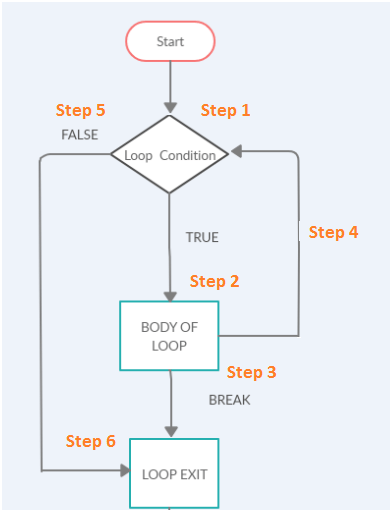
The process is straightforward:
- Enter the loop.
- Evaluate the loop condition.
- If
breakis encountered, exit the loop. - Otherwise, execute the loop body.
- Re‑evaluate the condition and repeat until it fails.
Examples
break in a for‑loop
my_list = ['Siya', 'Tiya', 'Guru', 'Daksh', 'Riya', 'Guru']

for name in my_list:
    print(name)
    if name == 'Guru':
        print('Found the name Guru')
        break

print('Loop is terminated')
Output:
Siya
Tiya
Guru
Found the name Guru
Loop is terminated
break in a while‑loop
my_list = ['Siya', 'Tiya', 'Guru', 'Daksh', 'Riya', 'Guru']
index = 0

while True:
    print(my_list[index])
    if my_list[index] == 'Guru':
        print('Found the name Guru')
        break
    index += 1

print('After while-loop exit')
Output:
Siya
Tiya
Guru
Found name Guru
After while-loop exit
break in nested loops
for i in range(4):
    for j in range(4):
        if j == 2:
            break
        print("The number is", i, j)
Output:
The number is 0 0
The number is 0 1
The number is 1 0
The number is 1 1
The number is 2 0
The number is 2 1
The number is 3 0
The number is 3 1
continue Statement
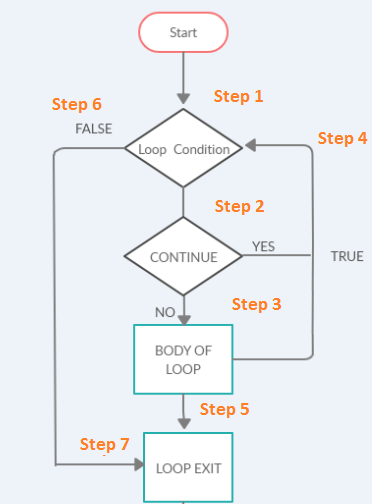
The continue keyword skips the remaining code in the current iteration and proceeds directly to the next loop cycle.
How continue Works (Flowchart)
Examples
continue in a for‑loop
for i in range(10):
    if i == 7:
        continue
    print("The Number is:", i)
Output:
The Number is: 0
The Number is: 1
The Number is: 2
The Number is: 3
The Number is: 4
The Number is: 5
The Number is: 6
The Number is: 8
The Number is: 9
continue in a while‑loop
i = 0
while i <= 10:
    if i == 7:
        i += 1
        continue
    print("The Number is:", i)
    i += 1
Output:
The Number is: 0
The Number is: 1
The Number is: 2
The Number is: 3
The Number is: 4
The Number is: 5
The Number is: 6
The Number is: 8
The Number is: 9
The Number is: 10
continue in nested loops
for i in range(4):
    for j in range(4):
        if j == 2:
            continue
        print("The number is", i, j)
Output:
The number is 0 0
The number is 0 1
The number is 0 3
The number is 1 0
The number is 1 1
The number is 1 3
The number is 2 0
The number is 2 1
The number is 2 3
The number is 3 0
The number is 3 1
The number is 3 3
pass Statement
The pass keyword is a no‑op placeholder used when a statement is syntactically required but no action is desired. It is commonly employed in empty function bodies, classes, loops, or conditional blocks that will be implemented later.
When to Use pass
- Defining a function or class that is a stub for future implementation.
- Temporarily disabling a block of code while preserving syntax.
- Providing a minimal loop or conditional body during debugging.
Examples
pass in a function
def my_func():
    print('pass inside function')
    pass

my_func()
Output:
pass inside function
pass in a class
class My_Class:
    print("Inside My_Class")
    pass
Output:
Inside My_Class
pass in a loop
# Pass statement in for-loop
text = "Guru"
for char in text:
    if char == 'r':
        print('Pass executed')
        pass
    print(char)
Output:
G
u
Pass executed
r
u
pass in an if‑statement
a = 1
if a == 1:
    print('pass executed')
    pass
Output:
pass executed
Choosing between break and continue
- break – use when you need to exit the loop entirely based on a condition.
- continue – use when you want to skip the rest of the current iteration but keep looping.
Understanding the subtle difference ensures that loops run efficiently and behave exactly as intended.
Takeaway
- Use
breakto terminate loops when a condition is met. - Use
continueto skip the remainder of the current iteration. - Use
passas a placeholder for future code or to satisfy syntax requirements.
Python
- Mastering Python Loop Control: break & continue
- Python Print() Function: A Practical Guide with Examples
- Master Python Loops: For, While, Break, Continue, and Enumerate Explained
- Master Python’s str.count(): How to Count Characters & Substrings with Examples
- Master Python `format()` Strings with Clear Examples
- Python round() Function Explained with Practical Examples
- Mastering Python's map() Function: Syntax, Examples, and Best Practices
- Python timeit() – Measuring Execution Time with Practical Examples
- Python list.count(): Expert Guide with Practical Examples
- Python Module Importing – A Practical Guide with Examples