



Mastering std::map in C++: Comprehensive Guide with Code Examples
What is std::map?
In the C++ Standard Template Library (STL), std::map is an associative container that stores elements as key‑value pairs. Each key is unique and the container automatically keeps the elements sorted according to the key’s comparison function (by default, std::less). The values can be of any type and are accessed through their corresponding keys.
Why use std::map?
- Keys are unique and stored in sorted order, making lookup operations fast (
O(log n)). - Ideal for scenarios that require an associative array or dictionary with guaranteed order.
- Internally implemented as a balanced binary search tree (red‑black tree), which provides reliable performance across all operations.
- Supports fast insertion, deletion, and traversal.
- Rich API that integrates seamlessly with iterators and STL algorithms.
Syntax
Declare a map with:
std::map<KeyType, ValueType> mapName;
KeyType– the type of the key (must be comparable).ValueType– the type of the mapped value.mapName– the variable name.
Example:
std::map<std::string, int> ageMap;
Member Types
- key_type: Type of the keys.
- mapped_type: Type of the mapped values.
- value_type:
std::pair<const key_type, mapped_type> - iterator: Bidirectional iterator over
value_type. - const_iterator, reverse_iterator, const_reverse_iterator
- size_type, difference_type
Built‑in Functions
begin()– iterator to first element.end()– past‑the‑end iterator.size()– number of elements.empty()– whether the map is empty.insert()– add a key/value pair.find()– locate an element by key.erase()– remove elements by iterator or key.clear()– remove all elements.- Other utilities such as
count()andlower_bound()are also available.
Iterating Over Map Elements
Iterators give you full control over traversal order, which is always sorted by key.
#include <iostream>
#include <string>
#include <map>

using namespace std;

int main() {
    map<int, string> students;
    students.insert({200, "Alice"});
    students.insert({201, "John"});

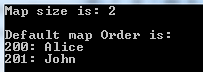
    cout << "Map size is: " << students.size() << endl;
    cout << endl << "Default map order:" << endl;

    for (auto it = students.begin(); it != students.end(); ++it) {
        cout << it->first << ": " << it->second << endl;
    }
    return 0;
}
Output:
Inserting Data into std::map
Use insert() for new entries; it silently rejects duplicates. To overwrite an existing key, use insert_or_assign().
#include <map>
#include <iostream>

using namespace std;

int main() {
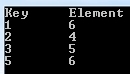
    map<int, int> m{{1,3},{2,4},{3,5}};
    m.insert({5,6});        // adds new pair
    m.insert({1,8});        // ignored, key 1 already exists
    m.insert_or_assign(1,6); // updates key 1 to value 6

    cout << "Key\tElement\n";
    for (auto& p : m) {
        cout << p.first << '\t' << p.second << '\n';
    }
    return 0;
}
Output:
Searching in a Map
Finding a key is straightforward with find(). If the key exists, the returned iterator points to the element; otherwise end() is returned.
#include <iostream>
#include <map>

using namespace std;

int main() {
    map<int, string> students;
    students.insert({200, "Alice"});
    students.insert({201, "John"});

    if (auto it = students.find(201); it != students.end()) {
        cout << "Key 201 has value: " << it->second << endl;
    }
    return 0;
}
Output:

Deleting Data from a Map
Elements can be removed by key or by iterator. The erase() method invalidates only iterators pointing to the erased element.
#include <iostream>
#include <map>

using namespace std;

int main() {
    map<string, int> myMap;
    myMap["cow"] = 1;
    myMap["cat"] = 2;
    myMap["lion"] = 3;

    if (auto it = myMap.find("cat"); it != myMap.end()) {
        myMap.erase(it);
    }

    for (auto& p : myMap) {
        cout << p.first << ": " << p.second << endl;
    }
    return 0;
}
Output:

Summary
std::mapis a sorted associative container with unique keys.- Keys provide efficient lookup; values hold the associated data.
- All core operations run in logarithmic time due to the underlying red‑black tree.
- Iterators enable traversal, insertion, deletion, and range queries.
- With
insert_or_assign(), updating values is straightforward. - Use
find()for fast existence checks and direct access. - Erase operations can target individual elements or clear the entire map.
C Language
- C++ For Loops Explained: Syntax, Workflow, and Practical Examples
- Mastering C++ Switch‑Case: Syntax, Usage, and Practical Examples
- Master C++ Dynamic Array Allocation: A Practical Guide with Code Examples
- Mastering std::stack in C++: A Comprehensive Guide with Practical Examples
- C++ Structs Explained with a Practical Example
- Mastering C++ Vectors: Dynamic Arrays, Iterators, and Practical Examples
- C++ Classes & Objects: A Practical Guide with Code Examples
- C++ Polymorphism Explained: Practical Examples & Key Concepts
- Mastering std::list in C++: Syntax, Functions & Practical Examples
- Dynamic Memory Allocation in C: Understanding malloc() with Practical Examples