



C++ Function Overriding Explained – Practical Examples & Best Practices
C++ Function Overriding Explained
This guide demystifies function overriding in C++, providing clear examples, best practices, and a step‑by‑step walk‑through that a seasoned C++ developer would use in production.
Why Function Overriding Matters
In object‑oriented programming, inheritance lets a derived class extend or modify the behavior of a base class. When the same member function is declared in both the base and the derived class, the derived implementation “overrides” the base one. When you call that function through a derived‑class object, the overridden version runs.
Example 1: Basic Overriding
#include <iostream>
using namespace std;

class Base {
public:
    void print() {
        cout << "Base Function" << endl;
    }
};

class Derived : public Base {
public:
    void print() {
        cout << "Derived Function" << endl;
    }
};

int main() {
    Derived d;
    d.print();
    return 0;
}
Output
Derived Function
Calling print() on a Derived instance executes the overridden function, not the base version.
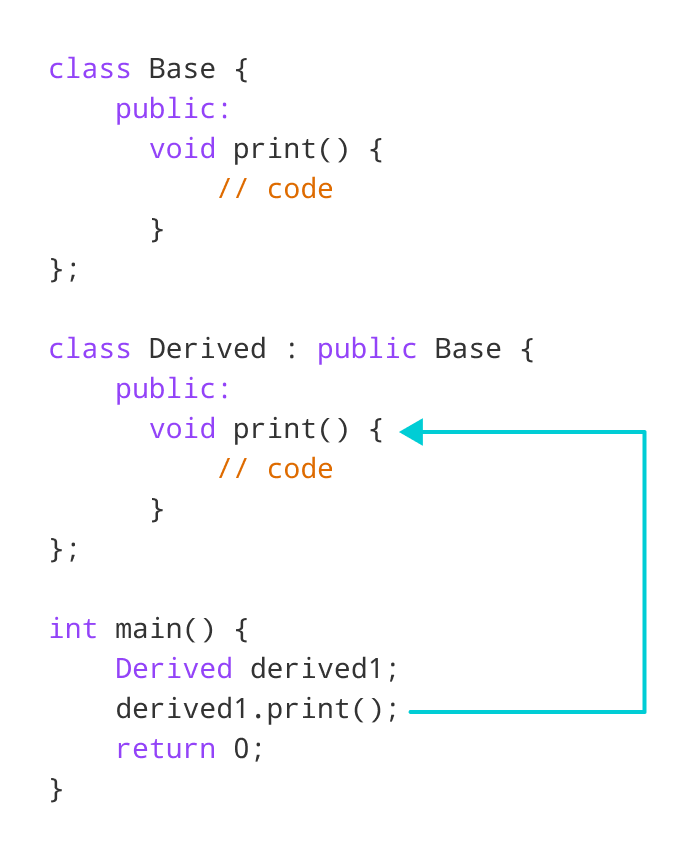
If you create a Base object and call print(), you’ll see the original base implementation.
Base b;
b.print(); // Output: Base Function
Accessing the Overridden Base Function
Sometimes you need to invoke the base class’s version explicitly. Two common techniques are:
- Using the scope resolution operator
::. - Employing a base‑class pointer that points to a derived object (when the function isn’t virtual).
Example 2: Scope Resolution to Call Base Function
#include <iostream>
using namespace std;

class Base {
public:
    void print() { cout << "Base Function" << endl; }
};

class Derived : public Base {
public:
    void print() { cout << "Derived Function" << endl; }
};

int main() {
    Derived d1, d2;
    d1.print();
    d2.Base::print(); // Explicit call to Base::print
    return 0;
}
Output
Derived Function
Base Function
Example 3: Calling Base Function from Within Derived
#include <iostream>
using namespace std;

class Base {
public:
    void print() { cout << "Base Function" << endl; }
};

class Derived : public Base {
public:
    void print() {
        cout << "Derived Function" << endl;
        Base::print(); // Invoke base version
    }
};

int main() {
    Derived d;
    d.print();
    return 0;
}
Output
Derived Function
Base Function
Example 4: Using a Base Pointer to Access Base Function
#include <iostream>
using namespace std;

class Base {
public:
    void print() { cout << "Base Function" << endl; }
};

class Derived : public Base {
public:
    void print() { cout << "Derived Function" << endl; }
};

int main() {
    Derived d;
    Base* ptr = &d; // Pointer to Base pointing to Derived object
    ptr->print(); // Calls Base::print because the function isn’t virtual
    return 0;
}
Output
Base Function
When the function is not declared virtual, a base‑class pointer invokes the base implementation. To achieve true polymorphic behavior, declare the base function virtual and override it in the derived class.
These examples illustrate the mechanics of function overriding in C++. By mastering these concepts, you can write cleaner, more maintainable code that leverages polymorphism effectively.
C Language
- Mastering C++ Functions: From Basics to Advanced Usage
- C++ Function Overloading: A Practical Guide
- How to Pass Arrays to Functions in C++: A Practical Guide
- C++ Friend Functions and Friend Classes: Mastering Access Control
- Mastering C++ Virtual Functions: Concepts, Examples, and the Override Keyword
- C++ Operator Overloading – A Practical Guide with Code Examples
- C++ Polymorphism Explained: Practical Examples & Key Concepts
- C++ Functions Explained with Practical Code Examples
- Mastering C++ Overloading: Functions & Operators Explained
- Understanding Polymorphism in C++: A Practical Guide