



Mastering C++ Arrays: Declaration, Initialization, and Practical Examples
C++ Arrays
This tutorial covers C++ arrays—how to declare, initialize, access, and manipulate them—using practical code examples.
In C++, an array is a single variable that stores a fixed-size sequence of elements of the same type. For instance, a class with 27 students might store their grades in one array:
double grade[27];Here, grade can hold up to 27 double values. Once an array is declared, its size and element type are immutable.
C++ Array Declaration
dataType arrayName[arraySize];For example:
int x[6];Explanation:
int– element type- x – array name
6– number of elements
Accessing Elements in a C++ Array
Each array element is identified by an index, starting at 0. You can retrieve or modify an element using:
// syntax to access array elements
array[index];
Consider the array x above.
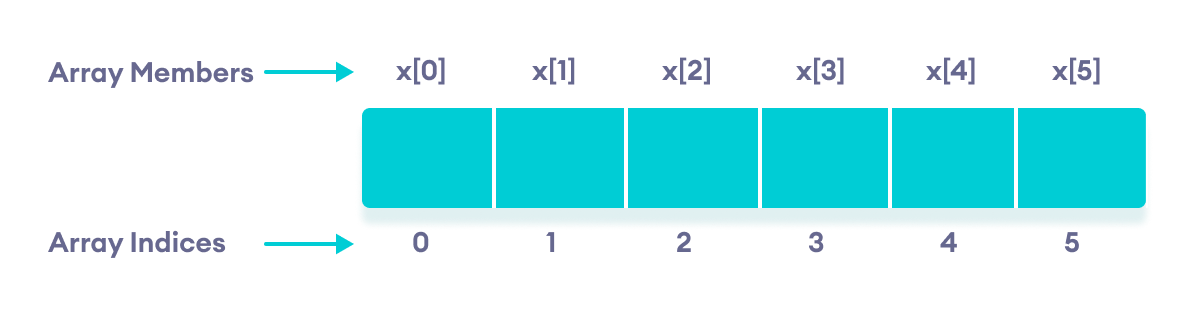
Key Points
- Indices begin at
0(e.g., x[0] is the first element). - For an array of size
n, the last index isn-1(here x[5]). - Array elements are stored in consecutive memory addresses. If
x[0]starts at 2120d, thenx[1]is at 2124d,x[2]at 2128d, etc., because anintoccupies 4 bytes.
C++ Array Initialization
Arrays can be initialized at declaration:
// declare and initialize an array
int x[6] = {19, 10, 8, 17, 9, 15};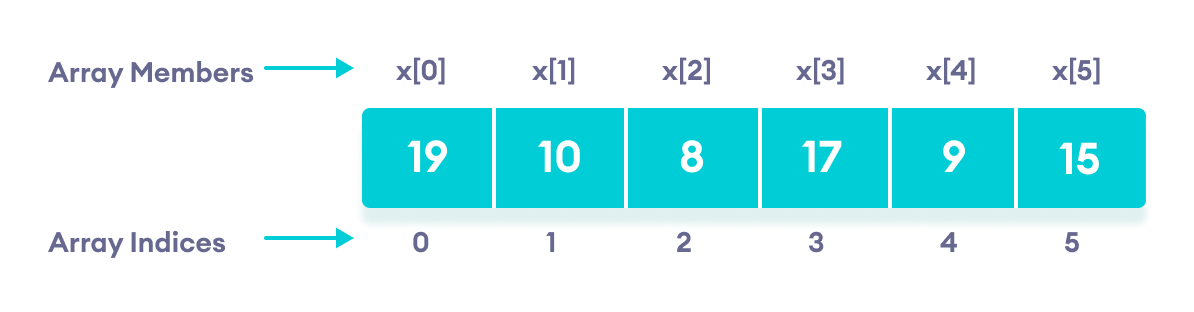
Alternatively, let the compiler deduce the size:
// declare and initialize an array
int x[] = {19, 10, 8, 17, 9, 15};
If fewer elements are provided than the array size, the remaining elements are zero‑initialized in C++.
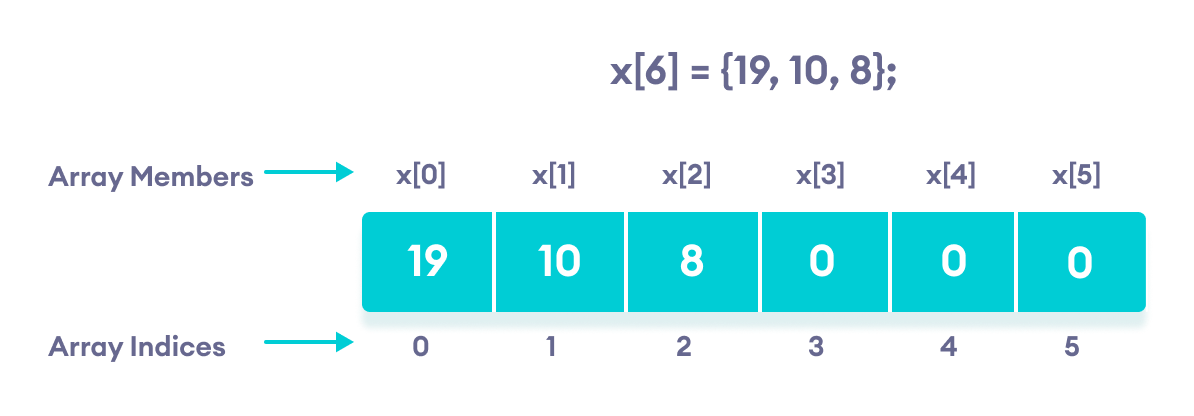
Inserting and Printing Array Elements
int mark[5] = {19, 10, 8, 17, 9};

// change 4th element to 9
mark[3] = 9;

// take input from the user and store it at third position
cin >> mark[2];

// take input from the user and insert at ith position
cin >> mark[i-1];

// print first element of the array
cout << mark[0];

// print ith element of the array
cout >> mark[i-1];
Example 1: Displaying Array Elements
#include <iostream>
using namespace std;

int main() {
    int numbers[5] = {7, 5, 6, 12, 35};

    cout << "The numbers are: ";

    // Print array elements using a range‑based for loop
    for (const int &n : numbers) {
        cout << n << "  ";
    }

    cout << "\nThe numbers are: ";

    // Print array elements using a traditional for loop
    for (int i = 0; i < 5; ++i) {
        cout << numbers[i] << "  ";
    }

    return 0;
}
Output
The numbers are: 7  5  6  12  35
The numbers are: 7  5  6  12  35
Both loops produce the same result. The range‑based loop is preferred when you only need to read values, as it avoids unnecessary copying.
Note: Using const int &n is more efficient than int n because it passes elements by reference and prevents accidental modification.
Example 2: Reading User Input into an Array
#include <iostream>
using namespace std;

int main() {
    int numbers[5];

    cout << "Enter 5 numbers: " << endl;

    // Store user input into the array
    for (int i = 0; i < 5; ++i) {
        cin >> numbers[i];
    }

    cout << "The numbers are: ";

    // Print the array elements
    for (int n = 0; n < 5; ++n) {
        cout << numbers[n] << "  ";
    }

    return 0;
}
Output
Enter 5 numbers:
11
12
13
14
15
The numbers are: 11  12  13  14  15
Example 3: Sum and Average of Array Elements
#include <iostream>
using namespace std;

int main() {
    double numbers[] = {7, 5, 6, 12, 35, 27};

    double sum = 0;
    double count = 0;
    double average;

    cout << "The numbers are: ";

    // Print elements and calculate sum using a range‑based for loop
    for (const double &n : numbers) {
        cout << n << "  ";
        sum += n;
        ++count;
    }

    cout << "\nTheir Sum = " << sum << endl;

    average = sum / count;
    cout << "Their Average = " << average << endl;

    return 0;
}
Output
The numbers are: 7  5  6  12  35  27
Their Sum = 92
Their Average = 15.3333
This example demonstrates how a range‑based loop simplifies traversal when the array size is not known at compile time.
C++ Array Out‑of‑Bounds Access
Arrays with size 10 expose valid indices from 0 to 9. Accessing index 10 or higher triggers undefined behavior, which may manifest as crashes or corrupted data.
C Language
- Mastering C# Arrays: Declaration, Initialization, and Operations
- Mastering Multidimensional Arrays in C++: Declaring, Initializing, and Looping
- Mastering C Arrays: Declaration, Initialization, and Common Operations
- Mastering Java Arrays: Declaration, Initialization, and Manipulation
- Mastering Java Multidimensional Arrays: 2D & 3D Examples
- C++ Arrays Demystified: Declaration, Initialization, and Pointer Techniques
- Master C++ Dynamic Array Allocation: A Practical Guide with Code Examples
- C Arrays Explained: Efficient Data Storage & Access
- MATLAB: Mastering Multidimensional and Special Arrays
- Mastering Arrays in C#: Efficient Data Storage & Access