



Mastering Java Multidimensional Arrays: 2D & 3D Examples
Mastering Java Multidimensional Arrays: 2D & 3D Examples
This tutorial walks you through Java’s multidimensional arrays, covering 2‑D and 3‑D structures with clear, practical examples.
Before diving into multidimensional arrays, ensure you’re comfortable with basic Java arrays. A multidimensional array is essentially an array of arrays—each element itself is an array.
int[][] a = new int[3][4];Here, a is a two‑dimensional array capable of holding 12 integers (3 rows × 4 columns). Java uses zero‑based indexing, so indices start at 0.
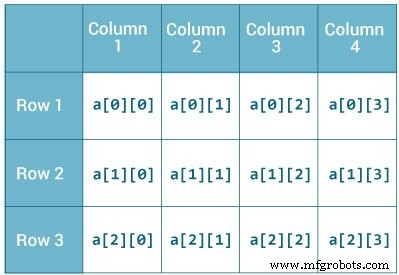
For a three‑dimensional example:
String[][][] data = new String[3][4][2];The data array can store 24 strings (3 × 4 × 2).
Initializing a 2D Array in Java
You can declare and populate a 2‑D array in one step:
int[][] a = {
      {1, 2, 3},
      {4, 5, 6, 9},
      {7},
};
Notice that each row is an array itself, and rows may vary in length—Java allows “ragged” arrays, unlike C/C++.
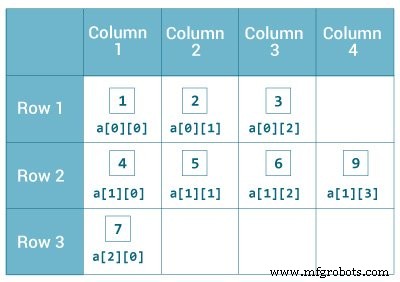
Example: 2‑Dimensional Array
class MultidimensionalArray {
    public static void main(String[] args) {
        int[][] a = {
            {1, 2, 3},
            {4, 5, 6, 9},
            {7},
        };
        System.out.println("Length of row 1: " + a[0].length);
        System.out.println("Length of row 2: " + a[1].length);
        System.out.println("Length of row 3: " + a[2].length);
    }
}Output:
Length of row 1: 3
Length of row 2: 4
Length of row 3: 1
Here, a[0], a[1], and a[2] are themselves arrays, so we use the length attribute to inspect each row.
Printing All Elements of a 2D Array with a Loop
class MultidimensionalArray {
    public static void main(String[] args) {
        int[][] a = {
            {1, -2, 3},
            {-4, -5, 6, 9},
            {7},
        };
        for (int i = 0; i < a.length; ++i) {
            for(int j = 0; j < a[i].length; ++j) {
                System.out.println(a[i][j]);
            }
        }
    }
}Output:
1
-2
3
-4
-5
6
9
7
You can also employ a nested for‑each loop for cleaner syntax:
class MultidimensionalArray {
    public static void main(String[] args) {
        int[][] a = {
            {1, -2, 3},
            {-4, -5, 6, 9},
            {7},
        };
        for (int[] innerArray : a) {
            for (int data : innerArray) {
                System.out.println(data);
            }
        }
    }
}Output:
1
-2
3
-4
-5
6
9
7
Initializing a 3D Array in Java
A three‑dimensional array is an array of 2‑D arrays. It can be declared similarly:
int[][][] test = {
    {
        {1, -2, 3},
        {2, 3, 4}
    },
    {
        {-4, -5, 6, 9},
        {1},
        {2, 3}
    }
};
Rows in a 3‑D array may vary in length, just like in 2‑D arrays.
Iterating Over a 3‑Dimensional Array
class ThreeArray {
    public static void main(String[] args) {
        int[][][] test = {
            {
                {1, -2, 3},
                {2, 3, 4}
            },
            {
                {-4, -5, 6, 9},
                {1},
                {2, 3}
            }
        };
        for (int[][] array2D : test) {
            for (int[] array1D : array2D) {
                for (int item : array1D) {
                    System.out.println(item);
                }
            }
        }
    }
}Output:
1
-2
3
2
3
4
-4
-5
6
9
1
2
3
These examples demonstrate how to create, populate, and traverse Java’s multidimensional arrays efficiently.
Java
- Mastering C# Arrays: Declaration, Initialization, and Operations
- C# Multidimensional Arrays: 2D Arrays Explained with Code Examples
- Mastering C++ Arrays: Declaration, Initialization, and Practical Examples
- Mastering Multidimensional Arrays in C++: Declaring, Initializing, and Looping
- Mastering C Arrays: Declaration, Initialization, and Common Operations
- Mastering Java Arrays: Declaration, Initialization, and Manipulation
- Java Array Copying Techniques: A Comprehensive Guide
- Master Java Arrays: A Comprehensive Guide to Efficient Data Handling
- C Arrays Explained: Efficient Data Storage & Access
- Mastering Arrays in C#: Efficient Data Storage & Access