



Mastering Java Arrays: Declaration, Initialization, and Manipulation
Java Arrays
This comprehensive guide walks you through every aspect of Java arrays—from declaration and initialization to efficient traversal and real‑world applications. Perfect for beginners and seasoned developers alike.
An array is a contiguous block of memory that holds multiple values of the same type.
For instance, to keep the names of 100 people, you’d create a string array capable of storing 100 names:
String[] array = new String[100];Notice the fixed size: once allocated, the array can never grow beyond 100 elements.
Declaring an Array in Java
In Java, array declaration follows this syntax:
dataType[] arrayName;- dataType – primitive types like
int,char,double,byteor reference types such asStringor custom objects. - arrayName – a valid identifier.
Example:
double[] data;Here, data is an array that can hold double values.
How many elements can it hold?
You determine the capacity by allocating memory:
// declare an array
double[] data;

// allocate memory
data = new double[10];
The array’s size—or length—is now 10.
Often, declaration and allocation are combined:
double[] data = new double[10];Initializing Arrays
Arrays can be initialized at declaration using a value list:
// declare and initialize
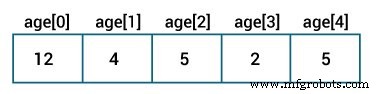
int[] age = {12, 4, 5, 2, 5};
Because you supply values, Java infers the size (5 in this case).
Alternatively, you can instantiate an empty array and set values by index:
// declare an array
int[] age = new int[5];

// assign values
age[0] = 12;
age[1] = 4;
age[2] = 5;
...
Key points:
- Indices start at 0.
- The last element resides at
n-1when the size isn.
Accessing Elements
Retrieve a value with its index:
array[index]Example program:
class Main {
    public static void main(String[] args) {
        int[] age = {12, 4, 5, 2, 5};

        System.out.println("Accessing Elements of Array:");
        System.out.println("First Element: " + age[0]);
        System.out.println("Second Element: " + age[1]);
        System.out.println("Third Element: " + age[2]);
        System.out.println("Fourth Element: " + age[3]);
        System.out.println("Fifth Element: " + age[4]);
    }
}
Output
Accessing Elements of Array:
First Element: 12
Second Element: 4
Third Element: 5
Fourth Element: 2
Fifth Element: 5
Loops enable bulk processing.
Iterating Over Arrays
Using a Classic For Loop
class Main {
    public static void main(String[] args) {
        int[] age = {12, 4, 5};

        System.out.println("Using for Loop:");
        for (int i = 0; i < age.length; i++) {
            System.out.println(age[i]);
        }
    }
}
Output
Using for Loop:
12
4
5
The length property gives the array size.
Using the Enhanced For Loop
class Main {
    public static void main(String[] args) {
        int[] age = {12, 4, 5};

        System.out.println("Using for-each Loop:");
        for (int a : age) {
            System.out.println(a);
        }
    }
}
Output
Using for-each Loop:
12
4
5
Sum and Average of Array Elements
class Main {
    public static void main(String[] args) {
        int[] numbers = {2, -9, 0, 5, 12, -25, 22, 9, 8, 12};
        int sum = 0;
        Double average;

        for (int number : numbers) {
            sum += number;
        }

        int arrayLength = numbers.length;
        average = ((double)sum / (double)arrayLength);

        System.out.println("Sum = " + sum);
        System.out.println("Average = " + average);
    }
}
Output
Sum = 36
Average = 3.6
This example demonstrates the enhanced for loop, type casting, and the length property.
Multidimensional Arrays
Beyond one‑dimensional arrays, Java supports multi‑level arrays—arrays of arrays. For example:
double[][] matrix = {
    {1.2, 4.3, 4.0},
    {4.1, -1.1}
};
Here, matrix is a 2‑D array (a matrix). For more on this, see Java multidimensional array.
Recommended Readings
- Java Copy Array
- Java Program to Print an Array
- Java Program to Concatenate two Arrays
- Java ArrayList to Array and Array to ArrayList
- Java Dynamic Array
Java
- Mastering C# Arrays: Declaration, Initialization, and Operations
- Mastering C++ Arrays: Declaration, Initialization, and Practical Examples
- Mastering C Arrays: Declaration, Initialization, and Common Operations
- Mastering Java Multidimensional Arrays: 2D & 3D Examples
- Java Array Copying Techniques: A Comprehensive Guide
- Java Arrays Tutorial: Declaration, Creation, and Initialization – Example Code
- Master Java Arrays: A Comprehensive Guide to Efficient Data Handling
- C Arrays Explained: Efficient Data Storage & Access
- MATLAB: Mastering Multidimensional and Special Arrays
- Mastering Arrays in C#: Efficient Data Storage & Access