



Mastering C# Arrays: Declaration, Initialization, and Operations
Mastering C# Arrays
Discover how to declare, initialize, and work with arrays in C#. Practical code examples, looping techniques, and LINQ operations are covered.
An array stores a fixed-size sequence of elements of the same type. For example, instead of five separate variables for student ages, a single array is sufficient.
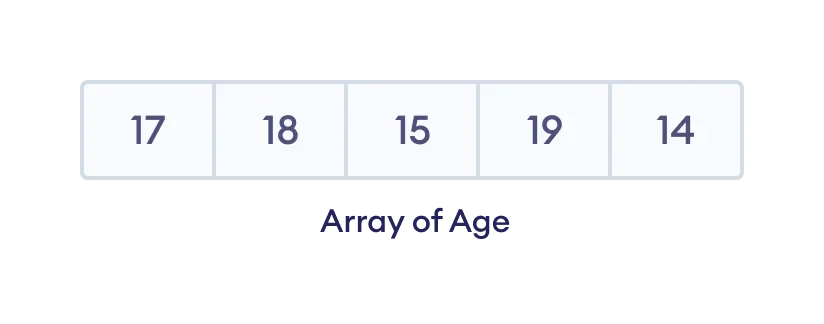
1. Declaring an Array in C#
Use the following syntax to declare an array:
datatype[] arrayName;datatype– e.g.,int,string,char, etc.arrayName– a valid identifier.
Example:
int[] age;Here, age can hold integer values.
Determining the array size
Allocate memory to set the number of elements:
// declare an array
int[] age;

// allocate memory for 5 elements
age = new int[5];
Alternatively, declare and allocate in one statement:
int[] age = new int[5];2. Initializing an Array
Arrays can be initialized during declaration:
int[] numbers = {1, 2, 3, 4, 5};The compiler infers the size from the initializer.
Individual elements can also be set after declaration:
// declare an array
int[] age = new int[5];

// initialize elements
age[0] = 12;
age[1] = 4;
age[2] = 5;
// …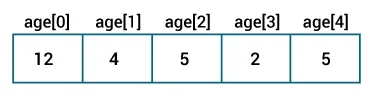
- Array indices start at 0.
- A 5‑element array has indices 0‑4.
3. Accessing Elements
Retrieve an element by its index:
// third element
array[2];
// fifth element
array[4];array[2]returns the third element.array[4]returns the fifth element.
Example: Accessing Array Elements
using System;

namespace AccessArray {
  class Program  {
    static void Main(string[] args) {

      // create an array
      int[] numbers = {1, 2, 3};

      // access first element
      Console.WriteLine("Element at index 0 : " + numbers[0]);

      // access second element
      Console.WriteLine("Element at index 1 : " + numbers[1]);

      // access third element
      Console.WriteLine("Element at index 2 : " + numbers[2]);

      Console.ReadLine();

    }
  }
}
Output
Element at index 0 : 1
Element at index 1 : 2
Element at index 2 : 3
4. Modifying Elements
Change an element by assigning a new value to its index:
using System;

namespace ChangeArray {
  class Program {
    static void Main(string[] args) {

      // create an array
      int[] numbers = {1, 2, 3};

      Console.WriteLine("Old Value at index 0: " + numbers[0]);

      // update value
      numbers[0] = 11;

      Console.WriteLine("New Value at index 0: " + numbers[0]);

      Console.ReadLine();
    }
  }
}
Output
Old Value at index 0: 1
New Value at index 0: 11
5. Iterating with Loops
Use for or foreach to traverse an array.
For Loop Example
using System;

namespace AccessArrayFor {
  class Program {
    static void Main(string[] args) {

      int[] numbers = { 1, 2, 3};

      for(int i=0; i < numbers.Length; i++) {
        Console.WriteLine("Element at index " + i + ": " + numbers[i]);
      }

      Console.ReadLine();
    }
  }
}
Output
Element at index 0: 1
Element at index 1: 2
Element at index 2: 3
Use numbers.Length to obtain the array size.
Foreach Loop Example
using System;

namespace AccessArrayForeach {
  class Program {
    static void Main(string[] args) {
      int[] numbers = {1, 2, 3};

      Console.WriteLine("Array Elements: ");

      foreach(int num in numbers) {
        Console.WriteLine(num);
      }

      Console.ReadLine();
    }
  }
}
Output
Array Elements:
1
2
3
6. Array Operations with System.Linq
The System.Linq namespace offers powerful methods for array manipulation.
Finding Minimum and Maximum
using System;
using System.Linq;

namespace ArrayMinMax {
  class Program  {
    static void Main(string[] args) {

      int[] numbers = {51, 1, 3, 4, 98};

      Console.WriteLine("Smallest Element: " + numbers.Min());
      Console.WriteLine("Largest Element: " + numbers.Max());

      Console.ReadLine();
    }
  }
}
Output
Smallest Element: 1
Largest Element: 98
Calculating the Average
using System;
using System.Linq;

namespace ArrayFunction {
  class Program  {
    static void Main(string[] args) {

      int[] numbers = {30, 31, 94, 86, 55};

      float sum = numbers.Sum();
      int count = numbers.Count();
      float average = sum / count;

      Console.WriteLine("Average : " + average);
      Console.WriteLine("Average using Average() : " + numbers.Average());

      Console.ReadLine();
    }
  }
}
Output
Average : 59.2
Average using Average() : 59.2
Note: Include using System.Linq; to access Min, Max, Sum, Count, and Average methods.
C Language
- C# Multidimensional Arrays: 2D Arrays Explained with Code Examples
- Mastering C++ Arrays: Declaration, Initialization, and Practical Examples
- Mastering Multidimensional Arrays in C++: Declaring, Initializing, and Looping
- Mastering C Arrays: Declaration, Initialization, and Common Operations
- Mastering Java Arrays: Declaration, Initialization, and Manipulation
- Mastering Java Multidimensional Arrays: 2D & 3D Examples
- Java Array Copying Techniques: A Comprehensive Guide
- C Arrays Explained: Efficient Data Storage & Access
- MATLAB: Mastering Multidimensional and Special Arrays
- Mastering Arrays in C#: Efficient Data Storage & Access